

Planning a Magento to WooCommerce migration
Move from Magento to WooCommerce once the catalogue, B2B needs and extension count no longer justify a dedicated commerce platform. The method: inventory the catalogue, customers and orders, map every field to WooCommerce's model, match extensions to plugin equivalents, rehearse the full load on staging, and verify the cutover before the old store goes dark.
Submit a project Compare Magento and WooCommerceReviewed by Huy Nguyen (David), CEO · Updated 1 Nov 2026 · 11 min read

OutsourcingVN is operated by Netbase JSC, which builds commerce stores on both platforms, has migrated stores between Magento versions and earns its revenue from the engineering either one needs, so this guide names that conflict upfront. The platform choice itself is covered separately by the Magento vs WooCommerce guide or, for a store that will also decouple its front end, the headless vs traditional e-commerce guide; this page assumes WooCommerce is already chosen, or nearly so, and plans the move off Magento; a store leaving Shopify instead uses the Shopify to WooCommerce migration guide.
Contents
- When does WooCommerce replace Magento well?
- Match extensions to plugin equivalents
- Map the catalogue, customers and orders
- Keep SEO and tax parity
- The migration pipeline
- Worked scenario: a mid-catalogue retailer leaving Magento
- Where AI fits in this migration
- What to check before committing
- What Netbase has done on Magento and WooCommerce
- Which questions should you ask a migration vendor?
- What goes wrong in a Magento to WooCommerce migration?
- How this guide is sourced and where it stops
- Common questions
- Bring your catalogue and your team to the decision
When does WooCommerce replace Magento well?
Score the current store against five signals before committing to the move.
| Signal | Stay on Magento | Move to WooCommerce |
|---|---|---|
| Catalogue size | Thousands of SKUs with complex attribute sets | A few hundred to a few thousand products |
| B2B needs | Company accounts and negotiated pricing tiers | Little or no B2B pricing logic |
| Extension count | A large, actively maintained extension stack earning its cost | A shrinking or unmaintained extension list nobody wants to keep patching |
| Team and hosting | A team already comfortable operating Magento's own platform | A team that already runs WordPress day to day |
| Reason for looking | None; the platform is doing its job | Operations cost or talent availability, not a missing feature |
A catalogue past a few thousand SKUs or carrying real B2B pricing rules usually belongs on Magento regardless of these other signals; the Magento vs WooCommerce guide covers that ceiling, and where WooCommerce keeps fitting as the destination, in full.
Match extensions to plugin equivalents
Every Magento extension and custom module needs a named WooCommerce equivalent, not an assumption that "something similar" exists. Pricing rules, shipping calculators, payment gateways, loyalty logic and any B2B-specific extension each get checked individually: some map cleanly to an existing plugin, some need a small custom plugin, and a few have no honest equivalent and must be scoped as new work. Writing this list down before migration starts turns "the store does less than before" from a launch-day surprise into a decision made on purpose.
Map the catalogue, customers and orders
Configurable products, attribute sets and custom options move to WooCommerce's variable products and attributes, checked attribute by attribute rather than assumed one-to-one. Customer accounts, saved addresses and any customer-group pricing move to WooCommerce accounts and roles, with group pricing usually needing a plugin since it is not a default feature. Order history, statuses and line items move across with enough fidelity that support staff can still answer "what happened to this order" after cutover, the practical bar reconciliation has to clear.
Keep SEO and tax parity
Every product, category and CMS-page URL maps to its WooCommerce address, with a tested redirect for each one; the same profiling discipline legacy data migration planning sets out for any data move applies here, and the e-commerce platform modernization checklist is the wider inventory a move like this should run against. Tax rules, shipping zones and payment gateway configuration are re-created in WooCommerce rather than exported, since the two platforms model checkout differently enough that a direct copy usually produces the wrong total somewhere.
The migration pipeline
A rehearsed cutover on a staging copy catches the mapping and tax errors a live dry run cannot afford to find.
-
Inventory the catalogue, customers and orders
List every product, variant, customer record and order status Magento holds, and the extensions that touch each one.
-
Map fields to WooCommerce
Turn the inventoried fields into WooCommerce's product, customer and order schema, naming every mismatch before the build starts.
-
Match every extension to a plugin
List every Magento extension and plugin dependency, then match each to its closest WooCommerce equivalent and flag any with no match.
-
Rehearse the migration on a staging copy
Run the full catalogue, customer and order load against a staging WooCommerce store, timing the run, recording every discrepancy, and rehearsing the rollback path back to Magento.
-
Decide go or no-go on the WooCommerce cutover
Catalogue counts, tax calculations and a full checkout run gate the decision; every exception is recorded with a named owner, and anything unresolved is a no-go, not a guess.
-
Cut over to the WooCommerce store
Switch DNS or the storefront to the new, live WooCommerce site, then watch orders, tax and payment routes through the agreed verification window before declaring the migration complete.
-
Verify and close out the migration
Confirm every order, customer and catalogue record reconciles against the old Magento store, then decommission Magento on a written decision, not a date.
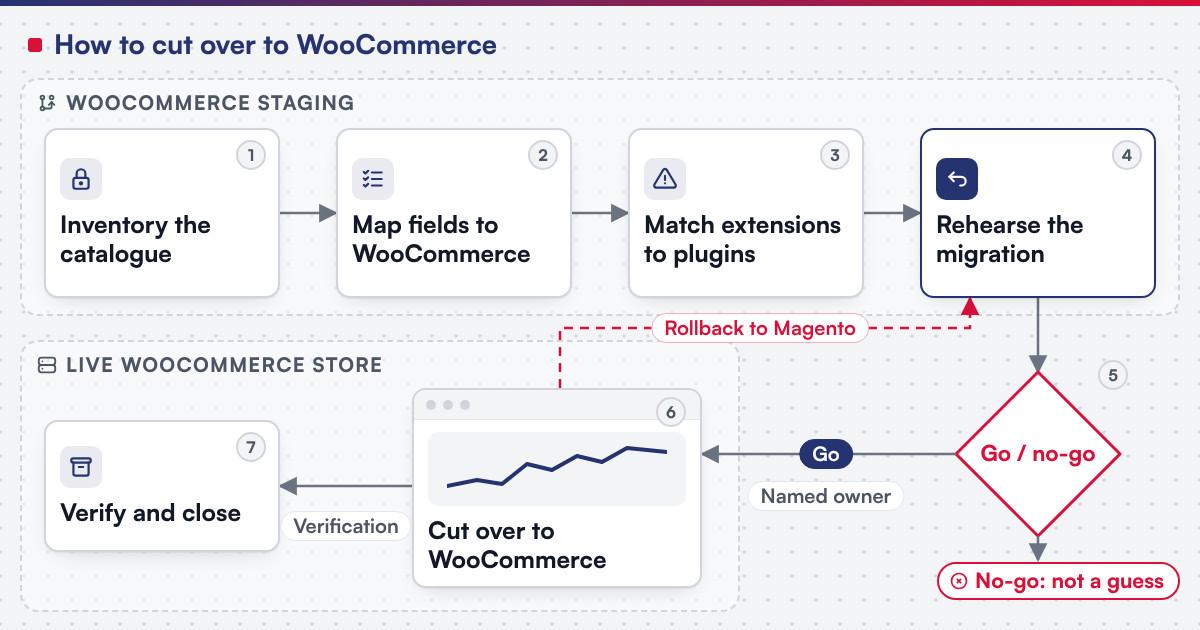 (opens the full-size diagram in a new tab)
Worked scenario: a mid-catalogue retailer leaving Magento
A hypothetical homeware retailer runs 600 products on Magento Open Source with no B2B buyers, a handful of extensions and a hosting bill it has outgrown patience for.
- Milestone one inventories the catalogue and the six extensions in use, and maps every product attribute and customer field to WooCommerce's model.
- Milestone two rehearses the full load on a staging store, matching each extension to a plugin and flagging a loyalty-points extension with no clean equivalent.
- Milestone three scopes the loyalty-points gap as a small custom plugin, rehearses the cutover again with it included, and verifies the move against the agreed checkout and tax tests.
The retailer's small catalogue and absent B2B rules are exactly the signals that make the move worth making; a thousand-SKU B2B catalogue in the same position would usually stay on Magento.
Where AI fits in this migration
The clearest AI use on a migration like this is on the mapping and testing side: reading an unfamiliar extension's configuration, drafting a first-pass field map between the two schemas, and generating candidate test orders that exercise tax and shipping edge cases for a person to check. Netbase's delivery lifecycle: discovery and strategic alignment; team assembly and architecture planning; agile execution with outcome-based milestones; modular components; training and rollout; ongoing support. None of that assistance decides a field mapping, approves an extension match or signs off the cutover.
What to check before committing
Adobe Commerce 2.4.9 supports PHP 8.5; MySQL 8.0 reached end of support on 2026-04-30 and Elasticsearch 7.17 on 2026-01-15, and Adobe recommends that on-premises stores on 2.4.4 to 2.4.7 move to a compatible MariaDB release (experienceleague.adobe.com, accessed 2026-10-14). WooCommerce's current minimum is WordPress 6.9, PHP 8.3 and MySQL 8.0 or MariaDB 10.6, with a 256 MB memory limit (woocommerce.com, accessed 2026-10-14). Confirm before scoping a build:
- Which Magento edition and version the current store runs, since Open Source and Adobe Commerce carry different feature and extension sets to map.
- The target WordPress, PHP and database versions, checked against WooCommerce's current minimums, not the old Magento host.
- Every extension in active use, named, before any plugin equivalent is chosen, so a gap is a planned decision, not a launch-day discovery.
- The go/no-go gate for cutover itself, which the software release readiness checklist covers for any production switch.
What Netbase has done on Magento and WooCommerce
The clearest evidence of how Netbase runs a platform migration is the Netztech engagement: a Magento 1 to Magento 2 Commerce migration delivered in 35 working days, including 11 extensions with installation, configuration, customization and data transfer; see the Netztech migration record. The same extension-by-extension discipline applies to a move onto WooCommerce, which needs even more of it, since nothing on the target platform behaves the same way by default. A Magento 1 store that would rather stay on Magento can follow the Magento 1 to Magento 2 migration guide instead. Representative Magento stores with companion Android and iOS apps on Netbase's record serve a women's fashion retailer in the Netherlands, an omnichannel fashion retailer in Nigeria and a parts and equipment seller, evidence of catalogue and app breadth on the platform being left behind.
On WordPress, PrintLeo, an e-commerce and advertising company, runs the CMSmart WordPress Printshop package with its online design plugin, delivered by Netbase. Indieprint, a Melbourne digital paper and apparel printer, installed a Netbase WooCommerce online designer across two domains; design errors fell 28% and production turnaround improved 15%, single published figures with no time period attached.
Which questions should you ask a migration vendor?
- How will every extension be matched to a plugin, and what happens to the ones with no match? A list made after the build starts tends to surface gaps at the worst time.
- Who reconciles the catalogue, customer and order counts after the rehearsal, and against what source? A migration accepted on a clean log alone is not one accepted on reconciled counts.
- How are tax rules and payment gateways re-tested, not just re-entered? The two platforms model checkout differently enough that a direct copy is rarely correct first time.
- What is the rollback plan if parity fails after cutover? Most Netbase projects are fixed-scope contracts agreed after discovery, and the rollback decision is scoped as part of it.
What goes wrong in a Magento to WooCommerce migration?
- Assuming an extension has an obvious equivalent. Some do; others need a small custom plugin, and a few have no honest match at all.
- Migrating the catalogue before tax and checkout are re-tested. A correct product list with the wrong tax total still fails the launch.
- Treating the staging rehearsal as optional for a "small" catalogue. A few hundred SKUs still carry enough edge cases to surprise a team that skipped the dry run.
- Keeping both platforms live past the agreed cutover point. Orders split across two systems are harder to reconcile the longer that period runs.
How this guide is sourced and where it stops
The platform requirements are read from Adobe's and WooCommerce's own documentation on the dates cited. The steps above are editorial guidance drawn from the work this guide links.
Plan the next step for your project
Common questions
Yes, and it is a common order: a stable catalogue lets checkout and tax testing start before every historical order has been reconciled.
Each one is matched to a WooCommerce plugin, replaced with a small custom build, or dropped as a deliberate decision; none carries over by assumption.
Not if the redirect map is built and tested first; the risk is an untested redirect, not the migration itself.
Only with added plugins, since company accounts and negotiated pricing are not WooCommerce's default design; a heavy B2B catalogue is a reason to stay on Magento instead.
The Netztech engagement, a Magento 1 to Magento 2 move, took 35 working days across 11 extensions, and a WooCommerce migration's own timeline depends on catalogue size and extension count.
Talk to Huy Nguyen (David), Founder and CEO of Netbase JSC: message him on WhatsApp at +84 937 869 689 or email project@netbasejsc.com. You can also send your brief through the project request form. Say which workflow or system the project concerns and what has to stay unchanged; the first step is a discovery conversation, and scope and milestones are agreed after it.
Bring your catalogue and your team to the decision
E-commerce development scopes a Magento to WooCommerce migration as a project, with the extension match, the data mapping, the rehearsal and the cutover staged as separate milestones. Bring your catalogue size, your extension list and your team's WordPress experience, and submit a project; a person will reply with the fit and what discovery would check first. OutsourcingVN is Netbase's own outsourcing-services platform.
Work behind this guide

Netbase migrated Netztech from Magento 1 to Magento 2 Commerce in 35 working days, moving 11 extensions across with installation, configuration, customization and data transfer.
Keep Reading
PrintLeo, an e-commerce and advertising company, runs the CMSmart WordPress Printshop package with its online design plugin, delivered by Netbase.
Keep ReadingRelated services and solutions
 E-commerce development, built, extended or replatformed as a project
A store built, extended or replatformed on Magento, WooCommerce or headless, as scoped milestones.
Learn More