

E-commerce platform modernization checklist: what to check before you move a store
Modernize a commerce platform when its version is losing security support, when extensions block the changes the business needs, or when the front end can no longer serve new channels. Before committing, inventory the catalogue, checkout, extensions, integrations and data, and plan search continuity, because those five areas decide the scope and most of the risk.
Submit a project Read the modernization guideReviewed by Huy Nguyen (David), CEO · Updated 5 Oct 2026 · 10 min read

OutsourcingVN is operated by Netbase JSC, which migrates, recovers and rebuilds commerce platforms for a living, so read this checklist as a supplier's list. It is written to be usable with any team, and it leans on four Netbase records: a Magento 1 to Magento 2 migration, a scoped store recovery, a headless reward shop and conversion work on a print store.
Contents
- When is a commerce platform due for modernization?
- What should the checklist cover?
- Which modernization route fits your store?
- Worked scenario: a homeware store leaving an unsupported version
- What do Netbase commerce records show?
- Which questions should you ask a modernization supplier?
- What goes wrong in commerce modernization?
- How this guide is sourced and where it stops
- Common questions
- Bring your extension list and your end-of-support date
When is a commerce platform due for modernization?
A store rarely needs modernizing because it looks old. It needs it when one of four triggers appears: the platform version is leaving vendor support and security patches will stop; an extension or customization blocks a change the business has decided to make; the store has been compromised or keeps failing under ordinary load; or a new channel, such as a mobile app, a marketplace or a partner storefront, cannot be served from the current architecture.
Vendor lifecycles make the first trigger concrete. Adobe's published lifecycle policy for Adobe Commerce, checked on 2026-09-28, gives each version a three-year standard support window from general availability, and warns that staying on an unsupported version exposes the store to security vulnerabilities and loss of support. Put the end-of-support date for your version in the business case; it is the one deadline nobody can negotiate.
The legacy system modernization guide covers the general decision for any system. This page is the commerce-specific list that sits underneath it.
What should the checklist cover?
Work through each area and record evidence, not opinions. An area you cannot fill in is itself a finding. Most of this inventory applies whether the running platform is Magento or WooCommerce.
| Area | What to inventory | Evidence to collect | Warning sign |
|---|---|---|---|
| Platform and version | Core version, hosting, PHP or runtime version, end-of-support date | Version output from the running store; hosting contract | Version already out of support |
| Extensions and customizations | Every extension, its vendor, licence and whether a supported version exists for the target | A list checked against the running code, not the admin screen alone | Extensions from vendors that no longer exist; core files edited directly |
| Catalogue | Products, variants, attributes, categories, media, catalogue rules | Counts per type and a sample export | Attributes used differently from their names |
| Checkout and payments | Payment gateways, tax, shipping rules, promotions, guest checkout | A test order through every payment route | A gateway module with no supported version for the target |
| Customers and orders | Accounts, addresses, order history, stored consents | Record counts and a trial export | Passwords or consents that cannot be migrated as they are |
| Integrations | ERP, stock, fulfilment, marketing, loyalty and search services | A diagram checked with each system owner | Integrations nobody on the team can explain |
| Search continuity | URL structure, redirects, metadata, structured data, sitemaps | A crawl of the current store and its top landing pages | No list of the URLs that earn organic traffic |
| Security and operations | Admin access, patch history, backups, monitoring | A restored backup and an access review | Shared admin accounts or unexplained files on the server |
The catalogue and customer rows feed the migration plan; the legacy data migration planning guide covers profiling, rehearsals and cut-over for those records.
Which modernization route fits your store?
-
Upgrade in place
when the platform is current enough, extensions have supported versions and the architecture still suits the business. This is the smallest change.
-
Migrate to the next major platform version
when the current version is leaving support, and plan it as a project: extensions are reinstalled or replaced, customizations are re-implemented and data is transferred.
-
Go headless
when the storefront must serve several brands, channels or apps, keeping the commerce engine for catalogue, cart and orders and moving the front end to a separate application; the headless vs traditional e-commerce guide weighs that architecture decision on its own.
-
Replatform
when the current platform no longer fits the business model at all; this carries the largest data and search-continuity risk.
-
Modernize in slices
when the store must keep trading throughout; the incremental modernization guide shows how to move one capability at a time.
If the choice is between repairing the current code and rebuilding it, the replace or refactor guide sets out the trade-offs in detail.
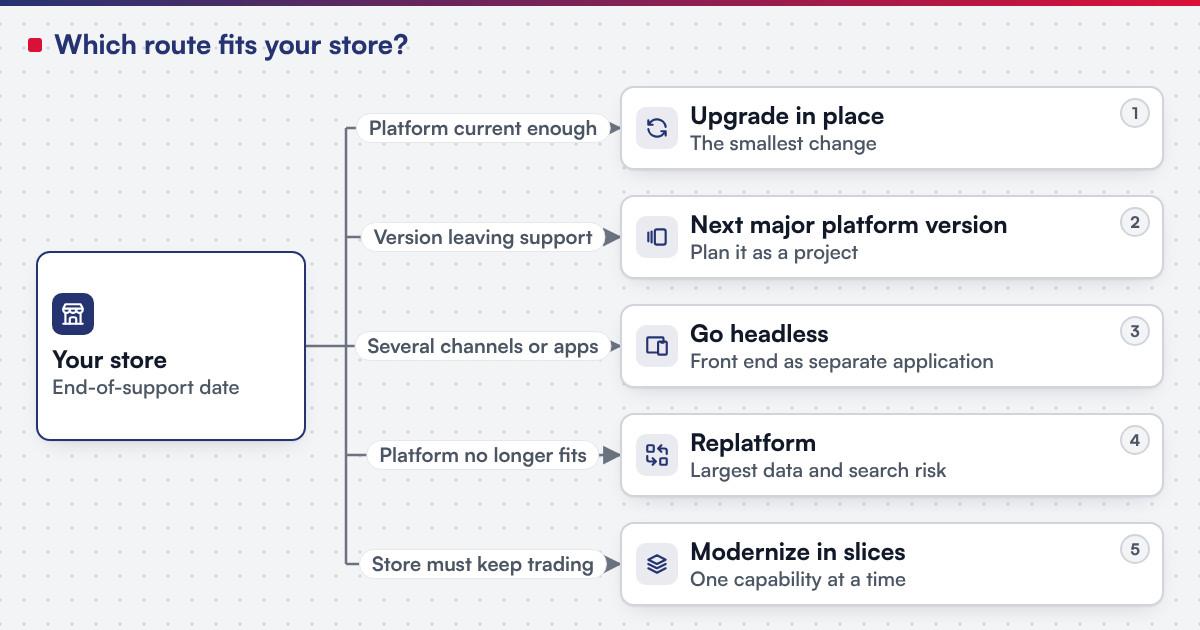 (opens the full-size diagram in a new tab)
Worked scenario: a homeware store leaving an unsupported version
A homeware retailer runs a store on a platform version that has left vendor support. It has 14 extensions, a payment gateway module, an ERP stock feed and around 3,000 products with variants. The scenario is illustrative and describes no client.
- Week 1, inventory. The team lists every extension against the running code. Two turn out to be disabled but still loaded; one has no supported version for the target platform and is replaced by a small custom module.
- Week 2, search baseline. A crawl lists the 400 URLs that earn most organic visits. Each gets a mapped target URL and a permanent redirect.
- Weeks 3-6, build and data rehearsal. Extensions are installed and configured on the new version, customizations re-implemented, and two trial data transfers are run and checked by the merchandising team.
- Week 7, cut-over. Orders are frozen for a short window, the final data transfer runs, redirects go live and test orders go through every payment route.
Google's site-move guidance, checked on 2026-09-28, recommends server-side permanent redirects from old to new URLs, kept for as long as possible and generally at least a year, and an updated sitemap. The retailer keeps its redirects indefinitely, because the cost is small and old links in emails and marketplaces keep working.
What do Netbase commerce records show?
For Netztech, Netbase delivered a Magento 1 to Magento 2 Commerce migration in 35 working days, including migrating 11 extensions with installation, configuration, customization and data transfer. The Netztech migration record is the clearest example of why the extension row in the checklist decides the scope: each extension became its own line of work.
For an existing client store, Netbase scoped a three-phase recovery of a compromised Magento site: investigation with an infected-file report and a recovery plan, then cleaning and system recovery, then file restore, recoding and hardening with Magento security patches applied, typically 6 to 13 days in total depending on the damage. The Magento recovery and hardening record shows the modernization trigger nobody plans for; recovery is never guaranteed, which is why the security row belongs in the checklist before an incident.
For a Dubai-based loyalty and rewards technology company, Netbase delivered a headless multi-store reward shop platform on Magento 2 Open Source with a Next.js front end, including a hybrid points-plus-cash checkout, Arabic and English, and integrations by webhook and scheduled sync, in four phases over 3.5 to 4.5 months. The loyalty reward shop record illustrates the headless route.
For 4over4, Netbase delivered e-commerce conversion work on its print store, including a product recommendation engine and an automated conversion of uploaded Adobe Illustrator files to SVG so layers can be edited; the 4over4 conversion record shows modernization that adds capability without moving platform. Netbase has also built representative Magento stores with companion Android and iOS apps for a women's fashion retailer in the Netherlands, an omnichannel fashion retailer in Nigeria and a parts and equipment seller.
Which questions should you ask a modernization supplier?
- How will you build the extension inventory? Expect a check against the running code and database, not a screenshot of the admin extension list.
- Which extensions will be replaced rather than migrated, and why? Each replacement is new code you will maintain.
- How many data rehearsals are included, and who signs them off? At least one rehearsal checked by your merchandising or operations team.
- What is the redirect plan, and who owns the crawl? A named person with the list of top landing pages.
- How will checkout be tested? A test order through every payment route, tax zone and shipping rule you use.
- What happens to the old store after cut-over? A defined read-only period and a decommissioning date.
What goes wrong in commerce modernization?
- Inventory from the admin screen only. Direct core edits and disabled-but-loaded modules surface mid-build as surprises.
- Search treated as a launch-day task. Organic traffic drops because top URLs were never mapped.
- Checkout tested with one card. A secondary gateway or a tax zone fails in the first week.
- Integrations assumed to reconnect. The ERP or stock feed silently stops, and stock levels drift.
- Modernization and redesign in one step. Two changes at once make any drop in conversion impossible to diagnose; Google's own guidance advises changing one thing at a time where possible.
How this guide is sourced and where it stops
Netbase facts come from approved entries in the OutsourcingVN claim register and their attested sources, published in registered wording: the Netztech migration, the scoped Magento recovery, the loyalty reward shop, the 4over4 conversion work and the representative Magento stores with apps. The methodology explains how claims are reviewed. The platform lifecycle and search-continuity points come from the Adobe and Google pages listed under Sources, checked on 2026-09-28. The homeware scenario is illustrative. Netbase's published records cover Magento migration, recovery, headless and conversion work; a move from Magento to a different commerce platform is scoped with the same extension-by-extension inventory, and no traffic or revenue result is claimed for any of these projects.
Plan the next step for your project
Common questions
It depends mostly on extensions, customizations and data. The Netztech Magento 1 to Magento 2 migration took 35 working days with 11 extensions; a store with more custom code or integrations needs longer, and a discovery inventory is the only reliable way to size it.
Only if you accept that you will not be able to tell which change moved your conversion rate. Most teams migrate first on a close copy of the current design and redesign afterwards.
Some movement is normal after a move. Mapping every URL that earns traffic, using permanent redirects and submitting an updated sitemap limits the loss and speeds recovery.
No. Headless suits stores that serve several brands, channels or apps. A single-brand store with one storefront often gains more from a clean upgrade than from a second application to maintain.
Yes. Most of the work runs on a separate environment, and only the final cut-over needs a short order freeze, planned for a low-traffic period.
Bring your extension list and your end-of-support date
Legacy Application Modernization is the service route for migrating or restructuring a commerce platform, and e-commerce development is the route when the checklist points to a new build or a full replatform; the checklist above is the input either one starts from.
OutsourcingVN is Netbase's own outsourcing-services platform. Submit a project with your platform version, extension list and integrations, and a person will reply with the route that fits and what discovery would need to check first.
Work behind this guide

They are that one company's outcomes on that one store, and this page presents them as nothing wider.
Keep Reading
Confidentiality covers the engagement; no client is named and no result is claimed.
Keep Reading
This page describes the work, not the incident.
Keep ReadingRelated services and solutions
 Legacy application modernization, one bounded capability at a time
The code is assessed first, then one bounded capability moves at a time, with a way back.
Learn More
 E-commerce development, built, extended or replatformed as a project
A store built, extended or replatformed on Magento, WooCommerce or headless, as scoped milestones.
Learn More