

Planning a Magento 2 upgrade
A Magento Open Source or Adobe Commerce 2.4.x upgrade is routine only when it is planned: check the release line's support window, confirm PHP, database and search-engine requirements, test extension and theme compatibility, rehearse the full upgrade on staging, then deploy inside a maintenance window with a tested rollback path ready.
Submit a project See the Magento recovery and hardening recordReviewed by Huy Nguyen (David), CEO · Updated 24 Oct 2026 · 11 min read

OutsourcingVN is operated by Netbase JSC, which upgrades Magento 2 stores on both editions, so this guide names that commercial interest upfront. A store still on Magento 1 plans its move first on the Magento 1 to Magento 2 migration guide; whether Magento fits the catalogue at all is the Magento platform page's question, answered before either guide applies.
Contents
- How long does a release line stay supported?
- What system requirements does the target release need?
- How do you test extension and theme compatibility before upgrading?
- Security patches or a full upgrade?
- The Magento 2 upgrade pipeline
- Worked scenario: a store on an unsupported release line
- Where does AI fit in a Magento 2 upgrade?
- What should you check in Adobe's own documentation?
- What has Netbase done on Magento patching and migration?
- Which questions should you ask an upgrade vendor?
- What goes wrong in a Magento 2 upgrade?
- How this guide is sourced and where it stops
- Common questions
- Plan your release line's upgrade
How long does a release line stay supported?
| Support element | Adobe Commerce | Magento Open Source |
|---|---|---|
| Standard support | Three years from general availability | Adobe's lifecycle policy names Adobe Commerce |
| Extended support | One additional year, at no extra cost, on versions 2.4.6 and 2.4.7 | Not offered |
| Security patches | Released under the -pN naming for the release line | Check the release notes for the line |
| Extended-support security patches | Available to Adobe Commerce customers | Not available |
| Cloud enforcement | From 1 June 2027, traffic to Cloud environments on unsupported versions can be suspended | Not applicable; Open Source is self-hosted |
Adobe's own lifecycle policy states that it "offers a three-year standard support window from the General Availability (GA) date for each version," extended by "one year of additional support at no additional cost for Adobe Commerce customers on versions 2.4.6 and 2.4.7." From 1 June 2027, Adobe will no longer maintain Cloud environments running unsupported Commerce versions and may suspend their traffic, so a Cloud-hosted store carries a harder deadline than a self-hosted one.
What system requirements does the target release need?
Adobe's own system requirements page lists requirements per release line rather than once for the whole platform: for an on-premises deployment, Adobe Commerce 2.4.9 calls for PHP 8.5, Composer 2.10, MariaDB 12.3 or MySQL 8.4, and OpenSearch 3, while the latest patch of an earlier line, 2.4.7-p10, names PHP 8.2 or 8.3, Composer 2.10, MariaDB 10.11 or 11.8, and OpenSearch 2.19 or 3. Adobe states plainly that it "supports only the system requirement combinations listed" for the release in question, and does not validate a mismatched one. Checking the current page for the specific release line in scope, not an older tutorial, is the first gate before any extension is touched.
How do you test extension and theme compatibility before upgrading?
Adobe's own Upgrade Compatibility Tool "checks an Adobe Commerce customized instance against a specific version by analyzing all modules and core code installed in it" and "returns a list of critical issues, errors, and warnings that must be addressed before upgrading." Adobe states it "is available for Adobe Commerce instances only," so a Magento Open Source store checks each extension's own release notes against the target version by hand instead. Either way, every installed extension and custom theme override is tested against the target release individually: an extension with no tested release for that line is scoped as its own piece of work before the deployment window is set.
Security patches or a full upgrade?
Adobe's Quality Patches Tool lets a team "apply, revert, and view general information about quality patches" for a case-by-case issue, but Adobe's own guidance is "to use the tool to pull in necessary quality fixes as needed on a case-by-case basis only and not as a long-term approach," and it directs a team to a full upgrade for resolving quality issues generally. Security patch releases follow their own naming, appended as "-pN" to a version number, and Adobe's own documentation notes that "extended support security patches are available to Adobe Commerce customers only" and "are not available for the Magento Open Source code base." A store that only ever applies patches, without ever moving to a newer release line, eventually runs out of a release line Adobe still patches at all.
The Magento 2 upgrade pipeline
The deployment window is the point when the live Magento 2 store takes the new release; rehearsing it on staging first catches compatibility and configuration errors a live deploy cannot afford to find.
-
Check the release line's support window
Confirm which Adobe Commerce or Magento Open Source release line is in scope and how long it has supported status left.
-
Check system requirements and compatibility
Confirm the target release's PHP, database and search-engine versions against the current environment.
-
Test extension and theme compatibility
Run the Upgrade Compatibility Tool against every installed extension and custom theme on Adobe Commerce; a Magento Open Source store checks each extension's own release notes instead.
-
Rehearse the upgrade on staging
Run the full Composer-based upgrade against a staging copy, clear caches, and test the storefront and admin end to end.
-
Decide go or no-go on the deployment
Compatibility results, the rehearsal's test run and a rollback plan gate the decision.
-
Deploy during the maintenance window
Enable maintenance mode, disable cron, then run
composer require-commercewithmagento/product-community-editionfor Magento Open Source ormagento/product-enterprise-editionfor Adobe Commerce, since Adobe's upgrade procedure replaced the plaincomposer require, followed bycomposer update,bin/magento setup:upgradeand a cache clear. -
Verify and roll back if needed
Confirm the storefront and admin load correctly, then watch orders and integrations through the verification window; roll back to the pre-upgrade backup if a check fails.
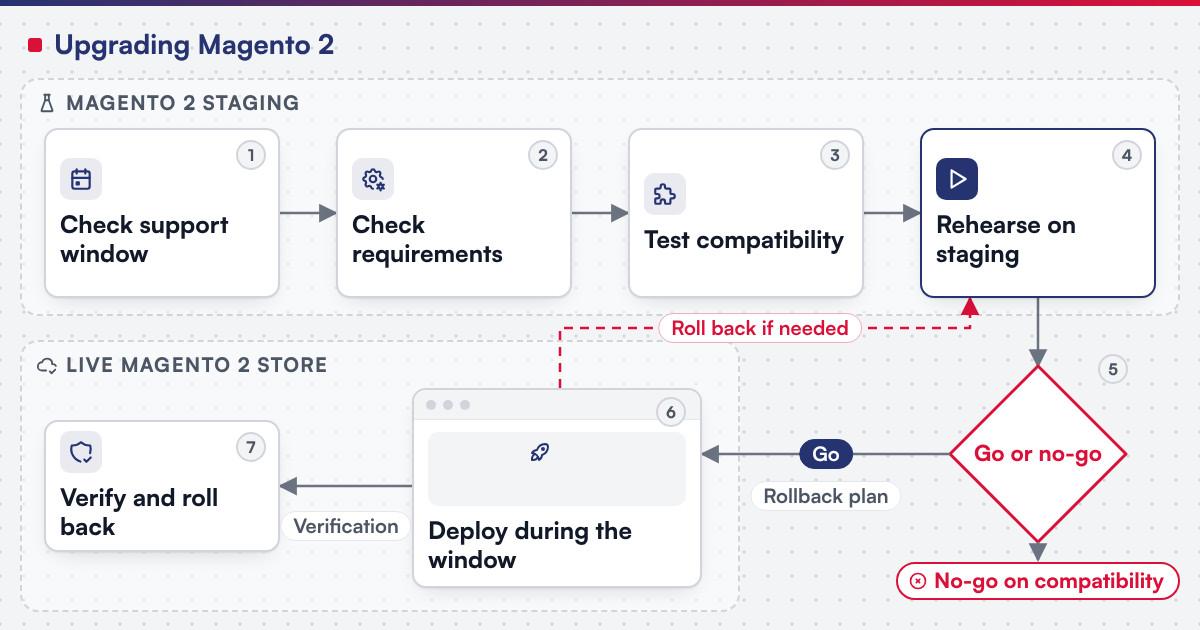 (opens the full-size diagram in a new tab)
Worked scenario: a store on an unsupported release line
A hypothetical mid-size retailer runs Adobe Commerce 2.4.5, now past its standard and extended support windows, with nine installed extensions and one custom theme.
- Milestone one checks 2.4.9's support window and system requirements against the current PHP, database and search-engine versions, and runs the Upgrade Compatibility Tool against the nine extensions and the theme.
- Milestone two rebuilds or updates the two extensions the tool flags as incompatible, rehearses the Composer-based upgrade on staging, and tests the storefront and admin end to end.
- Milestone three schedules the maintenance window, runs the deployment, and watches orders and integrations through the verification period before closing the upgrade on a written decision.
A store already close to the current release line usually compresses this into fewer milestones; one running an unsupported line with many custom extensions rarely can.
Where does AI fit in a Magento 2 upgrade?
The clearest AI use on an upgrade like this sits on the compatibility and testing side: summarising an Upgrade Compatibility Tool report into a prioritised list for a developer to work through, and drafting candidate staging test cases that exercise checkout, tax and company-account paths after the upgrade for a person to check. None of that assistance decides whether an extension is compatible or signs off the deployment. Netbase's delivery lifecycle: discovery and strategic alignment; team assembly and architecture planning; agile execution with outcome-based milestones; modular components; training and rollout; ongoing support.
What should you check in Adobe's own documentation?
Confirm before booking a deployment window:
- Which release line is actually in scope, checked against the current lifecycle and support-dates page rather than an older post.
- The PHP, database and search-engine versions the target release supports, since each release line lists its own combination.
- Whether the Upgrade Compatibility Tool covers your edition, since Adobe states it is an Adobe Commerce tool; a Magento Open Source store checks extension release notes by hand.
- Whether a patch or a full upgrade actually fixes the issue, since Adobe's own guidance treats the Quality Patches Tool as a case-by-case bridge, not a long-term substitute for upgrading.
What has Netbase done on Magento patching and migration?
For an existing client store, Netbase scoped a three-phase recovery of a compromised Magento site: an investigation and damage assessment, then cleaning and core-file restoration at the matching version, then file repair, Magento security patches and hardening of the server and administrator area, typically 6 to 13 days in total depending on the damage; the Magento recovery and hardening record sets out that scope. For Netztech, Netbase delivered a Magento 1 to Magento 2 Commerce migration in 35 working days, including migrating 11 extensions; the Magento 1 to Magento 2 migration guide plans that kind of platform move.
Plan the next step for your project
Which questions should you ask an upgrade vendor?
- Which release line and edition are actually in scope, checked against the current support-dates page?
- Who runs the Upgrade Compatibility Tool or the extension-by-extension check, and who owns the fixes it finds?
- How many rehearsal passes run on staging before the deployment window is booked?
- What is the rollback path if a post-deployment check fails?
- How is scope fixed? Most Netbase projects are fixed-scope contracts agreed after discovery.
What goes wrong in a Magento 2 upgrade?
- Treating a patch as a substitute for an upgrade. Adobe's own guidance says the opposite: a patch is a case-by-case bridge, and a release line left unpatched for years eventually runs out of patches to apply.
- Skipping the compatibility check. An extension or theme nobody tested against the target release surfaces its break in production instead of on staging.
- Rehearsing on a staging copy that is not current. A rehearsal against stale data or an old extension set proves nothing about the real deployment.
- No rollback path booked before the window opens. A deployment with no tested way back turns a failed check into an outage instead of a delay.
How this guide is sourced and where it stops
The support-window, system-requirements, compatibility-tool and patch facts come from Adobe's own documentation, read on the release lines they name. The Netbase examples are the scoped recovery of a compromised Magento store and the Netztech migration; the deployment pipeline and the worked scenario are editorial planning guidance.
Common questions
No. Adobe's own guidance treats a patch as a case-by-case bridge; a store stays on a supported line only by upgrading to a release line Adobe still maintains.
Check the current lifecycle and support-dates page for the exact release line in scope; standard support runs three years from general availability, with one extra year for Adobe Commerce customers on 2.4.6 and 2.4.7.
No. Adobe states it is an Adobe Commerce tool; a Magento Open Source store checks each extension's own release notes against the target version instead.
It is rebuilt, replaced or scoped as its own piece of work before the deployment window is booked, the same decision an incompatible extension forces during a Magento 1 to Magento 2 migration.
That is a different starting point: see the Magento recovery and hardening record for how Netbase has scoped that work.
It depends on the extension count, how many fail the compatibility check, and how many rehearsal passes are planned; the deployment window itself is usually short once staging has proven clean.
Plan your release line's upgrade
E-commerce development scopes a Magento 2 upgrade as a project, with the compatibility check, the staging rehearsal and the deployment window staged as milestones; once the upgrade is live, managed operations can carry the ongoing patch cadence covered on the software takeover and maintenance guide. The same release-readiness discipline is covered for any platform on the software release readiness checklist, a stale dependency list is what the technical debt assessment is for, and software reliability and incident readiness covers the rollback and alerting side once the new release is live. Bring your current release line, extension list and edition, and submit a project; a person will reply with the fit. OutsourcingVN is Netbase's own outsourcing-services platform.
Work behind this guide

For an existing client store running Magento that had been compromised, Netbase scoped a three-phase recovery: investigate and assess, clean and restore, then repair and harden.
Keep Reading
What this record reports instead is a duration and a scope, both attested.
Keep ReadingRelated services and solutions
 E-commerce development, built, extended or replatformed as a project
A store built, extended or replatformed on Magento, WooCommerce or headless, as scoped milestones.
Learn More