

Magento malware recovery: confirm, clean and harden a compromised store
Recovering a compromised Magento Open Source or Adobe Commerce store means confirming the compromise and containing it immediately, investigating the cause before anything is cleaned, deciding whether to clean the installation in place or rebuild it, restoring core files at the matching version, applying security patches, hardening the administrator area, then monitoring the store before handing it back.
Submit a project See the Magento recovery and hardening recordReviewed by Huy Nguyen (David), CEO · Updated 1 Nov 2026 · 12 min read

OutsourcingVN is operated by Netbase JSC, which has scoped a recovery of exactly this kind for an existing client store, so this guide names that interest upfront. A store that is not compromised but only needs its next scheduled release plans that on the Magento 2 upgrade guide instead; and the Magento platform page is where to start if Magento itself is still the open question.
Contents
- Should a compromised Magento store be cleaned in place or rebuilt?
- What does a confirmed Magento compromise look like?
- The Magento malware recovery pipeline
- Worked scenario: a storefront found serving redirect malware
- What has Netbase scoped for a compromised Magento store?
- Where does AI fit in a Magento malware recovery?
- What should you check in Adobe's own documentation?
- Which questions should you ask a recovery vendor?
- What goes wrong in a Magento malware recovery?
- How this guide is sourced and where it stops
- Common questions
- Plan your Magento recovery
Should a compromised Magento store be cleaned in place or rebuilt?
| Factor | Clean in place | Rebuild from scratch |
|---|---|---|
| Scope of damage | Limited to identifiable files, a known plugin or a single injected script | Extensive, scattered across the codebase, or impossible to fully enumerate |
| Custom code | Core files restored at the matching version; custom code reviewed and kept | Custom code not trusted enough to keep; rebuilt from a known-clean baseline |
| Time pressure | Usually faster, since only the infected parts are touched | Usually slower, since more of the store is rebuilt before relaunch |
| Confidence after the work | Depends on how completely the investigation found every change | Higher, because nothing carried over from the compromised install |
What does a confirmed Magento compromise look like?
A compromise is confirmed, not assumed, before any cleanup starts. Common signs include a storefront serving unfamiliar redirects or pop-ups, unexpected administrator accounts or scheduled tasks, outbound traffic a server should not generate, or a failed scan. Adobe's own Security Scan Tool is built for that last check: Adobe describes it as a service that will "run over 21,000 security tests to help identify potential malware" and lets a store owner "access the scan report that shows successful and failed checks, with any recommended actions." Adobe's own guidance is direct: "If you suspect that your Adobe Commerce or Magento Open Source site is compromised, follow this action plan without delay."
The Magento malware recovery pipeline
Cleaning before investigating destroys the evidence of how the attacker got in. Adobe's own incident-response guidance lists investigation before cleanup: "Try to find the attack vector to determine when and how the site was compromised, by reviewing server log files and file changes." It then warns that "malware could be hidden in an unsuspected location just waiting to restore itself," and advises reinstalling required files "from a known, clean source."
-
Confirm the compromise and contain it
Verify the signs are real, then put the store into maintenance mode, isolate the server from other systems, and rotate every admin, database and API credential immediately.
-
Investigate the cause
Scan the source code, the database, server logs, cron jobs and file permissions for malware, backdoors and abnormal files, so the fix addresses how the attacker got in rather than only what they left behind.
-
Assess the damage
List every infected or modified file, the extensions and themes affected, and how much custom code survived intact, since that list decides how much of phase three is repair versus rebuild.
-
Prepare the clean restore
Stage the Magento core files for the store's current version, a clean database export and a hardened server and administrator configuration, ready to deploy once the decision is made.
-
Decide: clean in place or rebuild
A store with limited, identified damage is usually cleaned and restored at the matching version; one with extensive or unidentified damage, or custom code that cannot be trusted, is usually rebuilt from a known-clean baseline instead.
-
Restore, patch and harden
Apply the restored core files or the rebuild, apply the current security patches for the release line, and harden the administrator area and server, bringing the hardened store back online only once those are in place.
-
Monitor and hand back
Watch logs, file integrity and admin activity closely after relaunch; if the store looks compromised again, repeat containment rather than assume the first fix held, then hand the store back with the infected-file report and recovery plan.
Step seven is not optional. Adobe's own guidance after an incident is blunt about the risk: "continue to closely monitor the site after the incident as many sites get compromised again within hours." A recovery that skips this step leaves the store exposed to exactly the kind of quick reinfection Adobe describes.
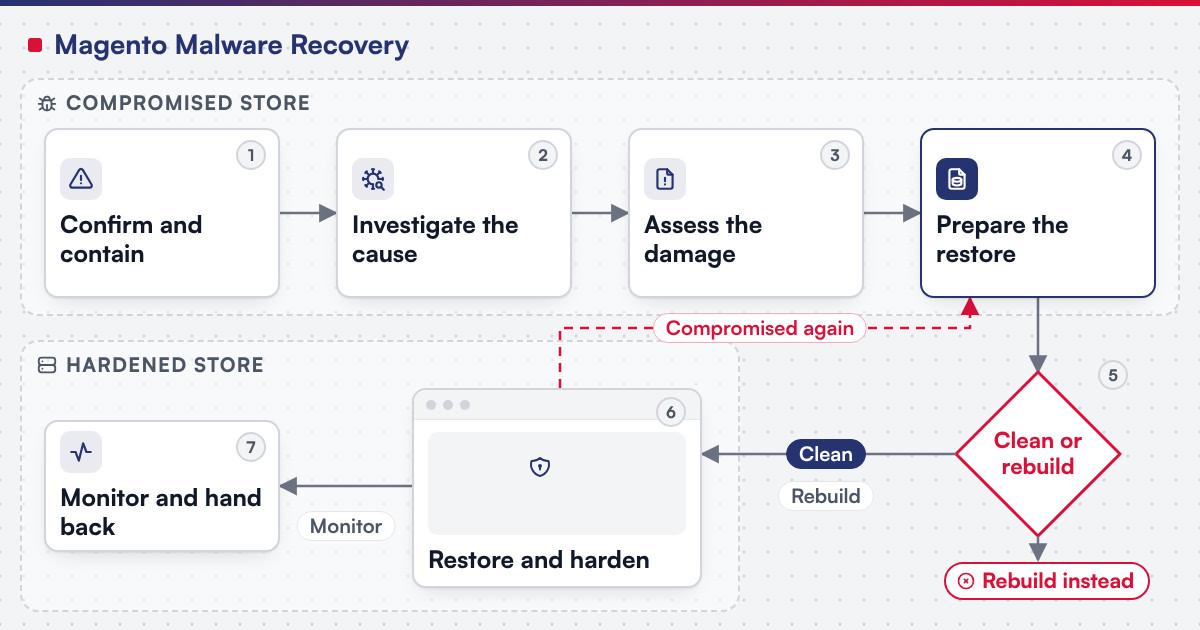 (opens the full-size diagram in a new tab)
Worked scenario: a storefront found serving redirect malware
A hypothetical mid-size Magento Open Source storefront is flagged by its hosting provider: outbound traffic looks abnormal, and a customer reports being redirected to an unfamiliar site mid-checkout.
- Milestone one confirms the compromise with a Security Scan Tool run and a log review, puts the store into maintenance mode, and rotates every admin, database and API credential.
- Milestone two investigates the cause across the code, database and permissions, finds an injected script in a customised checkout template, and confirms the rest of the custom code is unaffected.
- Milestone three cleans in place rather than rebuilding, since the damage is limited and identified: restores the affected core files at the matching version, applies current patches, enables two-factor authentication and a non-default administrator path, then relaunches and watches logs closely.
A store with extensive, unidentified damage or untrusted custom code usually cannot compress this into three milestones and is rebuilt from a known-clean baseline instead.
What has Netbase scoped for a compromised Magento store?
For an existing client store, Netbase scoped a three-phase recovery of a compromised Magento site: investigation and security scan with cause analysis, full source-code and database malware scan, server log, permission and abnormal-file checks and a damage assessment, delivering an infected-file report and a recovery plan; cleaning and system recovery with malware and backdoor removal, Magento core files restored at the matching version, permissions fixed and the database cleaned; and file restore, recoding and hardening with damaged files, modules and themes repaired, Magento security patches applied and the server and administrator area hardened, typically 6 to 13 days in total depending on the damage. The Magento recovery and hardening record sets out that scope in full.
Plan the next step for your project
Where does AI fit in a Magento malware recovery?
The clearest AI use on a recovery like this sits on the triage side: summarising a large Security Scan Tool report or a server-log dump into a shortlist of the files and timestamps most likely to matter, and drafting a first pass at which lines of a suspicious file look injected rather than original, for a person to confirm before anything is deleted or restored. None of that assistance decides whether a file is safe to keep, whether the store is ready to relaunch, or when to rebuild instead of clean. Netbase's delivery lifecycle: discovery and strategic alignment; team assembly and architecture planning; agile execution with outcome-based milestones; modular components; training and rollout; ongoing support.
What should you check in Adobe's own documentation?
Confirm before scoping a recovery:
- What the Security Scan Tool actually checks and reports, since Adobe states it will "run over 21,000 security tests to help identify potential malware" and provide "the scan report that shows successful and failed checks, with any recommended actions."
- Which release line's security patches apply, since Adobe states "extended support security patches are available to Adobe Commerce customers only" and "are not available for the Magento Open Source code base."
- Whether two-factor authentication and a non-default administrator path are both configured, since Adobe's own guidance is to "enable two-factor authentication for your Admin and all SSH connections" and to "configure a non-default admin URL instead of using the default admin or a common term such as backend." The Commerce two-factor authentication "applies to the Admin only, and is not available for customer accounts."
- How long the release line being restored to still stays supported, since Adobe's lifecycle policy offers "a three-year standard support window from the General Availability (GA) date for each version."
Preparation reduces how often this list is needed. At Netbase, security practices include secure code review and version control, role-based access control, MFA for admin dashboards, contributors under NDA, and NDAs and DPAs on request.
Which questions should you ask a recovery vendor?
- Does the investigation happen before anything is cleaned, so the evidence of how the attacker got in is not destroyed?
- Which release line and edition does the plan assume, and does the restore put core files back at that version?
- What hardening happens after cleanup: current patches, two-factor authentication, a non-default administrator path, rotated credentials?
- How is the store watched right after relaunch, given Adobe's warning that many sites get compromised again within hours?
- Who decides between cleaning in place and rebuilding, and on what evidence?
What goes wrong in a Magento malware recovery?
- Cleaning before investigating. The evidence of how the attacker got in is gone before anyone looks, so the same opening reopens.
- Restoring core files at the wrong version. The restore can reintroduce the vulnerability that let the attacker in.
- Treating cleanup as the last step. A store relaunched without current patches, two-factor authentication and a changed administrator path is an easy repeat target.
- No monitoring after relaunch. A second compromise reaches customers before anyone notices, instead of showing up as an alert within hours.
How this guide is sourced and where it stops
The compromise-detection, patch, administrator-security and lifecycle facts come from Adobe's own documentation, read on the pages they name. The Netbase example is the scoped recovery of a compromised Magento store; the recovery pipeline and the worked scenario are editorial planning guidance.
Common questions
Yes. Adobe's own incident-response guidance lists finding the attack vector, by reviewing server log files and file changes, before removing files and reinstalling from a known, clean source; cleaning first also risks destroying the evidence of how the attacker got in.
When the damage is extensive, the affected files cannot be clearly enumerated, or the custom code itself cannot be trusted; the decision step above splits exactly on that line.
No. Adobe describes it as a service that runs security tests to help identify potential malware and reports the result; it does not replace the server-log and file-change review that establishes how the attacker got in.
Adobe's own guidance is to "continue to closely monitor the site after the incident as many sites get compromised again within hours," which is why monitoring is its own step in the pipeline above, not an afterthought.
That is a different starting point: the Magento 2 upgrade guide plans the release line, requirements, compatibility and patch decision for a store that has not been compromised.
The Magento recovery and hardening record, described above in the chapter on what Netbase has scoped for a compromised Magento store.
Plan your Magento recovery
Bring the signs you have seen, the release line and edition, and your extension list to a brief. E-commerce development scopes the investigation, the clean-or-rebuild decision and the hardening work as milestones; once the store is back online, managed operations can carry the ongoing patch cadence covered on the software takeover and maintenance guide, and software reliability and incident readiness covers the monitoring and alert-routing side for any system. A staging environment is where the rebuilt store is rehearsed before it goes live again, a written runbook built from phase three's hardening steps gives the next responder a starting point, and the controls behind the security practices above sit on the data security and compliance guide. The guides index lists every other platform and reliability guide. Submit a project with what you have found, and a person will reply with the fit. OutsourcingVN is Netbase's own outsourcing-services platform.
Work behind this guide

For an existing client store running Magento that had been compromised, Netbase scoped a three-phase recovery: investigate and assess, clean and restore, then repair and harden.
Keep ReadingRelated services and solutions
 E-commerce development, built, extended or replatformed as a project
A store built, extended or replatformed on Magento, WooCommerce or headless, as scoped milestones.
Learn More