

Magento or WooCommerce: choosing a commerce platform
Choose WooCommerce when a small to mid-sized catalogue runs alongside WordPress content, or when a print or personalisation business needs a design tool bolted onto checkout. Choose Magento 2 Open Source or Adobe Commerce when the catalogue runs into the thousands of SKUs, spans several storefronts or languages, or needs B2B pricing and quoting rules.
Submit a project Read the architecture guideReviewed by Huy Nguyen (David), CEO · Updated 19 Oct 2026 · 9 min read

OutsourcingVN is operated by Netbase JSC. Netbase has delivered migration, recovery and storefront work on Magento, and installed design tools and store builds on WooCommerce, so neither platform is a neutral pick for a company that sells engineering on both. For custom development the client owns the IP created for it; Netbase productized modules and products are licensed, not transferred, which matters on whichever platform ends up carrying your storefront.
Contents
- What exactly is being compared?
- How do the two platforms compare?
- Which platform fits your store?
- Worked scenario: a stationery printer choosing a platform
- Moving between the two platforms
- What do Netbase records show on each platform?
- Which questions should you ask a platform supplier?
- What goes wrong when choosing a commerce platform?
- How this guide is sourced and where it stops
- Common questions
- Bring your catalogue and your team to the decision
What exactly is being compared?
Magento, shipped as the free Open Source edition or as Adobe Commerce, is a dedicated commerce platform built around a catalogue, cart, checkout and B2B pricing engine. WooCommerce is a commerce plugin added to WordPress, so the same install that runs the blog and marketing pages also runs the store. Neither platform answers the separate question of whether the storefront should be coupled to that platform at all or split behind an API; the headless vs traditional e-commerce guide covers that architecture choice once a platform is chosen here.
How do the two platforms compare?
| Area | Magento 2 / Adobe Commerce | WooCommerce |
|---|---|---|
| Catalogue size | Built for thousands of SKUs and complex attribute sets | Comfortable with a small to mid-sized catalogue |
| B2B and multi-store | Company accounts, negotiated pricing and multi-store or multi-language from one back office | Needs added plugins for company accounts or multi-currency; not its core design |
| Extensions and plugins | A large extension marketplace, each one re-tested on every core upgrade | A larger plugin ecosystem of uneven maintenance quality, sharing the WordPress core |
| Hosting | Open Source is self-hosted; Adobe Commerce adds a managed cloud option for a platform fee | Runs on standard WordPress hosting, sized for commerce traffic, not just content |
| Operations effort | A dedicated commerce platform to patch, scale and secure on its own cadence | WordPress core, WooCommerce and every plugin update on independent schedules |
| Team skills | A team comfortable operating a commerce-specific platform and its extension stack | A team already comfortable with WordPress, its plugins and its update cycle |
| Migration path | Magento 1 to Magento 2 is a scoped, extension-by-extension project | Usually an existing store gaining a capability, not a platform change |
Neither row makes the other platform wrong; a catalogue of 300 SKUs with no B2B rules runs fine on either, and the decision usually comes down to whether content and commerce already share one WordPress site.
Which platform fits your store?
-
Does your catalogue need B2B pricing or run across several storefronts?
Magento 2 Open Source or Adobe Commerce models company accounts, negotiated pricing tiers and multi-store or multi-language operation inside one back office; a fashion retailer with that catalogue shape can start planning from Magento implementation for fashion retailers.
-
Does content and commerce already share one WordPress site?
WooCommerce keeps the blog, pages and the store on one login and one theme system, which a dedicated commerce platform does not offer.
-
Is the catalogue past a few thousand SKUs with complex attributes?
Magento's catalogue and pricing engine were built for that scale; a plugin-based cart starts to strain under it.
-
Is an online design or personalisation tool the main new feature?
WooCommerce with a design plugin carries Netbase's own print-commerce records.
-
Still undecided?
Weigh the extension count, hosting budget and migration effort in the table above against your own roadmap before committing either way.
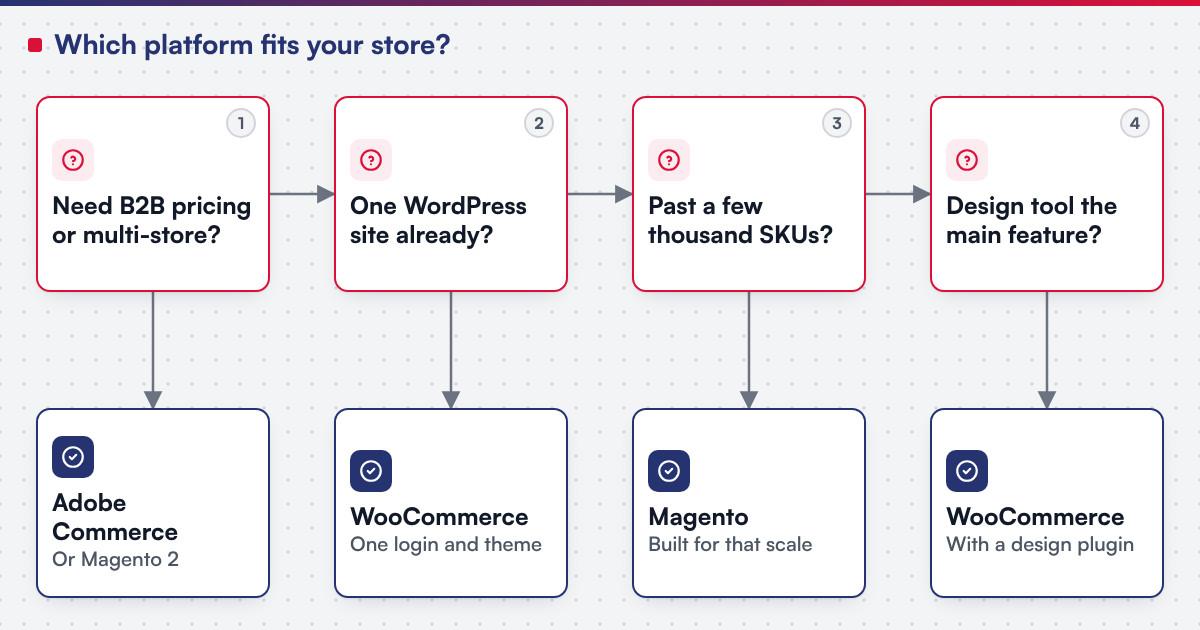 (opens the full-size diagram in a new tab)
Worked scenario: a stationery printer choosing a platform
A hypothetical stationery printer sells personalised cards through a WordPress site that already carries its blog and brand story, with a catalogue of a few hundred products and no B2B buyers. The storefront, the design tool and the content all need to sit on one login that the existing team can run.
- Milestone one stands up WooCommerce on the existing WordPress install, with the catalogue, shipping rules and payment gateway connected.
- Milestone two adds an online design tool to the product page, so a shopper's layout and artwork attach to the order as production-ready data.
- Milestone three builds the production side: a proof-approval step and an export the print floor can use.
The printer never evaluates Magento seriously, because the catalogue is small, there are no B2B buyers, and the content-and-commerce fit WooCommerce already has outweighs anything a dedicated commerce platform would add.
Moving between the two platforms
A move from WooCommerce to Magento, or the other way, is rarely a simple export and import. Catalogue attributes, customer accounts, order history and every extension's effect have to be re-proven on the target platform, the same inventory the e-commerce platform modernization checklist sets out for any commerce move. A platform migration this size is usually scoped through legacy application modernization rather than treated as a side effect of a redesign.
What do Netbase records show on each platform?
On Magento, Netbase migrated Netztech from Magento 1 to Magento 2 Commerce in 35 working days across 11 extensions; see the Netztech migration record. Separately, for an existing client store, Netbase scoped a three-phase recovery of a compromised Magento site, typically 6 to 13 days depending on the damage.
See the Magento recovery and hardening record
On WooCommerce, PrintLeo runs the CMSmart WordPress Printshop package with its online design plugin, delivered by Netbase; see the PrintLeo record. Indieprint, a Melbourne printer, installed a Netbase WooCommerce online designer across two domains; design errors fell 28% and production turnaround improved 15%. For a large-format inkjet printer in Singapore that is not named, Netbase redeveloped most of the store's system on a WordPress print-store feature set over several phases and more than a year; see the large-format redevelopment record. Representative WooCommerce and Magento stores on record also span Singapore, France, the Netherlands and South Korea.
Reusing Netbase's own productised modules on either platform can cut development time by up to 60%, an upper bound tied to module reuse rather than a typical saving on any one project.
Which questions should you ask a platform supplier?
- How many extensions or plugins does the current store depend on, and who will re-test them on the next upgrade? Each one is a dependency, on either platform.
- What does the hosting plan assume? WooCommerce assumes content-sized hosting unless told otherwise; Magento assumes a team able to patch and scale the platform itself.
- If we outgrow this platform, what does moving actually involve? Ask for the extension-by-extension approach the Netztech record shows, not a one-line estimate.
- Who owns the code once a design tool or custom module is added? For custom development the client owns the IP created for it; Netbase productized modules and products are licensed, not transferred.
What goes wrong when choosing a commerce platform?
- Choosing Magento for a catalogue that never needed it. A few hundred SKUs with no B2B rules pays Magento's operations cost for nothing a plugin-based cart lacked.
- Choosing WooCommerce past its ceiling. A multi-store, multi-language or heavy B2B catalogue fights the plugin model instead of being served by it.
- An extension count nobody wrote down. On either platform, undocumented extensions turn the next upgrade into an investigation before it becomes a plan.
- Treating a platform move as a lift-and-shift. The Netztech migration above shows why: every extension is re-proven, not assumed to carry over.
- Ignoring who already runs WordPress. A team fluent in WordPress updates and plugins has a real head start on WooCommerce that a feature comparison alone will not show.
How this guide is sourced and where it stops
The platform descriptions are editorial guidance based on Netbase's engineering practice on both platforms. Netbase's evidence covers a named Magento migration, a scoped Magento recovery, and WooCommerce design-tool installs for PrintLeo, Indieprint and an unnamed Singapore printer. The named and anonymised evidence is limited to what the linked records state, and the Indieprint figures are single published values with no time period attached.
Plan the next step for your project
Common questions
It can run one, but a catalogue in the thousands of SKUs with complex attributes usually strains the plugin model before it strains Magento's.
Only if the B2B features, Page Builder and managed cloud hosting it adds are worth paying for; both editions share the same core catalogue and checkout logic.
Yes, but Netbase's delivered design-tool work, PrintLeo, Indieprint and the Singapore redevelopment, runs on WooCommerce and WordPress rather than Magento.
The Netztech migration took 35 working days across 11 extensions; your own timeline depends on your extension count and data volume.
No. Choose the platform against catalogue size, B2B needs and your team first; the headless vs traditional e-commerce guide then decides whether either platform should sit behind its own front end.
The Magento to WooCommerce migration guide picks up from here: catalogue and order mapping, extension-to-plugin equivalents, and a rehearsed cutover.
That changes the priority to recovery, not platform choice; Netbase's scoped three-phase recovery pattern for a compromised Magento store is typically 6 to 13 days.
Bring your catalogue and your team to the decision
E-commerce development scopes a new storefront, an extension or a full replatform on either platform, and legacy application modernization is the service route once an existing Magento or WooCommerce store needs migrating, recovering or extending.
OutsourcingVN is Netbase's own outsourcing-services platform. Submit a project with your catalogue size, B2B needs and current platform, and a person will reply with the fit and what discovery would check first.
Work behind this guide

Netbase redeveloped the user experience, interface and most of the system behind the online store of a large-format inkjet printing company in Singapore, across several phases and more than a year.
Keep Reading
For an existing client store running Magento that had been compromised, Netbase scoped a three-phase recovery: investigate and assess, clean and restore, then repair and harden.
Keep Reading
What this record reports instead is a duration and a scope, both attested.
Keep ReadingRelated services and solutions
 Legacy application modernization, one bounded capability at a time
The code is assessed first, then one bounded capability moves at a time, with a way back.
Learn More
 E-commerce development, built, extended or replatformed as a project
A store built, extended or replatformed on Magento, WooCommerce or headless, as scoped milestones.
Learn More