

Planning a Magento 1 to Magento 2 migration
Magento 1 reached end of life, and moving a store onto Magento 2 Open Source or Adobe Commerce means auditing every extension and customisation, running Adobe's Data Migration Tool through its settings, data and delta modes, rebuilding the theme, keeping URL rewrites and search intact, and rehearsing a delta cutover before the live switch.
Submit a project See the Netztech migration recordReviewed by Huy Nguyen (David), CEO · Updated 24 Oct 2026 · 12 min read

OutsourcingVN is operated by Netbase JSC, which builds and migrates Magento stores on both the Open Source and Adobe Commerce editions, so this guide names that commercial interest upfront. Platform choice itself sits on the Magento platform page; a store moving between WooCommerce and Magento instead uses WooCommerce to Magento migration, Magento to WooCommerce migration or the Magento vs WooCommerce guide, and a store already on Magento 2 planning a version upgrade rather than a platform move uses the Magento 2 upgrade guide next.
Contents
- What does the extension and customisation audit need to cover?
- How does Adobe's Data Migration Tool move a Magento 1 store?
- How do Settings, Data and Delta modes differ?
- How do you rebuild the theme and extensions on Magento 2?
- How do you keep URLs and search intact?
- How do you re-set payment and tax?
- The Magento 1 to Magento 2 migration pipeline
- Worked scenario: an audit finds the scope
- Where does AI fit in a Magento 1 to Magento 2 migration?
- What should you check in Adobe's own documentation?
- What has Netbase delivered on a Magento 1 to Magento 2 migration?
- Which questions should you ask a migration vendor?
- What goes wrong in a Magento 1 to Magento 2 migration?
- How this guide is sourced and where it stops
- Common questions
- Bring your extension list and catalogue to the decision
What does the extension and customisation audit need to cover?
An audit before any migration tooling runs decides how much of the move is mechanical; the e-commerce platform modernization checklist covers the same discipline for any platform.
| Audit item | Why it matters | What moves to Magento 2 |
|---|---|---|
| Installed extensions | Each one needs its own Magento 2 release or a replacement | A compatible release, a marketplace alternative, or new scope |
| Theme and template overrides | Magento 2's theme structure replaces Magento 1's layout XML and templates entirely | A rebuilt theme, not a copied one |
| Custom code and patches | A core patch written for one codebase rarely applies to the other | Re-implementation against Magento 2's own APIs |
| Payment and tax configuration | Gateways and tax rules are reconfigured, not exported | Fresh configuration, tested before cutover |
| Search and SEO data | URL rewrites and indexed pages depend on Magento's own structure | A tested redirect map, covered later in this guide |
A catalogue that already runs company accounts, shared catalogues, quick order, requisition lists or negotiated quotes is auditing Adobe Commerce B2B features, not core Magento; either way, which edition fits is a question the audit answers before the Data Migration Tool runs.
How does Adobe's Data Migration Tool move a Magento 1 store?
Adobe's own documentation describes the Data Migration Tool as a command-line interface that "verifies consistency between Magento 1 and 2 database structures (tables and fields), tracks the data transfer progress, creates logs, and runs data verification tests." Its technical specification ships a different configuration file for each migration path: Magento Open Source 1 to Open Source 2, Open Source 1 to Adobe Commerce 2, and Adobe Commerce 1 to Adobe Commerce 2, each keyed to the Magento 1 version in play, inside a config.xml file the tool reads by path. Legacy data migration planning sets out the same inventory-first discipline for any platform move; this guide applies it to Magento specifically.
How do Settings, Data and Delta modes differ?
The tool runs in three sequential modes. Settings mode "migrates the system configuration and website-related settings" and runs first, through bin/magento migrate:settings, optionally with --reset to restart a test run or --auto so an integrity-check error does not stop the whole pass; Adobe's own documentation is explicit that "this command does not migrate all configuration settings," so every setting still needs a check in the Magento 2 Admin afterward. Data mode then "migrates database assets in bulk": products, customers, orders and the rest of the catalogue and transactional data. Delta mode runs last and "migrates incremental changes (changes since the last run), such as new customers and orders," which is what makes a rehearsal and a short cutover window possible: the bulk of the data moves once, well before the deadline, and Delta mode only ever has to carry what changed since.
How do you rebuild the theme and extensions on Magento 2?
Nothing about a Magento 1 theme runs on Magento 2: the layout XML, template structure and static assets differ between the two platforms, so every page is rebuilt against Magento 2's own theme structure rather than ported across. The same applies to extensions one at a time: a marketplace extension with a Magento 2 release is reinstalled and reconfigured, one with no direct release is scoped as custom work, and a company-account catalogue, quick order screen, requisition lists or negotiated quotes are Adobe Commerce B2B features that a Magento 1 store does not carry across automatically; they are configured fresh in the target edition.
How do you keep URLs and search intact?
Magento 2 generates its own URL rewrites rather than reusing Magento 1's, and Adobe's own import documentation warns that when a category-assignment or URL-key column is present, "Adobe Commerce regenerates URL rewrites for every product in the file," which lengthens the import step for a large catalogue. Every indexed Magento 1 URL still needs a tested redirect to its Magento 2 equivalent before cutover; Google's own guidance is to "use permanent redirects when you're sure that the redirect won't be reverted," and its indexing pipeline treats a permanent redirect as a signal that the new address should be canonical.
How do you re-set payment and tax?
A Magento 1 payment extension does not travel to Magento 2 either: each gateway is set up again inside Magento 2's own checkout configuration and tested with a real order before the store goes live. Tax rules and shipping zones are re-created and checked against real orders rather than exported, and an Adobe Commerce B2B catalogue adds company-level catalogue and quote rules that need their own configuration.
The Magento 1 to Magento 2 migration pipeline
A cutover is the point when the live Magento 2 store takes over traffic and checkout from Magento 1; rehearsing it with Delta mode first, on staging, catches mapping, theme and configuration errors a live run cannot afford to find.
-
Audit extensions, customisations and data
List every installed extension, theme override, custom patch and data set the Data Migration Tool will need to move.
-
Migrate settings and data with the Data Migration Tool
Run Settings mode first, verify the result in the Magento 2 Admin, then run Data mode against the full catalogue, customer and order set.
-
Rebuild the theme and extensions on Magento 2
Rebuild every page against Magento 2's own theme structure, and reinstall or rebuild each extension individually.
-
Rehearse the delta migration on staging
Run Delta mode against a staging store, test the redirect map, confirm payment and tax configuration, and rehearse the rollback.
-
Decide go or no-go on the cutover
Catalogue counts, tax and payment checks, the redirect map and a full checkout run gate the decision.
-
Cut over to the Magento 2 store
Point the domain at the new store, run Delta mode one last time to carry what changed since the rehearsal, then watch orders, redirects and payment routes through the verification window.
-
Verify and close out the migration
Confirm every record reconciles against the Magento 1 store, then close on a written decision.
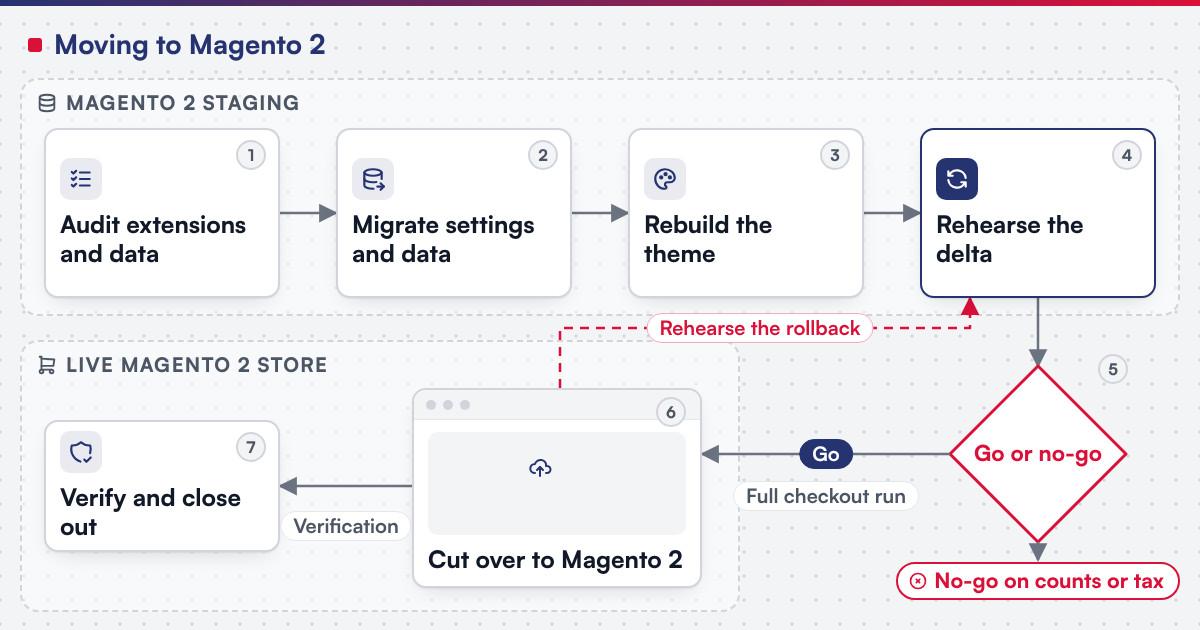 (opens the full-size diagram in a new tab)
Worked scenario: an audit finds the scope
A hypothetical regional retailer runs 6,000 SKUs on Magento 1, 14 installed extensions, and a custom invoice-on-account checkout step.
- Milestone one audits every extension, finds Magento 2 releases for ten, flags four for replacement, and scopes the invoice-on-account code as its own work.
- Milestone two runs Settings mode, verifies it in the Admin, then runs Data mode for the catalogue and a year of order history, with the rebuilt theme live on staging.
- Milestone three runs Delta mode for two rehearsal cycles, tests the redirect map, rebuilds invoice-on-account natively, and rehearses the cutover before the go or no-go decision.
A retailer with few extensions can usually compress this into fewer milestones; one with built-on customisations rarely can.
Where does AI fit in a Magento 1 to Magento 2 migration?
The clearest AI use on a migration like this sits on the audit and mapping side: reading an extension's Magento 1 configuration export and drafting a first-pass note on whether a Magento 2 release exists or the feature needs rebuilding, and generating candidate Delta-mode test orders that exercise tax, payment and company-account edge cases for a person to check before the rehearsal. None of that assistance decides an extension match, approves a theme rebuild or signs off the cutover. Netbase's delivery lifecycle: discovery and strategic alignment; team assembly and architecture planning; agile execution with outcome-based milestones; modular components; training and rollout; ongoing support.
What should you check in Adobe's own documentation?
Confirm before scoping a build:
- Which Data Migration Tool configuration file matches your path, since Open Source to Open Source, Open Source to Commerce and Commerce to Commerce each ship their own.
- Whether Settings mode covers every configuration your store needs, since Adobe's own documentation says it does not migrate every setting.
- Which changes Delta mode carries, since Adobe's own documentation says it migrates data created only by Magento's own modules, so data a third-party extension writes needs its own tool configuration, and entities entered through the Admin, such as attributes or CMS pages, are not migrated incrementally.
- Whether your B2B features need Adobe Commerce, since company accounts, shared catalogues, quick order, requisition lists and negotiated quotes are Adobe Commerce features, not Magento Open Source ones.
What has Netbase delivered on a Magento 1 to Magento 2 migration?
The published example is Netztech's migration: for Netztech, Netbase delivered a Magento 1 to Magento 2 Commerce migration in 35 working days, including migrating 11 extensions with installation, configuration, customization and data transfer.
See the Netztech migration record
Plan the next step for your project
Which questions should you ask a migration vendor?
- Which Data Migration Tool configuration file does our migration path use?
- Who verifies Settings mode's result in the Magento 2 Admin before Data mode runs?
- How many Delta mode rehearsal cycles are planned before cutover?
- What is the rollback plan if the go or no-go decision fails?
- How is scope fixed? Most Netbase projects are fixed-scope contracts agreed after discovery.
What goes wrong in a Magento 1 to Magento 2 migration?
- Assuming Settings mode covers everything. It does not migrate every configuration setting, and a skipped check surfaces as a broken setting after cutover.
- Treating Delta mode as optional. Without it, every change since the Data mode run has to be frozen or migrated again, forcing a longer maintenance window.
- Assuming a theme carries over. Magento 2's theme structure is not Magento 1's; a page rebuilt late is a page launched late.
- Skipping the redirect map. Indexed Magento 1 addresses fail after cutover when no tested redirect points them to their Magento 2 equivalents.
How this guide is sourced and where it stops
The Data Migration Tool, import and URL facts come from Adobe's own documentation, and the redirect guidance from Google's own documentation. The Netbase example is the named Netztech migration; the pipeline, the audit table and the worked scenario are editorial planning guidance.
Common questions
No. Settings mode does not migrate every configuration setting, so Adobe's own documentation directs a check in the Magento 2 Admin after it runs, and every extension is matched or rebuilt by hand.
Each one is checked individually: reinstalled and reconfigured if a Magento 2 release exists, replaced with a marketplace alternative, or scoped as custom work if neither applies.
It depends on the catalogue: company accounts, shared catalogues, quick order, requisition lists and negotiated quotes are Adobe Commerce B2B features, not part of Open Source.
Usually, since Magento 2 generates its own URL rewrites rather than keeping Magento 1's, so every indexed address needs a tested permanent redirect to its new one.
It depends on extension count, catalogue size and how much custom code is rebuilt; the audit chapter above is what turns the pipeline into a schedule for your own catalogue and extension list.
Yes. Adobe describes incremental migration as a continuous process that restarts every five seconds until it is stopped, carrying only what changed since the last run, which is what makes repeated rehearsal cycles possible.
Bring your extension list and catalogue to the decision
E-commerce development scopes a Magento 1 to Magento 2 migration as a project, with the audit, the Data Migration Tool run, the theme rebuild, the rehearsal and the cutover staged as milestones; where a Magento 1 store only needs patching rather than a platform move, legacy application modernization is the service to start from instead. Bring your extension list, catalogue size and current Magento edition, and submit a project; a person will reply with the fit. OutsourcingVN is Netbase's own outsourcing-services platform.
Work behind this guide

What this record reports instead is a duration and a scope, both attested.
Keep ReadingRelated services and solutions
 E-commerce development, built, extended or replatformed as a project
A store built, extended or replatformed on Magento, WooCommerce or headless, as scoped milestones.
Learn More