

Planning a WordPress to headless CMS migration
Move off WordPress to a headless stack once more than one channel needs the same content, a plugin has become most of the build, or editorial speed is capped by template rendering. The method: inventory first, model the content, build the new front end, map every redirect, and rehearse the cutover before switching anything live.
Submit a project Headless vs traditional architectureReviewed by Huy Nguyen (David), CEO · Updated 29 Oct 2026 · 11 min read

OutsourcingVN is operated by Netbase JSC, which has built both sides of this move: WordPress print stores with custom functions, and headless platforms behind a Next.js front end. This guide stays on the content-site migration itself; the architecture decision for a commerce storefront is covered by headless vs traditional e-commerce, and platform fit by the WordPress, Strapi and Next.js pages. Where the migration carries a commerce storefront rather than a content site alone, e-commerce development scopes that build separately from the content-platform work this guide covers.
Contents
- When does headless pay off for a WordPress site?
- Plugins with no headless equivalent
- Model the content before you map a single URL
- Map every URL and keep SEO parity
- Design the editor workflow before the cutover
- The migration pipeline
- Worked scenario: a publisher outgrowing its plugins
- Where AI fits in this migration
- What to check before committing
- What Netbase has built on WordPress and headless stacks
- Which questions should you ask a migration vendor?
- What goes wrong in a WordPress to headless migration?
- How this guide is sourced and where it stops
- Common questions
- Bring your WordPress site and your content team to the decision
When does headless pay off for a WordPress site?
Score the current site against five signals before committing to either route.
| Signal | Stay on WordPress | Move to headless |
|---|---|---|
| Content sources | One site, one editorial team | The same content read by a website, an app and a partner integration |
| Plugin dependency | A handful of well-maintained plugins | A custom plugin that has absorbed most of the real application logic |
| Release cadence | Content and template ship together | The front end needs its own release schedule, independent of publishing |
| Front-end ambition | The theme system already meets the brief | A specific framework or performance target the theme cannot reach |
| Editorial team | Comfortable in WordPress's own editor | Already working with a headless CMS elsewhere, or willing to learn one |
None of these signals alone forces a move. A site with one well-run plugin and one channel usually has no reason to decouple, and the WordPress page covers where that platform keeps fitting on its own.
Plugins with no headless equivalent
Every WordPress plugin has to be re-examined, not carried across by name. An SEO plugin's redirects and schema output, a forms plugin's submission storage, a membership plugin's access rules and a page builder's layout data each need a decision: rebuild the behaviour, replace it with a cleaner design, or drop the feature. Replace or refactor legacy software covers that same question for any legacy system, and a plugin audit answers it first here.
Model the content before you map a single URL
A content model groups what the old site publishes into types, fields and relationships the new CMS can enforce: an article type with author and category fields, a product or project type with its own media, a reusable block type for layouts editors build by hand today. Getting this right before any front-end code is written lets the front end, the editor workflow and the redirect list agree on the same shape of content.
Map every URL and keep SEO parity
Every URL the old site answers needs a destination on the new one, including paginated archives, tag pages and any URL a plugin generated automatically. The same profiling discipline legacy data migration planning sets out for a database migration applies here too: query what actually exists, including pages no menu links to, rather than migrating only what a sitemap shows. Titles, meta descriptions and canonical tags move with the content they describe, and every mapped URL gets a redirect tested before launch, not assumed to resolve because the new route "matches" the old one.
Design the editor workflow before the cutover
A headless CMS changes how content gets published, not just where it is stored: preview links that render against the real front end, an approval step that matches who signs off today, and roles that mirror the old WordPress capabilities rather than the new CMS's own defaults. An editorial team that cannot preview a draft before approving it will stop trusting the new system or revert to publishing straight to production, undoing the workflow discipline the migration was meant to add.
The migration pipeline
A phased cutover, not a single switch, keeps the old site answering requests until the new one is proven; incremental modernization without a rewrite covers running two systems side by side for longer than a migration alone needs.
-
Audit the current WordPress site
List every content type, URL, plugin and third-party integration, and flag any plugin with no headless equivalent before any model is drawn.
-
Model the content in the headless CMS
Turn the audited inventory into content types, fields and relationships the CMS can enforce, with editor roles matching who publishes today.
-
Build the new front end against that model
The front end, commonly built in Next.js, calls the CMS API for every page type the model defines, while editors keep working on the old site until launch.
-
Map every redirect and rehearse the rollback
Every WordPress URL maps to its new address, tested against the inventory from step one, with a rollback path back to WordPress kept live until parity is confirmed.
-
Decide go or no-go on the cutover rehearsal
Content parity, redirect test results and editor sign-off gate the decision; any exception is recorded, and an unresolved exception is a no-go, not a judgement call.
-
Cut over and watch the new site
Switch DNS or the CDN to the new front end, then monitor the agreed watch window for errors, broken redirects and missing content before declaring the migration complete.
-
Close the migration
Decommission or freeze the old WordPress site on a written decision, not a date, and record the launch for the next migration's reference.
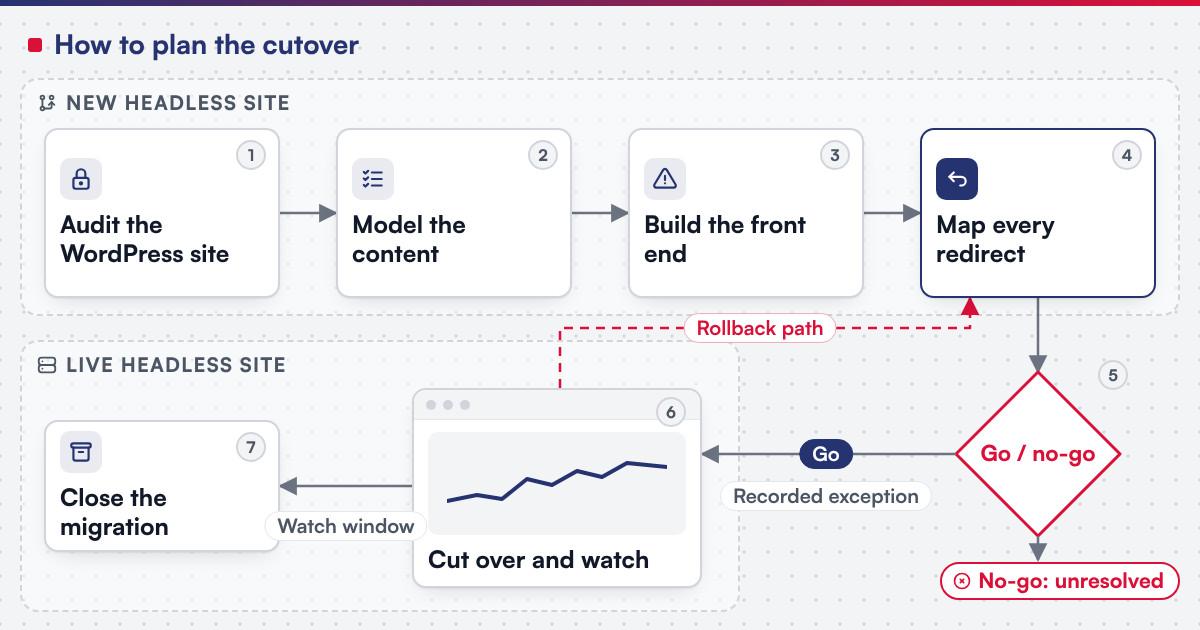 (opens the full-size diagram in a new tab)
Worked scenario: a publisher outgrowing its plugins
A hypothetical trade publisher runs a WordPress site where a membership plugin, a forms plugin and a custom directory plugin now account for most of what the site does, and the editorial team wants the same articles to reach a website and a members-only app.
- Milestone one audits every plugin's behaviour and models the content, membership tiers and directory listings as types the new CMS enforces directly.
- Milestone two builds the website front end against that model, while the membership app is scoped as a second consumer of the same API.
- Milestone three maps every article and member-only page to its new address, rehearses the cutover twice, and retires the old plugins once both front ends read correctly.
The publisher keeps its WordPress site live until the rehearsal passes twice, because a membership audience is exactly the one that notices a broken login first.
Where AI fits in this migration
The clearest AI use on a migration like this is on the audit and modelling side: reading an unfamiliar plugin's database tables, drafting a first-pass content model from the old schema, and summarising a long URL list into candidate redirect groups for a person to confirm. Netbase's delivery lifecycle: discovery and strategic alignment; team assembly and architecture planning; agile execution with outcome-based milestones; modular components; training and rollout; ongoing support. None of that assistance decides the content model, approves a redirect mapping or signs off the cutover.
What to check before committing
Next.js states a minimum Node.js version of 20.9 for any new project (nextjs.org, accessed 2026-10-14). Strapi supports only Active or Maintenance LTS Node.js releases, currently versions 22, 24 and 26, against PostgreSQL 14.0 or newer, MySQL 8.0 or newer, MariaDB 10.3 or newer, or SQLite 3, and not every database a WordPress host already provides (docs.strapi.io, accessed 2026-10-14). Confirm before scoping a build:
- The WordPress, PHP and plugin versions the current site runs, checked against WordPress's own current minimums.
- The Node.js version your hosting or CI pipeline provides, since the CMS and the Next.js front end both need a current LTS release.
- Every plugin with no headless equivalent, named and checked before the content model is fixed, not discovered mid-build.
- Which database the new CMS will actually run on, confirmed against its supported list, not assumed from the old host.
What Netbase has built on WordPress and headless stacks
On the WordPress side, PrintLeo runs the CMSmart WordPress Printshop package with its online design plugin, delivered by Netbase, and for a large-format inkjet printer in Singapore that is not named, Netbase redeveloped most of the store's system on a WordPress print-store feature set built from the client's own specifications, over several phases and more than a year; see the large-format redevelopment record. On the headless side, the multi-tenant cloud ERP platform stack includes React and Next.js, Laravel and Strapi, and PostgreSQL, MySQL, MariaDB and MongoDB on AWS, for a client that is not named. Separately, for a Dubai-based loyalty and rewards company that is not named, Netbase delivered a headless reward shop platform on Magento 2 Open Source with a Next.js front end, in four phases over 3.5 to 4.5 months.
See the loyalty reward shop record
Which questions should you ask a migration vendor?
- How will every plugin's behaviour be inventoried before the content model is drawn? A plugin audit that happens after modelling starts tends to force a second model.
- Who writes and tests the redirect map, and against what list of current URLs? A map built from the sitemap alone misses pages no menu links to.
- What does the editor workflow look like on day one, including preview and approval? A team that cannot preview a draft will not trust the new system.
- What is the rollback plan if parity fails after cutover? Most Netbase projects are fixed-scope contracts agreed after discovery, and a migration scopes this question directly.
What goes wrong in a WordPress to headless migration?
- Modelling the content after the front end is built. The front end ends up shaped by whichever fields were convenient first, not by what the content needs.
- Trusting the sitemap for the redirect list. Orphaned pages and plugin-generated URLs are exactly the ones a sitemap omits and a visitor still requests.
- Skipping the editor-workflow rehearsal. A preview or approval step nobody tested before launch surfaces on the first real article.
- Treating cutover as reversible once real content is live. A rollback is genuine only before the new system holds its first real edit; after that, reverting is a second migration nobody planned.
How this guide is sourced and where it stops
The platform requirements are read from Next.js's and Strapi's own documentation on the dates cited. The method steps above are editorial guidance.
Plan the next step for your project
Common questions
No. A phased cutover with the old site still live is the usual pattern; see incremental modernization without a rewrite for running both systems side by side.
Ranking signals travel with a correctly mapped redirect and matching metadata; the risk is an untested redirect or a missed URL, not the migration itself.
Yes. The old site stays the system of record until the rehearsal passes and the cutover step runs.
Strapi is this guide's working example because it is part of the stack of Netbase's published multi-tenant cloud ERP platform; the modelling and migration steps apply to any API-first CMS.
Its behaviour is rebuilt as custom logic in the new front end or CMS configuration, scoped like any other custom feature.
Talk to Huy Nguyen (David), Founder and CEO of Netbase JSC: message him on WhatsApp at +84 937 869 689 or email project@netbasejsc.com. You can also send your brief through the project request form. Say which workflow or system the project concerns and what has to stay unchanged; the first step is a discovery conversation, and scope and milestones are agreed after it.
Bring your WordPress site and your content team to the decision
Legacy application modernization scopes a WordPress to headless migration as a project, with the audit, the content model, the front end and the cutover staged as separate milestones. Bring your plugin list, your channel plans and your editorial workflow, and submit a project; a person will reply with the fit and what discovery would check first. OutsourcingVN is Netbase's own outsourcing-services platform.
Work behind this guide

This record covers phase-one scope for agency SMEs; the client and product are not named.
Keep Reading
The redevelopment ran on a WordPress print-store feature set, with custom functions built to the client's own workflow and design specifications.
Keep Reading
Confidentiality covers the engagement, so no client is named.
Keep ReadingRelated services and solutions
 Legacy application modernization, one bounded capability at a time
The code is assessed first, then one bounded capability moves at a time, with a way back.
Learn More