

Odoo vs custom ERP: choosing the route for your operations
Configure Odoo when its standard modules model your process. Extend Odoo with a custom module when most of the process fits but one piece does not, and that piece is worth building once, on Odoo's own framework. Build a custom ERP when the process rejects Odoo's model entirely, or when ownership and integration rules make a shared platform unworkable.
Submit a project See legacy application modernizationReviewed by Huy Nguyen (David), CEO · Updated 22 Oct 2026 · 10 min read

Most organisations start by configuring and extend only where a real gap remains.
OutsourcingVN is operated by Netbase JSC, which works with a local Odoo implementation partner and also builds custom ERPs, so it has an interest in both answers below. The criteria are written to be usable against that interest, and the most common right answer for a standard back office is still "configure".
Contents
- What exactly is being compared?
- Where do your processes and data live on each route?
- How do you make the decision?
- Worked scenario: a food distributor's batch-trace gap
- What do Netbase records show about each route?
- Which questions should you ask an Odoo or custom ERP supplier?
- What goes wrong on each route?
- How this guide is sourced and where it stops
- Common questions
- Decide the route before you scope the build
What exactly is being compared?
Configure Odoo means using Odoo's own modules, finance and accounting, inventory, sales orders, HR and recruiting, CRM, project planning and e-commerce integration, through settings and standard workflows alone. Extend Odoo means building one custom module on top of Odoo's framework for a gap no standard module covers, while the rest of the business still runs on standard modules. Custom ERP means a system built from the ground up, not on Odoo, when the workflow or the ownership rules reject Odoo's model. This guide is the ERP-specific version of that choice; if the question is a new capability in general rather than an ERP specifically, the custom build vs SaaS guide covers the wider decision, and the Odoo platform page covers where Odoo itself fits before you reach this three-way choice.
Where do your processes and data live on each route?
| Criterion | Out-of-the-box Odoo | Configured Odoo | Extended with a custom module | Custom ERP build |
|---|---|---|---|---|
| Time to first use | Days | Weeks | Weeks to months | Months |
| Fit to your process | Close, for common workflows | Close, mapped to your approval chains | Exact, for the one gap a module cannot cover | Exact, if specified well |
| Where the change lives | Settings only | Settings and configuration data | A new module on Odoo's framework | Your own codebase |
| Data and code ownership | Yours, inside Odoo's schema | Yours, inside Odoo's schema | Yours, inside Odoo's schema and your module | Yours, entirely |
| Integration freedom | Odoo's own connectors | Odoo's connectors plus settings | Odoo's API, extended | Unlimited, at your effort |
| Effort over five years | Hosting plus standard support | Hosting plus configuration upkeep | Hosting plus module maintenance | Build plus maintenance and hosting |
All four routes keep your data on a system you or a partner run; none of them hand it to a SaaS vendor the way a subscription product would. The difference is how much of the logic is Odoo's own code, maintained upstream, against how much is code written for you. Map your own fields and processes against this table using the ERP procurement and inventory guide if the back-office workflow itself is still undefined, and the ERP and back-office operations solution for the fuller workflow design, or the Vtiger CRM to ERP migration guide when a CRM already runs your orders and stock and needs to become the ERP itself. Where a separate storefront must stay in sync with whichever route you choose, the e-commerce and ERP integration page specifies that contract.
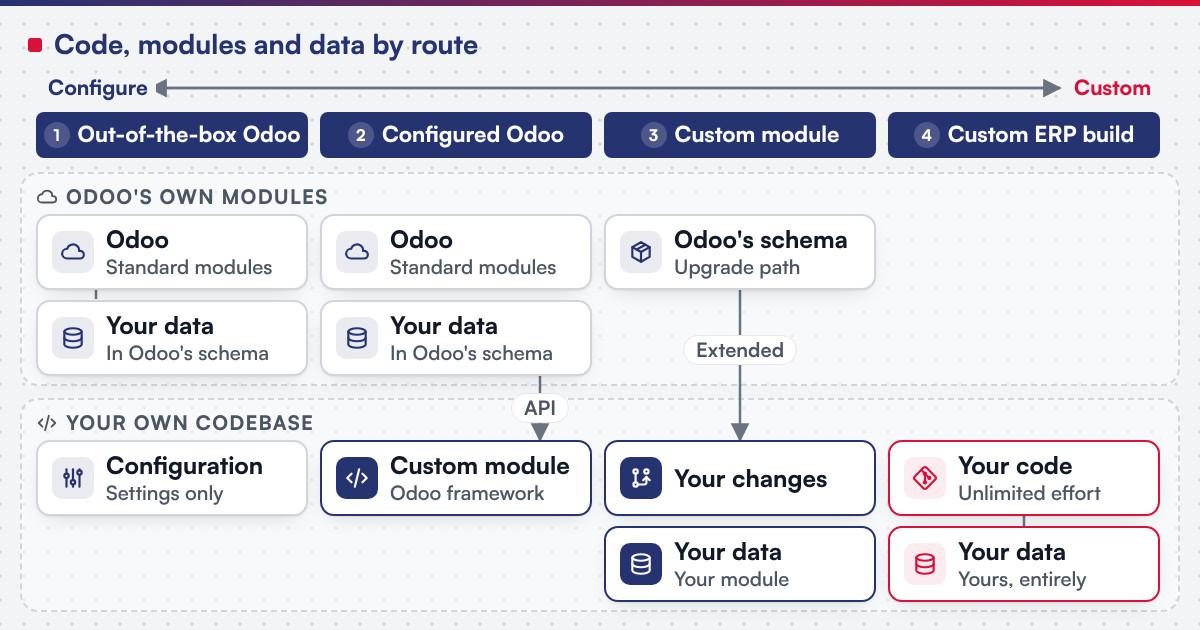 (opens the full-size diagram in a new tab)
How do you make the decision?
-
Map your process against Odoo's standard modules
Finance, inventory, sales orders, HR and recruiting, CRM, project planning and e-commerce integration cover most business functions without new code; the Odoo implementation for manufacturers guide walks through that mapping for a production line, and the food and beverage chains guide does it for an outlet rollout.
-
List what the modules do not model
Separate "configuration would handle this" from "no setting changes this behaviour".
-
Classify each gap
A missing setting is configuration; a missing field or screen is a custom module; a rejected data model is a sign Odoo is the wrong platform for that process.
-
Check the integration load
If a storefront or another system must sync with the ERP, scope that contract before committing to a route.
-
Check who owns the result
For custom development the client owns the IP created for it; Netbase productized modules and products are licensed, not transferred.
-
Weigh the upgrade path
A deep, undocumented custom module can turn every future Odoo version upgrade into its own project; a custom ERP has no such constraint because you set its upgrade schedule yourself.
-
Compare five-year effort
Include configuration or module maintenance, hosting, and the data-migration cost of changing route later.
-
Choose, and write down the trigger that would move you to the next route
For example, a gap that grows to cover most of one department's work.
Worked scenario: a food distributor's batch-trace gap
A hypothetical food distributor already runs purchasing, stock and accounting in Odoo, and the standard inventory and sales modules fit well; the kind of forecasting and batch-trace problem this sector faces is covered from the sector side in food and agriculture. Its batch-to-outlet traceability rule, though, follows a recall process no standard module models: a lot number must carry forward through every transformation and link back to the ingredient lots and the outlets it reached.
The decision keeps purchasing, stock and accounting on standard Odoo, because nothing about them differentiates the business. The traceability rule becomes one custom module that reads and writes against Odoo's own inventory and sales records rather than a parallel database. The reversal trigger is written down: if a second, unrelated workflow also needs a custom module within the same year, the gap is reassessed as a sign the business has outgrown a single shared ERP for that function, not a reason to keep adding modules piecemeal.
What do Netbase records show about each route?
Netbase's published records cover both the configure-and-extend side and the custom-build side, which is itself a reason to weigh this page accordingly.
- Configure and extend Odoo. Working with a local Odoo implementation partner, Netbase has consulted on and customised Odoo in Vietnam for retail store chains, a food and beverage franchise chain, manufacturers, trading and distribution companies, a warranty service network, an industrial-park purchasing centre, an energy-sector project time and cost system, a university institute and a postal-service helpdesk; these clients are not named. See the Odoo implementations record. Separately, Netbase's own ERP consultancy and development experience covers Odoo consultancy and customization, cloud ERP platform development, e-commerce integration with ERP by API synchronisation, a CRM-to-ERP upgrade, and modules built for finance, inventory, sales, HR, CRM and project planning.
- Custom ERP build. Since 2020, Netbase has worked as offshore development and managing partner on a multi-tenant cloud ERP SaaS for a US client that is not named; its phase one, from 2020 to 2023, covers CRM, real-time messaging, HR, a knowledge base, custom fields and workflows, work and project management and API integrations, on a stack of React and Next.js, Laravel and Strapi, and PostgreSQL, MySQL, MariaDB and MongoDB on AWS. See the multi-tenant cloud ERP platform record.
- Reuse inside either route. Reusing Netbase productized modules can cut development time by up to 60%; that is an upper bound tied to module reuse, not a typical saving for every project.
Which questions should you ask an Odoo or custom ERP supplier?
- For an Odoo implementation: which parts of this project are configuration, and which require a custom module, and how is that module retested against the next major version upgrade?
- For either route: who owns the code? For custom development the client owns the IP created for it; Netbase productized modules and products are licensed, not transferred, whether the result is a module or a full build.
- For either route: how is scope fixed? Most Netbase projects are agreed as fixed-scope contracts after discovery, with milestone-based arrangements also available.
- For a custom ERP build: what stack and hosting are proposed, and what, specifically, about this process rejects a shared platform like Odoo?
What goes wrong on each route?
- Customising past the platform's model. A deep, undocumented fork of standard Odoo modules turns every future upgrade into its own project.
- Reaching for a custom module before configuration is exhausted. A setting change is cheaper and safer than new code, and is often overlooked.
- Building a custom ERP when modules already cover most of the need. The unbuilt remainder gets built anyway, at full custom cost, out of habit rather than a real gap.
- Treating the e-commerce sync contract as an afterthought. Catalogue, inventory and order synchronisation needs its own design on every route, or the storefront and the ERP disagree about stock.
- Treating "up to 60%" reuse as guaranteed. It is an upper bound tied to module reuse, not a typical result for a specific project.
How this guide is sourced and where it stops
The three route definitions are editorial, built from how Odoo is implemented in practice. Netbase's evidence covers partner-assisted Odoo consultancy and customisation and a custom multi-tenant cloud ERP build; no measured, controlled comparison across the three routes is published, and the food-distributor and reversal-trigger scenario is illustrative.
Plan the next step for your project
Common questions
Usually at first, because no new code is written. Whether it stays cheaper depends on how many gaps accumulate and whether each is small enough to stay a setting.
Yes, and it is the common path. Keep your approval chains and production rules documented so a later custom module has a specification to work from.
When the process rejects Odoo's data model outright, or when a hard integration, ownership or data-residency rule makes a shared open-source platform unworkable for the business.
Less, because the rest of the business still runs on Odoo's own supported modules; only the extended piece needs its own upgrade testing.
The gaps your current spreadsheets or systems cannot close, and which Odoo modules already fit. Custom Product Engineering and legacy application modernization both scope this kind of build depending on whether a system already exists.
Decide the route before you scope the build
Map your process against Odoo's standard modules, list the real gaps, and bring that list rather than a platform preference. A discovery milestone in legacy application modernization tests an existing system's fit, and Custom Product Engineering scopes a build from zero when no ERP is running yet.
OutsourcingVN is Netbase's own outsourcing-services platform. Submit a project with the gaps you found, and a person will reply with which route they point to.
Work behind this guide

Since 2020, Netbase has worked as offshore development and managing partner on a multi-tenant cloud ERP that a US software company offers as SaaS to small and mid-sized businesses.
Keep Reading
No figure, no result and no partner name appears on this page.
Keep ReadingRelated services and solutions
 Legacy application modernization, one bounded capability at a time
The code is assessed first, then one bounded capability moves at a time, with a way back.
Learn More