

Moving from QuickBooks to Odoo, account by account
Moving from QuickBooks Online or QuickBooks Desktop to Odoo means mapping the chart of accounts and tax codes, carrying across customers, vendors, items and open invoices and bills, setting opening balances at an agreed cut-off, reconciling bank feeds against Odoo's own bank statements, and proving a parallel month-end close before cutover.
Submit a project See legacy application modernizationReviewed by Huy Nguyen (David), CEO · Updated 24 Oct 2026 · 13 min read

OutsourcingVN is operated by Netbase JSC, and legacy application modernization is the service that scopes a move like this as a project, so read this guide with that interest in mind. The mechanics are the platform-agnostic ones legacy data migration planning sets out for any system; this page covers the QuickBooks-specific seams that method meets on the way to Odoo: its chart of accounts and tax codes, its customer, vendor and item lists, and its own export and import tools.
Contents
- When has QuickBooks become more than a ledger?
- Which QuickBooks records map to which Odoo module?
- What happens to the chart of accounts and tax codes?
- How do open items and opening balances move across?
- How do bank feeds and reconciliation carry over?
- Which ERP fits the gap QuickBooks leaves?
- The QuickBooks to Odoo migration pipeline
- Worked scenario: a hypothetical retailer closing its first month in parallel
- Where does AI fit in a QuickBooks to Odoo migration?
- What has Netbase delivered that bears on a QuickBooks to Odoo move?
- Which questions should you ask a migration vendor?
- What goes wrong in a QuickBooks to Odoo migration?
- How this guide is sourced and where it stops
- Common questions
- From ledger decision to ERP project
When has QuickBooks become more than a ledger?
A CRM that grew into an order book raises a related question from a different starting point; the Vtiger CRM to ERP migration guide covers that path. QuickBooks raises it from the accounting side.
| Signal | Still mainly a ledger | Time to plan the Odoo move |
|---|---|---|
| Stock | Inventory tracked in a spreadsheet beside QuickBooks | Stock, purchasing and sales need to share one set of records with accounting |
| Purchasing | Vendor bills entered after the fact | A purchase order and a match against the bill and the receipt are part of the process |
| Multiple companies | One company file, one chart of accounts | Several entities need consolidated reporting on a shared chart of accounts |
| Reporting | Standard profit and loss, balance sheet and trial balance | Operational reports need to join accounting data with stock, sales or project records |
| Integration | A handful of connected apps | The ledger, e-commerce, CRM and inventory all need to agree on the same customer and item records |
A ledger failing two or more of these signals has become the system stock, sales and purchasing all depend on, whatever it was bought to do.
Which QuickBooks records map to which Odoo module?
QuickBooks organises a company around a chart of accounts, customer, vendor and product or service lists, and open invoices and bills; Odoo keeps a similar shape, so the mapping is mostly a naming and ownership exercise once the destination accounts exist.
-
Chart of accounts
- Where it goes in Odoo
- Odoo's own chart of accounts, inside the fiscal localization package the company's country installs
- Watch for
- An account mapped to the wrong type miscodes every transaction after it
-
Customers
- Where it goes in Odoo
- Customers
- Watch for
- Billing details and payment terms travel with the record
-
Vendors
- Where it goes in Odoo
- Vendors
- Watch for
- Default payment terms and tax treatment for each vendor
-
Products/Services
- Where it goes in Odoo
- Products
- Watch for
- Which products carry stock and which are pure services
-
Open invoices
- Where it goes in Odoo
- Customer invoices
- Watch for
- Only the open balance moves; paid invoices stay in QuickBooks as history
-
Open bills
- Where it goes in Odoo
- Vendor bills
- Watch for
- Due dates and any partial payment already applied
-
Bank accounts and feeds
- Where it goes in Odoo
- Bank journals
- Watch for
- The feed connection itself has to be rebuilt; it does not carry over
The stock and purchasing decisions a Products record then drives are covered on ERP and back-office operations, and the ERP glossary entry defines the term this guide uses throughout.
What happens to the chart of accounts and tax codes?
Odoo installs a fiscal localization package for the country selected when a company is created, and that package ships a standard chart of accounts already configured for the country's own rules; once a journal entry has been posted, the fiscal localization of that company cannot be changed, so the chart-of-accounts mapping has to be right before the first transaction is recorded. QuickBooks' own account list exports as a CSV file with an account number, type, detail type and balance; mapping each QuickBooks account to its nearest Odoo account, and each QuickBooks tax code to its Odoo equivalent, is the first work item, and the client's own accountant, not this guide, settles which tax code applies to which transaction type.
How do open items and opening balances move across?
Migrating open items and balances is a data migration in the sense the data migration glossary entry defines: a one-time, reconciled move, not an ongoing sync. Odoo's own onboarding lets a team indicate each account's opening balance in the chart of accounts, and, as in any double-entry ledger, the opening debits and credits have to balance as of the agreed cut-off date; only the open invoices and open bills move as live records, carried in with Odoo's own import tool using an External ID that keeps a QuickBooks record's identity through a second import pass, while paid and closed transactions stay in QuickBooks as reachable history rather than being re-entered.
How do bank feeds and reconciliation carry over?
A bank feed connection does not travel with the data; it is reconnected inside Odoo as its own bank journal. Odoo's bank reconciliation then matches each bank transaction against customer invoices, vendor bills and payments, using reconciliation models to pre-select the likely match and leaving anything without an automatic match for a manual entry. Running the new bank journal alongside the QuickBooks feed for the first statement period is how a team confirms the match rules behave the same way before relying on them alone.
Which ERP fits the gap QuickBooks leaves?
Choosing Odoo over a competing route is a separate decision from the migration mechanics above. Odoo vs custom ERP compares configuring Odoo's own modules, extending Odoo with a custom module, and building a custom ERP from zero; the Odoo platform page sets out where Odoo itself fits before that three-way choice.
The QuickBooks to Odoo migration pipeline
-
Inventory QuickBooks
List the chart of accounts, tax codes, customers, vendors, items, open invoices, open bills and connected bank feeds, not just the current reports.
-
Map accounts and tax codes to Odoo
Assign each QuickBooks account and tax code to its Odoo equivalent, inside the fiscal localization package the company's country installs.
-
Migrate open items and opening balances
Bring across open invoices, open bills and the opening debit and credit balances as of the cut-off date, not the full transaction history.
-
Run a parallel month-end close
Close one month in both QuickBooks and Odoo and compare the trial balance line by line; a close that does not reconcile is routed back to the mapping step before it is tried again.
-
Cut over
Once reconciliation holds for a full month-end close, switch live bookkeeping, bank feeds and invoicing to Odoo.
-
Reconcile and retire QuickBooks
Confirm the first close after the cut over reconciles, then keep QuickBooks read-only for historical reference.
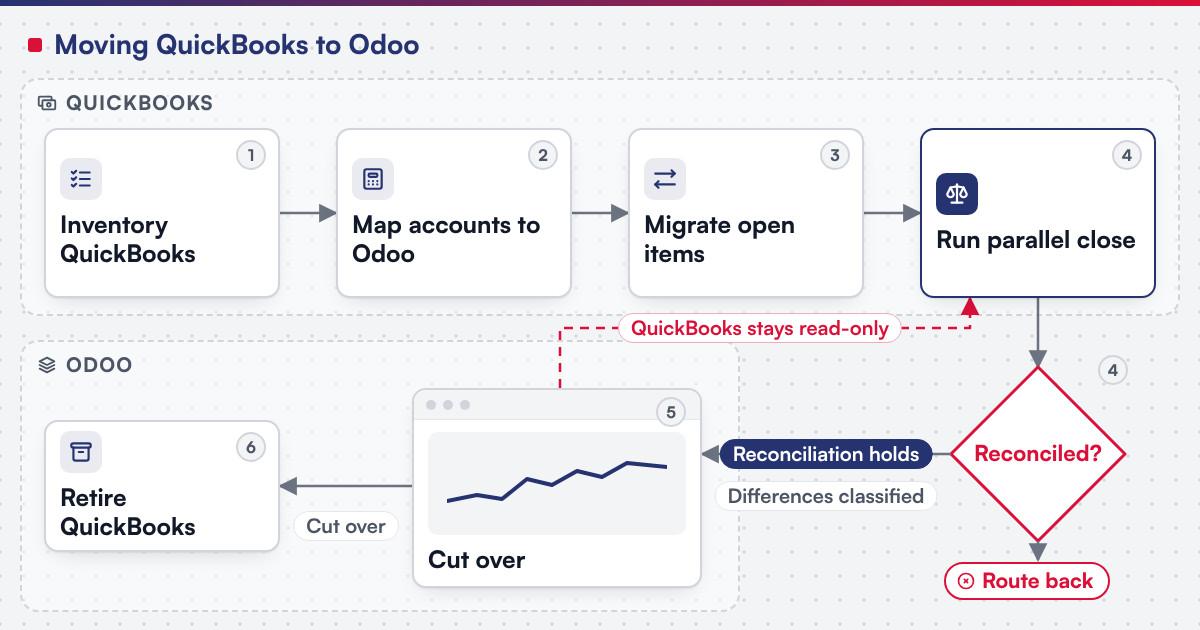 (opens the full-size diagram in a new tab)
Worked scenario: a hypothetical retailer closing its first month in parallel
A mid-size retailer runs QuickBooks Online for accounting, with stock and purchasing tracked separately in spreadsheets, none of it planned as one system; it accumulated that way over several years. The inventory step finds a chart of accounts with 40 active accounts, a dozen tax codes, and three bank feeds. Mapping goes quickly for customers, vendors and products, since their fields line up directly; the chart of accounts takes longer, since two QuickBooks accounts map to one Odoo account once account types are reconciled with the accountant. The first parallel close finds a one-day timing difference on a vendor bill dated across month end, which the team classifies and fixes in the mapping rather than overriding the balance by hand; the second parallel close reconciles cleanly, and cutover follows it.
Where does AI fit in a QuickBooks to Odoo migration?
The clearest use sits in the mapping step: reading a QuickBooks chart-of-accounts export to draft a first-pass mapping to Odoo's own accounts and tax codes, for the client's accountant to check line by line, and scanning transaction descriptions for likely miscodes to flag for review rather than correcting them automatically. None of that assistance decides whether a mapped account is correct or signs off a parallel close. Netbase's delivery lifecycle: discovery and strategic alignment; team assembly and architecture planning; agile execution with outcome-based milestones; modular components; training and rollout; ongoing support.
What has Netbase delivered that bears on a QuickBooks to Odoo move?
Netbase's ERP consultancy and development experience covers Odoo consultancy and customisation, cloud ERP platform development, e-commerce integration with ERP by API synchronisation of product catalogues, inventory, orders and customer data, a Vtiger CRM to ERP upgrade covering customer experience management, sales orders, workforce administration, support tickets, product management, resource allocation and budget planning, and Redmine to ERP development; modules built include finance and accounting, inventory, sales orders, HR and recruiting, CRM, project planning, e-commerce integration and reporting.
Working with a local Odoo implementation partner, Netbase has consulted on and customised Odoo in Vietnam for retail store chains, a food and beverage franchise chain, manufacturers, trading and distribution companies, a warranty service network, an industrial-park purchasing centre, an energy-sector project time and cost system, a university institute and a postal-service helpdesk; these clients are not named.
The published Work record closest to what comes next is the Odoo implementations record, which covers Odoo consultancy and customisation of this kind, and the Odoo for distributors guide and the Odoo for retail chains guide plan a rollout for two of the sectors above.
Plan the next step for your project
Which questions should you ask a migration vendor?
- Which QuickBooks lists and reports are in scope, and who checks the chart-of-accounts mapping line by line rather than trusting an automated match?
- Who settles the tax-code mapping with the accountant, and when in the project does that happen? Most Netbase projects are agreed as fixed-scope contracts after discovery, and this is the kind of detail discovery should fix in writing.
- How is the opening balance set, and what cut-off date does it use?
- What happens to a bank feed connection on cutover day, not just to historical transactions?
What goes wrong in a QuickBooks to Odoo migration?
- Treating the chart of accounts as a one-to-one copy. Tax codes and account types rarely line up exactly, and an account mapped to the wrong type miscodes every transaction after it.
- Migrating open items without an agreed cut-off. An invoice counted on both sides of the cut-off date overstates revenue or double-books a payment.
- Reconnecting bank feeds as an afterthought. A feed that is not tested before cutover leaves the first reconciliation with no source transactions to match.
- Treating the parallel close as a formality. A close that is not genuinely compared line by line hides the one timing difference that would have mattered.
How this guide is sourced and where it stops
QuickBooks' export, list and migration behaviour is read from Intuit's own help documentation on the dates cited; the Odoo chart of accounts, opening balance, import and bank reconciliation facts are read from the documentation for Odoo 18.0. The pipeline and the worked scenario above are editorial guidance for planning the move. Tax-code mapping is a decision for the client's own accountant; this guide gives no tax advice.
Common questions
The destination mapping is the same, but Intuit's own guidance on moving between QuickBooks Desktop and QuickBooks Online shows that even a move between the two QuickBooks products leaves some data behind, such as budgets, inventory units of measure and the bank connection setup, and copies the current year's paychecks as lump sums; treat each source product's own export limits as the starting inventory rather than an assumption.
Only the open balance needs to move; paid, closed transactions can stay in QuickBooks as read-only history.
Odoo takes an opening balance per account as of the cut-off date, and the debits and credits must balance; agree the cut-off date and reconcile it against the QuickBooks trial balance on that date before import.
No. A bank feed is reconnected inside Odoo as its own bank journal, so plan a short reconnection window at cutover rather than assuming continuity.
The client's own accountant, working from the chart-of-accounts mapping; this guide sets out the migration mechanics, not the tax treatment itself.
When the differences between QuickBooks and Odoo have been classified, not just counted, and the ones that matter are at zero for a full month-end close.
From ledger decision to ERP project
Legacy application modernization scopes a QuickBooks to Odoo move as a project, with the mapping, the parallel close and the cutover staged as separate milestones. Bring your chart of accounts, your busiest bank feed and the month you want as your first parallel close, and submit a project; a person will reply with the fit. OutsourcingVN is Netbase's own outsourcing-services platform.
Work behind this guide

No figure, no result and no partner name appears on this page.
Keep ReadingRelated services and solutions
 Legacy application modernization, one bounded capability at a time
The code is assessed first, then one bounded capability moves at a time, with a way back.
Learn More
Sources
- Intuit, Learn how features and data transfer from QuickBooks Desktop to QuickBooks Online
- Intuit, Import/export CSV files in QuickBooks Desktop
- Intuit, Move your lists to QuickBooks Online
- Odoo, Get started, documentation for Odoo 18.0
- Odoo, Chart of accounts, documentation for Odoo 18.0
- Odoo, Reconciliation, documentation for Odoo 18.0
- Odoo, Import and export data, documentation for Odoo 18.0