

Odoo implementation for retail chains: planning the rollout
A multi-store retail Odoo implementation works when point of sale, store stock, replenishment, promotions and accounting all run from one shared system instead of a spreadsheet per location. Configure the standard modules first, prove the pattern on one pilot store, then migrate and roll out the rest in scheduled waves with a rehearsed rollback.
Submit a project See the Odoo implementations recordReviewed by Huy Nguyen (David), CEO · Updated 27 Oct 2026 · 11 min read

OutsourcingVN is operated by Netbase JSC. This guide turns Odoo's retail modules into a store-by-store implementation plan, not a report on any one project's results.
Contents
- What does a retail-chain Odoo rollout need to cover?
- Which Odoo modules cover which part of the operation?
- How should the rollout be sequenced?
- Worked scenario: a five-store apparel chain's pilot
- What has Netbase delivered on Odoo for retail operations?
- Where does AI fit in a retail Odoo rollout?
- What should you check before committing to the stack?
- What goes wrong in a multi-store Odoo rollout?
- Which questions should you ask an Odoo implementation supplier?
- How this guide is sourced and where it stops
- Common questions
- Plan your store-by-store Odoo rollout
What does a retail-chain Odoo rollout need to cover?
Whether Odoo is the right platform at all is decided on the Odoo platform page, and whether to configure Odoo, extend it or build a custom ERP instead is decided in Odoo vs custom ERP; this guide starts once Odoo has been chosen and covers planning the retail-chain rollout itself. A manufacturer's Odoo rollout centres on a different set of decisions, bills of materials, work centres and quality checkpoints rather than point of sale, and Odoo implementation for manufacturers sequences that rollout instead; a chain whose outlets also prepare food, with recipes, kitchen orders and central-kitchen production, is covered instead by Odoo implementation for food and beverage chains.
A chain's rollout has to cover eight things working together: point of sale at every till, stock held and counted per store rather than one central number, replenishment and purchasing rules that reorder before a shelf runs out, promotions and loyalty rules applied consistently across stores, accounting localisation for every jurisdiction the chain trades in, the link to any e-commerce storefront or marketplace listing, the data migration from the chain's current systems, and the rollout sequence that proves the pattern on one store before it reaches the rest. The ERP and back-office operations solution maps the wider back-office workflow behind these decisions, and the ERP procurement and inventory guide defines the stock states and reconciliation points a retail rollout still needs.
Which Odoo modules cover which part of the operation?
| Retail operation | Odoo module or feature | What it usually replaces |
|---|---|---|
| Till sales and receipts | Point of Sale | Separate till software or a standalone cash register |
| Store-level stock | Inventory, tracked per store location | A stock count kept in a spreadsheet per store |
| Replenishment and purchasing | Inventory reordering rules feeding Purchase | A manual reorder call or email to a supplier |
| Promotions and loyalty | Point of Sale pricelists and a loyalty programme | A paper stamp card or a disconnected loyalty app |
| Accounting localisation | A fiscal localisation package per country | A local bookkeeper's own spreadsheet or ledger |
| E-commerce or marketplace link | Sales and e-commerce integration by API | A second, disconnected product catalogue |
Netbase's own ERP consultancy and development experience covers Odoo consultancy and customization, cloud ERP platform development, e-commerce integration with ERP by API synchronisation of product catalogues, inventory, orders and customer data, and modules built for finance, inventory, sales, HR, CRM and project planning; where a storefront or marketplace sits in front of the chain's stock, e-commerce and ERP integration specifies that sync contract in full.
How should the rollout be sequenced?
-
Blueprint the rollout
Document the processes each store runs today, point of sale, stock counts, purchasing approvals, promotions and loyalty rules, and map them onto Odoo's point of sale, inventory, purchase and accounting modules before any store goes live.
-
Pilot one store
Configure and run the rollout on a single representative store first, including its point of sale, stock and accounting localisation, so the pattern is proven before it is repeated anywhere else.
-
Migrate store and head-office data
Move item masters, store-level stock counts, supplier records and open purchase orders from the legacy systems, cleaned and reconciled against the pilot store's real numbers.
-
Rehearse the cutover and the rollback
Run the pilot store on Odoo alongside its old system for a full trading cycle, and rehearse the rollback to the legacy system before anyone decides to proceed.
-
Decide go or no-go for the next wave
A named owner checks the pilot store's stock accuracy, point of sale uptime and accounting close against the legacy baseline before authorising the remaining stores.
-
Roll out store by store
Repeat the configured pattern across the remaining stores in scheduled waves, verifying each store's point of sale and stock sync before the next wave starts.
-
Stabilise and hand over
Close out exceptions from the rollout, confirm promotions, loyalty and the e-commerce or marketplace link are live everywhere, and hand over the running system with training and support.
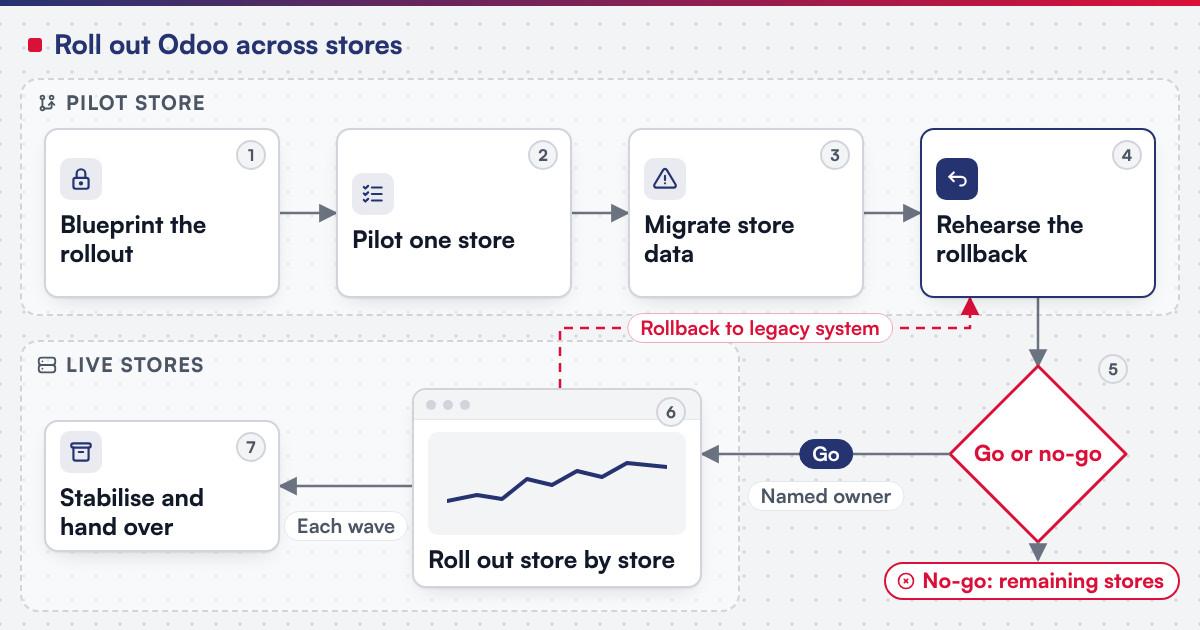 (opens the full-size diagram in a new tab)
Worked scenario: a five-store apparel chain's pilot
A hypothetical five-store apparel chain runs purchasing from a spreadsheet, point of sale from till software with no shared stock view, and loyalty from a paper stamp card. The blueprint stage maps each store's till workflow, weekly stock count and loyalty rule onto Odoo's Point of Sale, Inventory and a single loyalty programme. The pilot store goes live first: its till staff use Point of Sale for a full trading week while stock and loyalty data migrate in parallel, and a receipt discrepancy on day two is traced to a product variant mapped incorrectly during migration, fixed before the next store is touched. The go or no-go review checks that the pilot store's end-of-day stock count matches the system and that the accounting close reconciles for that store's jurisdiction; only then do the remaining four stores roll out in two scheduled waves.
What has Netbase delivered on Odoo for retail operations?
Working with a local Odoo implementation partner, Netbase has consulted on and customized Odoo in Vietnam for retail store chains and a food and beverage franchise chain; these clients are not named. The Odoo implementations record is the published summary. Separately, Netbase's own ERP consultancy and development experience covers Odoo consultancy and customization, cloud ERP platform development, and e-commerce integration with ERP by API synchronisation of product catalogues, inventory, orders and customer data, the same integration a retail chain's storefront or marketplace listing needs.
Plan the next step for your project
Where does AI fit in a retail Odoo rollout?
The categories that pay off first on a retail Odoo rollout are demand and reorder-point forecasting from the sales and stock history Point of Sale and Inventory already hold, a drafting assistant for purchase orders that a buyer then approves, and tagging or categorising a growing product catalogue before it reaches an e-commerce listing. None of it replaces the point of sale and inventory logic Odoo already owns; it reads from records that are more trustworthy once every store reports into one system instead of a spreadsheet each. Legacy application modernization is the usual route when an AI feature is added to a retail Odoo rollout already running rather than a new implementation.
What should you check before committing to the stack?
Odoo's own Point of Sale documentation states that the system "works on any device with a web browser, even if you are temporarily offline," with product moves "automatically registered in your stock", and that managers "get real-time statistics" with data "consolidated across all shops." Its inventory documentation describes reordering rules that generate a purchase or manufacturing order automatically or as a suggestion once stock falls below a set minimum, a separate make-to-order route triggered only after a sales order is confirmed, and warns that a manual master production schedule "should absolutely not be used alongside reordering rules." Its fiscal localisation documentation lists packages for more than 100 countries that fine-tune the chart of accounts, activate the right taxes and configure country-specific statements, installed automatically from the company's own country on first setup. Confirm before scoping a build:
- Which stores need offline till cover, since the point of sale app keeps working while temporarily offline.
- Which reordering strategy fits each product line, automatic reordering rules for steady stock, make-to-order for unpredictable or customised demand.
- Which fiscal localisation package applies to each store's jurisdiction, confirmed before any accounting entry is posted, since changing it afterwards is restricted.
- Which e-commerce or marketplace platform the chain already runs, so the catalogue, stock and order sync is scoped alongside the in-store rollout rather than after it.
What goes wrong in a multi-store Odoo rollout?
- Rolling out every store at once. Skipping the pilot store means the first real mistake is made at full scale instead of on one location.
- Treating accounting localisation as an afterthought. Posting entries before the right fiscal package is confirmed for a store's jurisdiction is hard to unwind.
- No rehearsed rollback. A chain that has never tested going back to its legacy system discovers the rollback does not actually work during a live cutover.
- Promotions and loyalty rebuilt per store. Letting each store configure its own pricelist or loyalty rule recreates the fragmentation the rollout was meant to remove.
Which questions should you ask an Odoo implementation supplier?
- Which parts of this rollout are standard configuration, and which require a custom module for a workflow Odoo's modules do not already model?
- How is the pilot store chosen, and what does the go or no-go review check before the next wave is approved?
- How is scope fixed? Most Netbase projects are agreed as fixed-scope contracts after discovery, with milestone-based arrangements also available.
- What does the delivery plan look like? Netbase's own delivery lifecycle runs discovery and strategic alignment, team assembly and architecture planning, agile execution with outcome-based milestones, modular components, training and rollout, then ongoing support.
How this guide is sourced and where it stops
The rollout sequence, the retail-operation table and the five-store apparel scenario are editorial, built from how a multi-store Odoo implementation is run in practice.
Common questions
Yes, that is the pilot-store pattern this guide recommends: one store runs fully on Odoo while the rest continue as before, until the go or no-go review clears the next wave.
The core configuration, point of sale, stock locations, purchasing rules and the loyalty programme, should be shared; only accounting localisation differs, and stores in another country belong to a separate company in Odoo, since localisation is set per company.
Move what the new process needs: current stock, open purchase orders and active customer or loyalty accounts usually move, while closed historical transactions can stay in an archive. The legacy data migration planning guide covers that decision in full.
Yes, and it usually should. Each wave's go or no-go review is a deliberate checkpoint, not a formality, and a chain can hold at any wave until the issues the pilot or a prior wave surfaced are resolved.
Where the chain's storefront runs on WooCommerce specifically, the WooCommerce and Odoo integration guide covers the connector, the sync rules and the tax and invoice flow between the two systems.
Talk to Huy Nguyen (David), Founder and CEO of Netbase JSC: message him on WhatsApp at +84 937 869 689 or email project@netbasejsc.com. You can also send your brief through the project request form. Say which workflow or system the project concerns and what has to stay unchanged; the first step is a discovery conversation, and scope and milestones are agreed after it.
Plan your store-by-store Odoo rollout
Bring your store count, current till and stock systems, and the jurisdictions you trade in to a scoping session, and a person will map them onto the sequence above. Retail, commerce and marketplaces covers the wider sector context, and legacy application modernization is the route when an existing store or back office needs to be assessed before the rollout starts.
OutsourcingVN is Netbase's own outsourcing-services platform. Submit a project with your store count and current systems, and a person will reply with a sequence like the one above.
Work behind this guide

Working with a local Odoo implementation partner, Netbase has consulted on and customized Odoo in Vietnam for a range of organisations, none of which is named.
Keep ReadingRelated services and solutions
 Legacy application modernization, one bounded capability at a time
The code is assessed first, then one bounded capability moves at a time, with a way back.
Learn More