

Shopify and Odoo integration: who owns which record
A Shopify and Odoo integration works when one system owns each record, products, stock, customers, orders, refunds and payouts, and the other reads a synced copy. Pick an app connector for the fields it maps, add a custom sync through the Admin GraphQL API for a gap, and write the conflict rule before go-live.
Submit a project See the e-commerce and ERP integration solutionReviewed by Huy Nguyen (David), CEO · Updated 21 Oct 2026 · 11 min read

OutsourcingVN is operated by Netbase JSC, and this guide covers the Shopify-specific side of an Odoo pairing: a hosted storefront with no server to change code on, so every sync runs through apps, the Admin GraphQL API and webhooks rather than custom server code on the storefront itself.
Contents
- What does a Shopify and Odoo integration need to decide?
- Which system owns which record?
- How do you choose and sequence the sync?
- Worked scenario: a two-location retailer's sync
- What has Netbase built on ERP integration?
- Where does AI fit in a Shopify and Odoo integration?
- What should you check before committing to a connector?
- What goes wrong in a Shopify and Odoo integration?
- Which questions should you ask an integration vendor?
- How this guide is sourced and where it stops
- Common questions
- Scope your Shopify and Odoo integration
What does a Shopify and Odoo integration need to decide?
Whether Odoo fits your back office is decided on the Odoo platform page; this guide starts once Shopify is the storefront and Odoo is the back office, and covers the pairing between them. The platform-agnostic version of this sync contract is specified in e-commerce and ERP integration; this guide covers the Shopify side specifically, its location mapping, its API limits and its refund and payout question. Shopify is a hosted platform, so there is no store codebase to extend the way a self-hosted WooCommerce or Magento installation has; every sync runs through an app, the Admin GraphQL API or a webhook instead. Where the Odoo side is a wholesale operation rather than a storefront's back office, Odoo implementation for distributors sequences the purchasing, warehouse and B2B modules a distributor needs before this guide's sync contract has anything to connect to.
Six decisions carry the integration: which system owns each record, app connector or custom GraphQL sync for each one, how a Shopify location maps onto an Odoo warehouse, the timing of each sync, the rule that resolves a conflict when both sides change the same field, and how a failed sync is caught and resolved rather than discovered by a customer.
Which system owns which record?
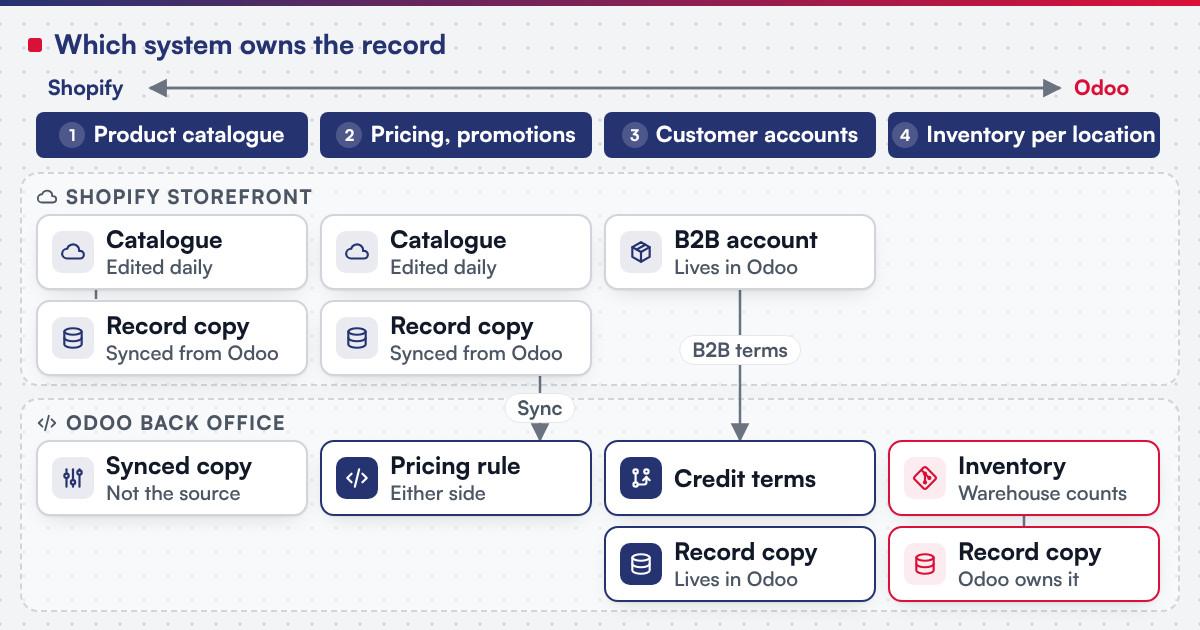
| Record | Usual source of truth | Why |
|---|---|---|
| Product catalogue and descriptions | Shopify | Merchandising and content teams edit the storefront daily |
| Inventory per location | Odoo | Purchasing, receiving and warehouse counts already live there |
| Pricing and promotions | Depends on the business | Either side can own it, but never both without a rule |
| Customers and accounts | Depends on B2C or B2B | A B2B account with Odoo-side credit terms usually lives in Odoo |
| Orders | Shopify creates, Odoo fulfils | The order is a one-way handoff once it is placed |
| Refunds and payouts | Shopify | Shopify's own checkout captures payment and issues refunds and payouts |
| Tax and invoice records | Odoo | Accounting localisation and invoice numbering need one ledger of record |
A Shopify location represents a place that stocks or fulfils orders, and Shopify tracks inventory separately per location; that per-location count is what has to line up with Odoo's own warehouses before a stock sync is written, and an order routed to the wrong location is as common a failure as a stock mismatch.
 (opens the full-size diagram in a new tab)
How do you choose and sequence the sync?
-
Map which records are standard commerce fields
Products, basic stock and orders are what an app connector is built to synchronise out of the box.
-
List what a connector does not model
A multi-location stock split across Shopify locations and Odoo warehouses, B2B pricing rules and refund-to-payout reconciliation are common gaps.
-
Decide connector or custom GraphQL sync per record
, using the gap list rather than a platform preference, and sizing each query's cost against the plan's point budget before relying on it for high-volume updates.
-
Choose sync timing per data type
Orders and inventory usually need a webhook; a scheduled sync is often enough for product descriptions.
-
Write down the conflict rule
Before go-live, agree which system wins when both sides edit the same field in the same window.
-
Build error handling and monitoring
Because webhook delivery and ordering are not guaranteed, pair every webhook with a scheduled reconciliation job that re-reads the record directly rather than trusting the event alone.
-
Test the exceptions
A duplicate order, a stock level that goes negative at one location, a refund issued after the Odoo invoice closed, and a tax-rate change each need a defined resolution.
Worked scenario: a two-location retailer's sync
A hypothetical homeware retailer runs one Shopify store with a flagship location and a separate fulfilment-centre location, while Odoo holds stock, purchasing and accounting for both. An app connector handles the common path: new products created in Odoo appear on Shopify within minutes, and orders placed on Shopify create a sales order in Odoo that reserves stock from the location nearest the customer. The connector does not model the retailer's refund-to-payout reconciliation, so a custom GraphQL call reads each payout from Shopify and matches it against the Odoo invoice it settles, scheduled daily rather than per transaction. A conflict rule is written down for the one field both sides can edit, the product description, and Shopify wins by agreement, since the content team works there daily. A reconciliation job catches a short window where a webhook for a stock adjustment was never delivered during a deployment, traced by re-reading the location's current count directly from the Admin API rather than relying on the missed event.
What has Netbase built on ERP integration?
Netbase's ERP consultancy and development experience covers e-commerce integration with ERP by API synchronisation of product catalogues, inventory, orders and customer data. Working with a local Odoo implementation partner, Netbase has consulted on and customised Odoo in Vietnam for trading and distribution companies, among other clients that are not named; the Odoo implementations record is the published example closest to the Odoo side of this guide.
Plan the next step for your project
Where does AI fit in a Shopify and Odoo integration?
The clearest wins sit either side of the sync, not inside it: drafting product descriptions on the Shopify side for a human to approve before they sync to Odoo, suggesting a match when a product in one system does not clearly map to a product in the other during a multi-location catalogue cleanup, and flagging an unusual reconciliation pattern, such as a location that disagrees on stock every week, for a person to investigate. None of it replaces the conflict rule or the reconciliation job; it makes both faster to run once the sync contract above is in place. E-commerce development scopes an AI feature on the Shopify side itself, separately from the ERP sync this guide covers.
What should you check before committing to a connector?
Shopify's own rate-limit documentation describes the Admin GraphQL API as cost-based: every field carries a point cost, and a plan's bucket refills at a fixed rate per second, with a single query capped at 1,000 points regardless of plan. Its API status documentation states the REST Admin API became a legacy API on 1 October 2024, and that new public apps must use the GraphQL Admin API instead. Its webhooks documentation states that delivery "isn't always guaranteed" and that Shopify "doesn't guarantee ordering within a topic," and recommends a reconciliation job that re-reads records by their updated-at timestamp rather than trusting webhooks alone. Its locations documentation describes a location as any place that sells, fulfils or stocks inventory, each tracked separately, and its fulfilment documentation describes a fulfilment order as the items from an order fulfilled from one location, which can differ in delivery method from another fulfilment order on the same order. Its versioning documentation states a new API version ships every three months, each supported for a minimum of twelve months with at least nine months of overlap. Odoo's own external API documentation describes reading, creating and updating records over XML-RPC, authenticated with a user id or an API key. Confirm before scoping a build:
- Which plan's point bucket and restore rate apply, since a sync built for a higher-volume plan's budget stalls on a smaller one.
- Whether a connector or custom code still targets the legacy REST Admin API, since it is legacy rather than the current interface for new work.
- Which events a webhook actually covers, and what reconciliation job backs it up, since delivery and ordering are not guaranteed.
- How a Shopify location maps to an Odoo warehouse, mapped against the ownership table above before the build starts.
What goes wrong in a Shopify and Odoo integration?
- Assuming the connector covers everything. A connector maps the fields it was built for; a multi-location or payout-reconciliation gap it was never built to cover surfaces weeks after go-live instead of during scoping.
- No conflict rule written down. Two systems editing the same field independently is a guaranteed disagreement, not a risk to monitor.
- Trusting webhooks alone. A missed or out-of-order webhook looks successful until a scheduled reconciliation job checks the record directly.
- Ignoring the query cost budget. A sync that exceeds its plan's point bucket is throttled mid-run, stalling the next scheduled job.
Which questions should you ask an integration vendor?
- Which records does the connector synchronise out of the box, and which need a custom GraphQL call against the gap list above?
- How is the Shopify location to Odoo warehouse mapping kept current as locations change?
- What is the conflict rule when both systems change the same field, and who agreed it?
- How is scope fixed? Most Netbase projects are agreed as fixed-scope contracts after discovery, with milestone-based arrangements also available.
How this guide is sourced and where it stops
The Shopify facts are read from Shopify's own developer and help documentation, and the Odoo facts from the documentation for Odoo 18.0, on the dates cited. The record-ownership table and the sync decisions are editorial planning guidance, and the two-location retailer is hypothetical.
Common questions
Start with the connector for the records it already maps, and add a custom GraphQL call only for the location and payout gaps the ownership table surfaces; rebuilding the whole sync from scratch is rarely needed.
Either can, but write the rule down: a storefront-led promotions calendar usually stays in Shopify, while B2B contract pricing usually stays in Odoo.
Nothing visible at first; a scheduled reconciliation job that re-reads the record by its updated-at timestamp is what catches it, not waiting for a complaint.
Yes. Adding a location turns a single-location store into a multi-location one, and the mapping to Odoo warehouses is defined at that point.
It changes how volume is budgeted, by query cost rather than a flat call count, and Shopify states that some newer platform features may only be available in GraphQL; the records a connector maps do not change on their own.
The WooCommerce and Odoo integration guide and the Magento and Odoo integration guide cover the connector options and record-ownership table for a self-hosted store, and Shopify to WooCommerce migration covers moving a storefront the other way.
Scope your Shopify and Odoo integration
Bring your current Shopify location set, your Odoo setup or implementation plan, and the records you suspect both systems touch. E-commerce development scopes the Shopify side when the storefront itself needs work, legacy application modernization is the usual route when an existing store or ERP needs the integration added, and the ERP procurement and inventory guide covers the stock and purchasing decisions the Odoo side still needs defined.
OutsourcingVN is Netbase's own outsourcing-services platform. Submit a project with the two systems involved, and a person will reply with which records need a connector and which need a custom sync.
Work behind this guide

Working with a local Odoo implementation partner, Netbase has consulted on and customised Odoo in Vietnam for a range of organisations, none of which is named.
Keep ReadingRelated services and solutions
 Legacy application modernization, one bounded capability at a time
The code is assessed first, then one bounded capability moves at a time, with a way back.
Learn More