

WooCommerce and Odoo integration: who owns which record
A WooCommerce and Odoo integration works when one system owns each record, products, stock, customers and orders, and the other reads a synced copy. Pick a connector for the standard fields it maps, add a custom API call for what it does not cover, and write the conflict rule before go-live, not after the first stock disagreement.
Submit a project See the e-commerce and ERP integration solutionReviewed by Huy Nguyen (David), CEO · Updated 1 Nov 2026 · 10 min read

OutsourcingVN is operated by Netbase JSC. This guide turns a store-to-ERP sync into the specific decisions a WooCommerce and Odoo pairing needs.
Contents
- What does a WooCommerce and Odoo integration need to decide?
- Which system owns which record?
- How do you choose and sequence the sync?
- Worked scenario: a mid-size apparel store's catalogue sync
- What has Netbase delivered on WooCommerce and Odoo?
- Where does AI fit in a WooCommerce and Odoo integration?
- What should you check before committing to a connector?
- What goes wrong in a WooCommerce and Odoo integration?
- Which questions should you ask an integration vendor?
- How this guide is sourced and where it stops
- Common questions
- Scope your WooCommerce and Odoo integration
What does a WooCommerce and Odoo integration need to decide?
Whether WooCommerce fits your storefront at all is decided on the WooCommerce platform page, and whether Odoo fits your back office is decided on the Odoo platform page; this guide starts once both are chosen and covers the pairing between them. The platform-agnostic version of this sync contract is specified in e-commerce and ERP integration; this guide covers the specific WooCommerce and Odoo pairing, its connector options, its record-ownership table and the tax and invoice flow between these two systems in particular. A retail chain planning the Odoo side of its operation from scratch starts instead with Odoo implementation for retail chains, a storefront running on Magento instead of WooCommerce follows the Magento and Odoo integration guide, and a storefront hosted on Shopify instead of self-hosted WooCommerce follows the Shopify and Odoo integration guide, whose sync runs through apps and webhooks rather than a server-side connector.
Six decisions carry the integration: which system owns each record, connector or custom API sync for each one, the timing of each sync, the rule that resolves a conflict when both sides change the same field, how tax and invoice numbering stay in one ledger, and how a failed sync is caught and resolved rather than discovered by a customer.
Which system owns which record?
| Record | Usual source of truth | Why |
|---|---|---|
| Product catalogue and descriptions | WooCommerce | Merchandising and content teams edit the storefront daily |
| Stock levels | Odoo | Purchasing, receiving and store-level counts already live there |
| Pricing and promotions | Depends on the business | Either side can own it, but never both without a rule |
| Customers and accounts | Depends on B2C or B2B | A B2B account with Odoo-side credit terms usually lives in Odoo |
| Orders | WooCommerce creates, Odoo fulfils | The order is a one-way handoff once it is placed |
| Tax and invoice records | Odoo | Accounting localisation and invoice numbering need one ledger of record |
Writing this table out for your own catalogue, before any connector is installed, is what decides whether a connector is enough or a custom API call is needed for a specific record.
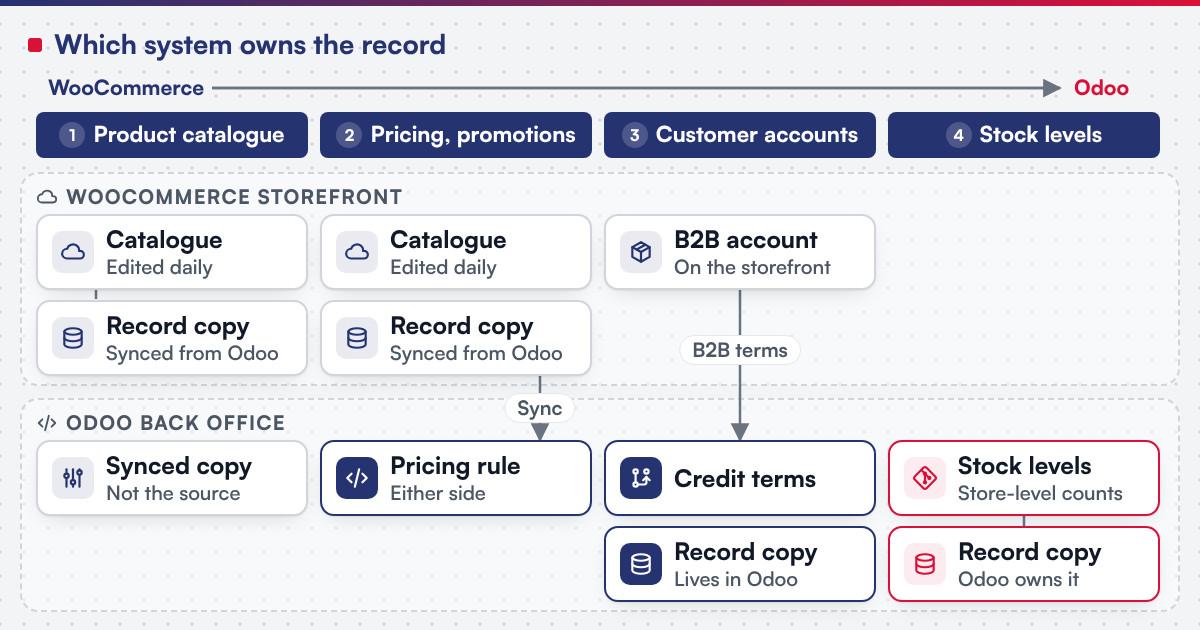 (opens the full-size diagram in a new tab)
How do you choose and sequence the sync?
-
Map which records are standard commerce fields
Products, basic stock and orders are what a connector is built to synchronise out of the box.
-
List what a connector does not model
Product variants, multi-warehouse stock splits, B2B customer-group pricing and tax rules specific to your jurisdictions are common gaps.
-
Decide connector or custom API sync per record
, using the gap list rather than a platform preference; a sync built directly against Odoo's own API for an application other than WooCommerce follows the Odoo API integration guide instead.
-
Choose sync timing per data type
Orders and stock usually need a webhook firing immediately; a scheduled sync is often enough for product descriptions.
-
Define the conflict rule
Decide, in writing, which side wins when both systems change the same field in the same window, before it happens in production.
-
Build error handling and monitoring
A failed sync is retried, queued or flagged to a named owner, and a scheduled reconciliation report compares the two systems' records.
-
Test the exceptions
A duplicate order, a stock level that goes negative, a tax-rate change and a customer record edited on both sides in the same hour each need a defined resolution.
Worked scenario: a mid-size apparel store's catalogue sync
A hypothetical apparel retailer runs its storefront on WooCommerce and its stock, purchasing and accounting in Odoo. A connector handles the common path: new products created in Odoo appear in WooCommerce within minutes, and orders placed in WooCommerce create a sales order in Odoo that reserves stock automatically. The connector does not model the retailer's B2B wholesale accounts, so a custom API call reads the wholesale pricing list from Odoo and applies it to the matching WooCommerce customer group, scheduled hourly rather than on a webhook because wholesale pricing changes rarely. A conflict rule is written down for the one field both sides can edit, the product description, and WooCommerce wins by agreement, since the content team works there daily. The reconciliation report catches a short window where a stock sync failed silently during a connector upgrade, and the fix is a monitored retry queue rather than a bigger connector.
What has Netbase delivered on WooCommerce and Odoo?
On the WooCommerce side, the PrintLeo record shows Netbase delivering the CMSmart WordPress Printshop package with its online design plugin for an e-commerce and advertising company, and representative web-to-print projects built on WooCommerce and WordPress span clients that are not named in Singapore, France, the Netherlands and South Korea. On the ERP side, Netbase's own ERP consultancy and development experience covers e-commerce integration with ERP by API synchronisation of product catalogues, inventory, orders and customer data, and, working with a local Odoo implementation partner, Netbase has consulted on and customized Odoo in Vietnam for retail store chains, among other clients that are not named. See the Odoo implementations record for that published summary.
Plan the next step for your project
Where does AI fit in a WooCommerce and Odoo integration?
The clearest wins sit either side of the sync, not inside it: drafting product descriptions on the WooCommerce side for a human to approve before they sync to Odoo, suggesting a match when a product in one system does not clearly map to a product in the other during catalogue cleanup, and flagging an unusual reconciliation pattern, such as a store that disagrees on stock every week, for a person to investigate. None of it replaces the conflict rule or the reconciliation report; it makes both faster to run once the sync contract above is in place.
What should you check before committing to a connector?
WooCommerce's own REST API documentation describes a key-based system: a Consumer Key and Consumer Secret tied to a WordPress user, with Read, Write or Read/Write permission levels, and notes that "the legacy REST API has been removed from WooCommerce core" in favour of the WordPress REST API. Its webhooks documentation states that WooCommerce "can trigger webhook notifications each time you add, edit, or delete orders, products, coupons, or customers," sends a test ping when a webhook is first saved, and "automatically disables a webhook after more than five consecutive delivery failures." Odoo's own external API documentation describes reading, searching, creating and updating records over XML-RPC, authenticated with a user id or, since version 14.0, an API key in place of a password, and notes that external API access depends on the Odoo subscription plan. Confirm before scoping a build:
- Which permission level each side's API key carries, since a sync that only needs to read stock should not hold write access to orders.
- Which webhook events the connector subscribes to, and where the delivery log is checked when a webhook is disabled after repeated failures.
- Whether your Odoo plan includes external API access, since that access is a plan-level setting, not a module you install.
- Which record your chosen connector does not model, mapped against the ownership table above before the build starts.
What goes wrong in a WooCommerce and Odoo integration?
- Treating the connector as a complete answer. Every connector maps the common fields; the project's real risk sits in what it does not map, found late if it is not checked first.
- No conflict rule written down. Two systems editing the same field independently is a guaranteed disagreement, not a risk to monitor.
- A disabled webhook going unnoticed. A webhook disabled after repeated failures stops syncing silently unless the delivery log is checked on a schedule.
- Tax and invoice numbers split across two systems. Letting both sides generate invoice numbers breaks the one ledger a tax authority expects to see.
Which questions should you ask an integration vendor?
- Which records does the connector synchronise out of the box, and which need a custom API call against the gap list above?
- What is the conflict rule when both systems change the same field, and who agreed it?
- How does each sync fail and recover, and who is notified when a webhook is disabled?
- How is scope fixed? Most Netbase projects are agreed as fixed-scope contracts after discovery, with milestone-based arrangements also available.
How this guide is sourced and where it stops
The record-ownership table and the sync decisions are editorial, built from how a WooCommerce and Odoo integration is run in practice; the apparel-store scenario is illustrative.
Common questions
Start with the connector for the records it already maps, and add a custom API call only for the specific gaps the ownership table surfaces; rebuilding the whole sync from scratch is rarely needed.
Either can, but write the rule down: a storefront-led promotions calendar usually stays in WooCommerce, while contract or wholesale pricing usually stays in Odoo.
WooCommerce stops delivering that event until it is re-enabled; checking the delivery log on a schedule, not only after a complaint, is what catches it in time.
It is possible but risky; keeping one system as the ledger of record for invoice numbering avoids a tax authority seeing two conflicting sequences.
Yes. Both sides can be scoped in one discovery when both are in scope.
Order and payment operations covers the order workflow itself, from placement through fulfilment and payment, once this guide's sync contract hands the order to Odoo.
Talk to Huy Nguyen (David), Founder and CEO of Netbase JSC: message him on WhatsApp at +84 937 869 689 or email project@netbasejsc.com. You can also send your brief through the project request form. Say which workflow or system the project concerns and what has to stay unchanged; the first step is a discovery conversation, and scope and milestones are agreed after it.
Scope your WooCommerce and Odoo integration
Bring your current WooCommerce catalogue, your Odoo setup or implementation plan, and the records you suspect both systems touch. E-commerce development scopes the WooCommerce side when the storefront itself needs work, legacy application modernization is the usual route when an existing store or ERP needs the integration added, and the ERP procurement and inventory guide covers the stock and purchasing decisions the Odoo side still needs defined.
OutsourcingVN is Netbase's own outsourcing-services platform. Submit a project with the two systems involved, and a person will reply with which records need a connector and which need a custom sync.
Work behind this guide

Working with a local Odoo implementation partner, Netbase has consulted on and customized Odoo in Vietnam for a range of organisations, none of which is named.
Keep Reading
PrintLeo, an e-commerce and advertising company, runs the CMSmart WordPress Printshop package with its online design plugin, delivered by Netbase.
Keep ReadingRelated services and solutions
 Legacy application modernization, one bounded capability at a time
The code is assessed first, then one bounded capability moves at a time, with a way back.
Learn More