

Odoo API integration: connecting a custom application
A custom application connects to Odoo through its external API by authenticating a dedicated integration user with an API key, mapping the application's own objects onto Odoo's models and fields, and batching, retrying and de-duplicating every write so a repeated call never creates the same record twice. Access rights decide what that user may reach before any of it runs.
Submit a project See the e-commerce and ERP integration solutionReviewed by Huy Nguyen (David), CEO · Updated 26 Oct 2026 · 12 min read

OutsourcingVN is operated by Netbase JSC. This guide covers Odoo's own external API for any custom application, customer portal or mobile app; a storefront built on WooCommerce, Magento or Shopify instead follows its own connector guide, and whether Odoo fits the back office at all is the Odoo platform page's question.
Contents
- What does an Odoo API integration need to decide?
- Which side owns each part of an Odoo API integration?
- How do you build and sequence the integration?
- Worked scenario: a customer portal reading and writing orders
- What has Netbase built on ERP integration?
- Where does AI fit in an Odoo API integration?
- What should you check before committing to the integration?
- What goes wrong in an Odoo API integration?
- Which questions should you ask an integration vendor?
- How this guide is sourced and where it stops
- Common questions
- Scope your Odoo API integration
What does an Odoo API integration need to decide?
Whether Odoo fits the back office at all is decided on the Odoo platform page; this guide starts once Odoo is the back office and a custom application, not a packaged storefront, needs to read or write its records. A store built on WooCommerce, Magento or Shopify follows its own connector guide instead, each covering that platform's record-ownership table and sync options; this guide covers Odoo's own external API directly, the route a custom portal or the Laravel backend behind a mobile app takes when there is no storefront connector to install. The platform-agnostic version of the sync contract itself, source of truth per field and reconciliation, is specified in e-commerce and ERP integration. Six decisions carry the build: which records Odoo owns against which the application owns, how the integration authenticates, what its access rights allow, how a write batches and retries without duplicating a record, how Odoo pushes a change out rather than waiting to be polled, and how an Odoo version upgrade is checked against the integration before it runs.
Which side owns each part of an Odoo API integration?
| Integration part | Owned by | Why |
|---|---|---|
| Model and field mapping | Odoo | Odoo's own models and fields are the schema the application maps to |
| Authentication | An API key and a dedicated integration user | Separates the integration's access from any human login |
| Access rights and record rules | Odoo's security groups | The integration user only reaches what its groups allow |
| Outbound events | An automation rule | Pushes a change to the application without the application polling for it |
| Batching and retries | The application's own sync job | Keeps a large or failed call from blocking the next one |
| Idempotency | The application's own sync job | Repeating a call after a retry must not create a duplicate record |
Writing this table out for your own objects, before the integration user is even created, is what decides which access rights that user actually needs.
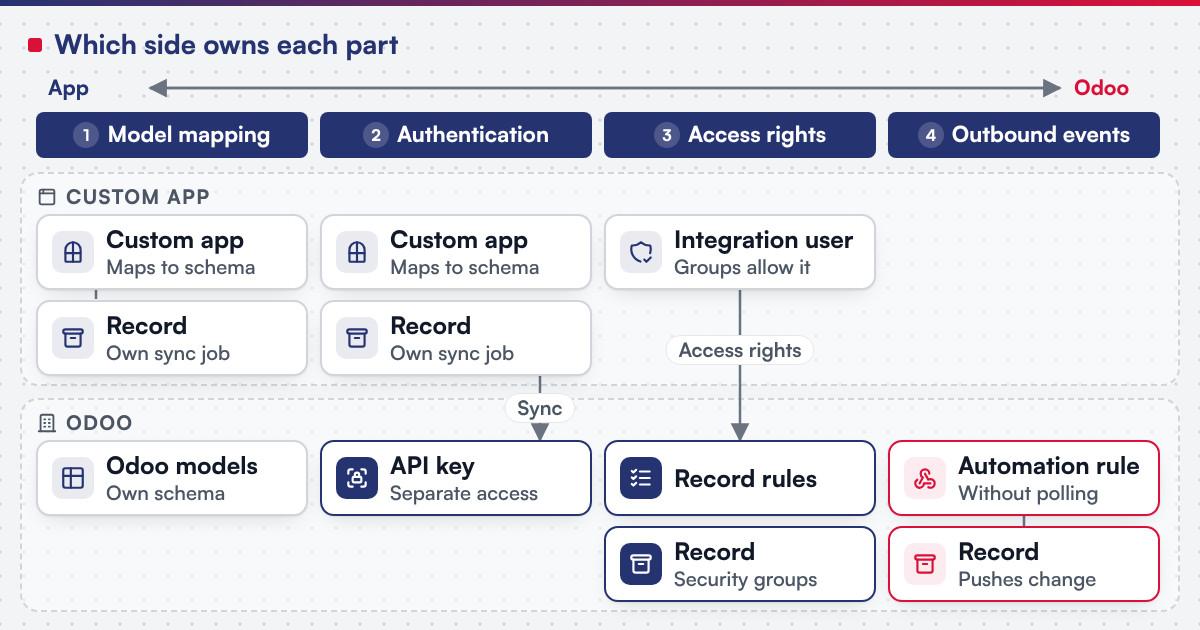 (opens the full-size diagram in a new tab)
How do you build and sequence the integration?
-
Map the application's objects onto Odoo's models and fields
List every object the application reads or writes and the Odoo model and field it corresponds to, including any field that does not exist yet.
-
Create a dedicated integration user and an API key for it
, never a shared login or a developer's own account, so access can be revoked without affecting a person.
-
Scope access rights and record rules to that user alone
Grant only the models and operations the mapping actually needs, and add a record rule where the user should see a subset of records, not every one.
-
Build the read and write calls
, batching a bulk read or write into one call where the API allows it rather than looping one record at a time.
-
Add retries with an idempotency key or a lookup-before-create check
, so a retried call after a timeout updates the same record instead of creating a second one.
-
Wire outbound events through an automation rule
where Odoo should notify the application of a change, rather than having the application poll Odoo on a schedule for every update.
-
Monitor the integration and check each Odoo upgrade
against the models, fields and automation rules it depends on before the upgrade runs.
Worked scenario: a customer portal reading and writing orders
A hypothetical B2B distributor builds a customer portal that lets its accounts view their own orders and invoices and place a new order, with Odoo as the back office. The portal authenticates as a dedicated integration user with an API key, scoped by access rights to the sales order, invoice and contact models, and the portal filters every call by the signed-in account's own contact record, so one customer's portal session can never read another's orders. Placing an order batches the order lines into a single create call rather than one call per line, and a client-generated reference on the order lets a retried submission, after a timeout with no confirmed response, look up that reference and update the existing order instead of creating a duplicate. An automation rule on the sales order's invoice status pushes a notification to the portal when an invoice is validated, so the portal's own view updates without a polling job checking every account's invoices on a schedule.
What has Netbase built on ERP integration?
Netbase's ERP consultancy and development experience covers e-commerce integration with ERP by API synchronisation of product catalogues, inventory, orders and customer data. Working with a local Odoo implementation partner, Netbase has consulted on and customised Odoo in Vietnam for retail store chains, manufacturers, and trading and distribution companies, among other clients that are not named. The Odoo implementations record is the published summary closest to the Odoo side of this guide.
Plan the next step for your project
Where does AI fit in an Odoo API integration?
AI assistance sits around the integration, not inside the sync itself: drafting a field-mapping document from a sample of both schemas for a person to check, suggesting which Odoo model a new application object most likely maps to during discovery, and flagging an unusual pattern in the retry or error log, such as one model failing far more often than the rest, for a person to investigate. None of it replaces the access rights, idempotency and automation-rule decisions this guide plans. Custom product engineering scopes where an AI feature belongs against where a mapping or a retry rule already does the job.
What should you check before committing to the integration?
Odoo's own external API documentation describes reading, creating, updating and deleting records over XML-RPC, authenticated with a user id and, since version 14.0, an API key generated from the user's own account security settings in place of a password; it notes that access to data through the external API depends on the database's Odoo subscription plan and is not available on every plan. Calls run through the execute_kw method against a model and a method name, with search_read combining a search and a read in one call and search_count returning a count without the records themselves, both useful for batching a sync rather than calling search and read separately. Its security documentation describes access rights as additive across a user's groups, each access control list granting create, read, write or delete on a model, and record rules as a second filter evaluated record by record after access rights, default-allow in that access is granted when access rights allow it and no rule applies to the operation and model for that user. Its automated actions documentation describes a rule triggered when a value is updated, a record is saved or deleted, or a timing condition relative to a date field or a record's creation or update is met, able to update or create a record, create an activity, send an email or SMS, or send a webhook notification, the mechanism for pushing a change to an application rather than waiting for it to poll. The Odoo 19.0 documentation adds the External JSON-2 API, which takes a POST to the /json/2 endpoint, naming the model and method in the URL, with an API key as the bearer token, validates every call against the user's access rights, record rules and field access, and recommends dedicated bot users for an integration; it states that the XML-RPC and JSON-RPC endpoints are "scheduled for removal in Odoo 22 (fall 2028) / Odoo Online 21.1 (winter 2027)." Confirm before scoping a build:
- Which Odoo subscription plan the target database runs on, since external API access depends on the plan, not on a module to install.
- Which access rights and record rules the integration user actually needs, scoped to the mapping from the table above, not copied from an administrator's own group.
- Which calls can batch through
search_reador a bulk write, instead of one call per record. - Which Odoo version is in scope, since a model, field or automation feature stated for one version is not assumed for another, and whether an integration on 19.0 or later targets the JSON-2 API rather than the RPC endpoints scheduled for removal.
What goes wrong in an Odoo API integration?
- A shared or administrator login used for the integration. Revoking access later means changing a credential a person also depends on, and every write looks like it came from that person.
- No idempotency check on a retried write. A client that retries after a timeout with no safeguard creates a second order, invoice or contact for the same event.
- Access rights copied from an unrelated group. A role built for a different purpose grants more than the mapping needs, and a mistake in the integration can then reach records it never needed to touch.
- Polling Odoo on a schedule for a change an automation rule could push. A tight polling interval adds load for a delay a webhook would remove entirely.
Which questions should you ask an integration vendor?
- Which Odoo models and fields does the mapping cover, and is a dedicated integration user and API key used rather than a shared login?
- What access rights and record rules does the integration user have, and are they scoped to the mapping alone?
- How does a retried write avoid creating a duplicate record?
- How is scope fixed? Most Netbase projects are agreed as fixed-scope contracts after discovery, with milestone-based arrangements also available.
How this guide is sourced and where it stops
The Odoo facts are read from the documentation for Odoo 18.0 and, for the JSON-2 API and the RPC removal schedule, Odoo 19.0, on the dates cited. The record-ownership table and the sync decisions are editorial planning guidance, and the distributor portal scenario is hypothetical. Netbase's delivery lifecycle: discovery and strategic alignment; team assembly and architecture planning; agile execution with outcome-based milestones; modular components; training and rollout; ongoing support.
Common questions
A storefront on WooCommerce, Magento or Shopify has its own connector guide; a custom application, portal or mobile backend with no packaged connector is what this guide's direct API route is for.
Access revocation and audit both break down once a credential is shared with a person; a dedicated integration user with its own API key and access rights keeps the integration's access separate and traceable.
An automation rule triggered on a record's update can call an external webhook or send a notification, so the application learns about the change when it happens rather than discovering it on the next poll.
A client-generated reference checked with a lookup before create, or an idempotency key, lets a retried write find and update the record a previous, unconfirmed attempt already created.
The Odoo implementations record, described above in the chapter on what Netbase has built on ERP integration.
Scope your Odoo API integration
Bring the application or portal that needs to connect, the Odoo objects it reads or writes, and whether the integration needs to push changes out or only respond to requests. Custom product engineering scopes the integration itself, e-commerce and ERP integration covers the platform-agnostic sync contract behind it, and B2B ordering portals covers the account-ordering layer a customer portal like the one above often needs. A team still weighing Odoo against a custom-built system starts with Odoo versus custom ERP instead.
OutsourcingVN is Netbase's own outsourcing-services platform. Submit a project with the application and the Odoo objects involved, and a person will reply with the access rights and sync approach.
Work behind this guide

Working with a local Odoo implementation partner, Netbase has consulted on and customised Odoo in Vietnam for a range of organisations, none of which is named.
Keep ReadingRelated services and solutions
 Custom product engineering for a bounded release outcome
One defined release of your product, built to named outcomes and handed over with acceptance evidence.
Learn More