

Odoo implementation for distributors: planning the warehouse-by-warehouse rollout
An Odoo implementation for a trading or distribution company works when purchasing and replenishment rules, multi-warehouse stock and routes, lots and serial numbers, landed costs, barcode picking and B2B sales orders all run from one system. Configure the wholesale modules first, prove the pattern in one warehouse, then migrate and roll out the rest with a rehearsed rollback.
Submit a project See the Odoo implementations recordReviewed by Huy Nguyen (David), CEO · Updated 21 Oct 2026 · 12 min read

OutsourcingVN is operated by Netbase JSC. Working with a local Odoo implementation partner, Netbase has consulted on and customised Odoo in Vietnam for trading and distribution companies, among other clients that are not named. This guide sets out a warehouse-by-warehouse implementation plan for a company that buys and resells.
Contents
- What does a distributor's Odoo rollout need to cover?
- Which Odoo modules cover which part of distribution?
- How should the warehouse rollout be sequenced?
- Worked scenario: a three-warehouse distributor's pilot
- Which published Netbase work is closest to a distributor's rollout?
- Where does AI fit in a distributor's Odoo rollout?
- What should you check before committing to the stack?
- What goes wrong in a distributor's Odoo rollout?
- Which questions should you ask an Odoo implementation supplier?
- How this guide is sourced and where it stops
- Common questions
- Plan your warehouse-by-warehouse Odoo rollout
What does a distributor's Odoo rollout need to cover?
Whether Odoo is the right platform at all is decided on the Odoo platform page, and whether to configure Odoo, extend it or build a custom ERP instead is decided in Odoo vs custom ERP; this guide starts once Odoo has been chosen and covers planning the wholesale rollout itself. A retail chain's Odoo rollout centres on store replenishment and point of sale, and Odoo implementation for retail chains sequences that instead; a plant's rollout centres on bills of materials and work centres, and Odoo implementation for manufacturers sequences that one. A company that buys finished goods and resells them needs a different set of decisions: purchasing and replenishment, multi-warehouse stock and routes, batch and unit traceability, landed cost allocation, warehouse picking, B2B ordering and the accounting close, covered here warehouse by warehouse.
The ERP procurement and inventory guide defines the stock states a distributor's rollout still needs, and once goods leave the warehouse, dispatch and delivery tracking covers the routing and proof-of-delivery layer this guide does not; the logistics and transport industry page covers the wider sector context where distribution and transport operations meet.
Which Odoo modules cover which part of distribution?
| Wholesale operation | Odoo module or feature | What it usually replaces |
|---|---|---|
| Purchasing and replenishment | Reordering rules with minimum and maximum quantities | A manual reorder call or a spreadsheet par level |
| Multi-warehouse stock | Multiple warehouses with stock moves between them | A separate spreadsheet per warehouse |
| Receiving and shipping routes | Multi-step incoming and outgoing routes | An informal dock process with no recorded steps |
| Batch and unit traceability | Lots for batches, serial numbers for units | A paper batch log or a handwritten serial list |
| Landed cost allocation | Landed costs applied to shipping, insurance and customs | A spreadsheet estimate added after the invoice arrives |
| Warehouse picking and packing | The Barcode app for receiving and picking | A paper pick list carried through the warehouse |
| B2B ordering and self-service | Sales quotations and orders with the customer portal | Phone or email order-taking with no account history |
How should the warehouse rollout be sequenced?
-
Blueprint the rollout
Document today's purchasing rules, warehouse routes, lot and serial policy, landed cost allocation and B2B account terms, and map them onto Odoo's Purchase, Inventory, Sales and Accounting modules before any warehouse goes live.
-
Pilot one warehouse
Configure and run the rollout on a single representative warehouse first, including its reordering rules, routes, barcode picking and the customer portal for the accounts it serves, so the pattern is proven before it is repeated.
-
Migrate item, customer and order data
Move item masters, supplier records, open purchase orders and customer accounts with their terms from the legacy systems, cleaned and reconciled against the pilot warehouse's real numbers; the legacy data migration planning guide covers that reconciliation decision in full.
-
Rehearse the cutover and the rollback to the legacy process
Run the pilot warehouse on Odoo alongside its old process for a full ordering cycle, and rehearse the rollback before anyone decides to proceed.
-
Decide go or no-go for the next wave
A named owner checks the pilot warehouse's order accuracy, stock discrepancy rate and landed-cost variance against the legacy baseline before approving the remaining warehouses.
-
Roll out warehouse by warehouse
Repeat the configured pattern across the remaining warehouses in scheduled waves, verifying each warehouse's routes and barcode set-up before the next wave starts.
-
Stabilise and hand over
Close out exceptions, confirm purchasing and the accounting close are running everywhere, and hand over the system with training and support.
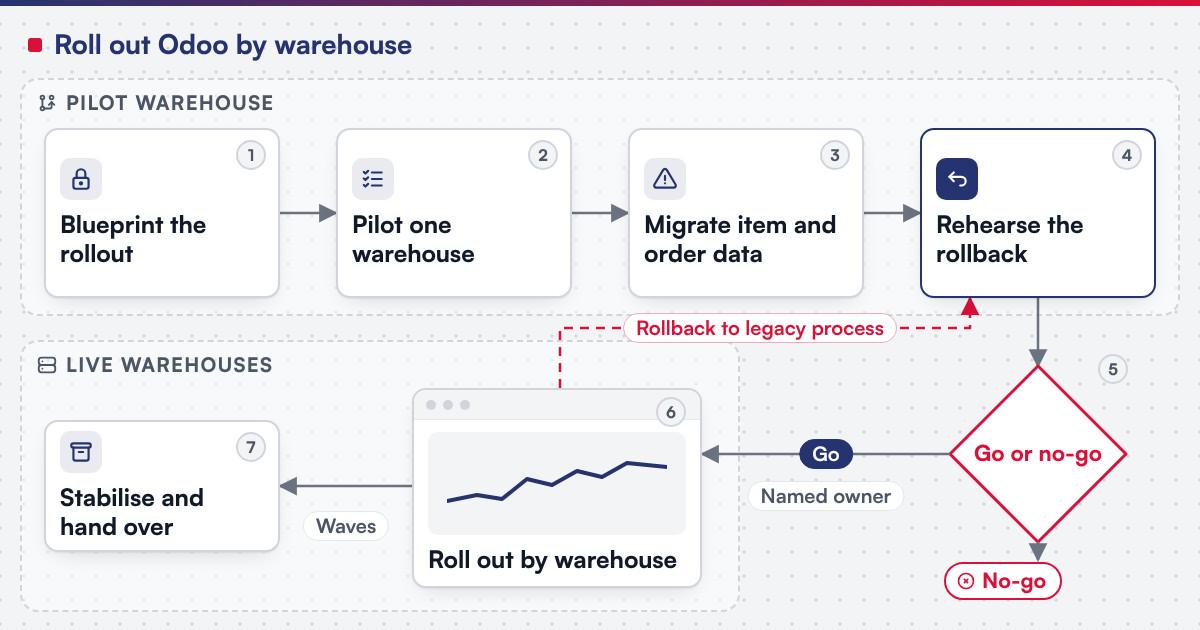 (opens the full-size diagram in a new tab)
Worked scenario: a three-warehouse distributor's pilot
A hypothetical electrical-parts distributor runs three regional warehouses from a shared supplier list, with reorder decisions made by phone and orders taken by email with no account history. The blueprint stage maps the central warehouse's reordering rules, receiving route and B2B accounts onto Odoo's Purchase, Inventory and Sales modules. The pilot warehouse goes live first: its team picks with barcode scanners for a full ordering cycle while records migrate in parallel, and a reorder trigger set too low on one fast-moving part is traced to a minimum quantity carried over from the old spreadsheet, fixed before the next warehouse is touched. The go or no-go review checks that the pilot warehouse's stock discrepancy rate matches the legacy baseline and that the landed cost roll-up for a recent shipment reconciles with last month's accounting figure; only then do the remaining two warehouses roll out in two scheduled waves.
Which published Netbase work is closest to a distributor's rollout?
See the Odoo implementations record for the published summary of Netbase's Odoo work. Netbase's ERP consultancy and development experience also covers cloud ERP platform development, with modules built for finance and accounting, inventory, sales orders, HR and recruiting, CRM, project planning, e-commerce integration and reporting. The B2B accounts a wholesale customer uses to reorder from a distributor's catalogue are the same kind of B2B ordering portal pattern Netbase builds as a project in its own right.
Plan the next step for your project
Where does AI fit in a distributor's Odoo rollout?
The categories that pay off first are demand and reorder-point forecasting from the purchasing and stock history Inventory and Purchase already hold, matching a customer's purchase order line against the catalogue when the wording does not match exactly, and flagging an unusual stock discrepancy for a supervisor to review rather than writing it off automatically. None of it replaces the reordering rule, the landed-cost calculation or the barcode count Odoo already owns; it reads from records that are more trustworthy once every warehouse reports into one system instead of a spreadsheet each. Legacy application modernization is the usual route when AI is added to a rollout already running rather than a new implementation.
What should you check before committing to the stack?
Odoo's own warehouses documentation states that "users can set up multiple warehouses, and create stock moves between them," and that once multi-step routes are enabled a warehouse can run one, two or three-step incoming and outgoing operations. Its replenishment documentation describes a reordering rule as a minimum and maximum quantity pair: when stock falls at or below the minimum, Odoo "generates (or suggests) a purchase or manufacturing order to replenish stock to the maximum level," automatically or as a suggestion on the replenishment report for a person to review. Its lots and serial numbers documentation distinguishes a lot, a specific batch of an item received, stored or shipped, from a serial number, a unique identifier for an item whose "history is identifiable when it travels through the supply chain." Its landed costs documentation describes folding shipping, insurance and customs duties into a product's recorded cost. Its Barcode app documentation states the app lets a business "assign barcodes to individual products and product packagings, and track inventory movements using those barcodes," covering receiving, delivery and inventory adjustments. Its customer portal documentation states that "portal users only have read/view access, and will not be able to edit any documents in the database," covering quotations, sales orders and invoices. Confirm before scoping a build:
- Which warehouses need multi-step routes, since a one-step receipt may suit a small warehouse while a larger one benefits from a separate staging step first.
- Which items reorder automatically and which a buyer reviews first, since the documentation lets either mode run per item.
- Which items need a lot and which need a serial number, since the choice follows whether the business tracks a batch or an individual unit.
- Which cost types belong in this business's landed cost calculation, since the documentation lists shipping, insurance and customs duties among the charges it can fold in.
What goes wrong in a distributor's Odoo rollout?
- Rolling out every warehouse at once. Skipping the pilot means the first real mistake is made at full scale instead of in one place.
- Carrying over bad reorder quantities. A minimum or maximum copied without review repeats the stock-out or overstock the new system was meant to fix.
- No rehearsed rollback. A warehouse that has never tested going back to its legacy process discovers the rollback does not actually work during a live cutover.
- Item and customer data not cleaned before migration. A duplicate supplier record or an account missing its agreed terms throws off purchasing and order accuracy the moment the pilot warehouse goes live.
Which questions should you ask an Odoo implementation supplier?
- Which parts of this rollout are standard configuration, and which require a custom module?
- How is the pilot warehouse chosen, and what does the go or no-go review check before the next wave is approved?
- How is scope fixed? Most Netbase projects are agreed as fixed-scope contracts after discovery, with milestone-based arrangements also available.
- What does the delivery plan look like? Netbase's delivery lifecycle: discovery and strategic alignment; team assembly and architecture planning; agile execution with outcome-based milestones; modular components; training and rollout; ongoing support.
How this guide is sourced and where it stops
The Odoo facts are read from the documentation for Odoo 18.0 on the dates cited. The rollout sequence and the wholesale-operation table are editorial planning guidance, and the three-warehouse distributor above is hypothetical.
Common questions
Yes, that is the pilot-warehouse pattern this guide recommends: one warehouse runs fully on Odoo while the rest continue as before, until the go or no-go review clears the next wave.
No. Each warehouse keeps its own minimum and maximum quantities; what should be shared is the configuration pattern, route naming, lot and serial policy and landed-cost method, so the second warehouse repeats a proven setup.
A distributor's wholesale customers order from an account-specific catalogue with its own terms and reorder history, the pattern the B2B ordering portals solution scopes as a project once the account layer needs more than Odoo's own sales quotations and portal.
Move what the new process needs: current item masters, open purchase orders and active customer accounts usually move, while closed historical transactions can stay in an archive.
Yes, and it usually should. Each wave's go or no-go review is a deliberate checkpoint, and a distributor can hold until the issues a prior wave surfaced are resolved.
Yes. Staff need to run the barcode scanners and work the customer portal before the pilot cycle starts, or the accuracy figures the go or no-go review relies on will reflect unfamiliarity with the screen rather than the process.
Plan your warehouse-by-warehouse Odoo rollout
Bring your warehouse count, current reordering rules and the B2B accounts you already serve to a scoping session, and a person will map them onto the sequence above. Legacy application modernization is the route when an existing distribution system needs assessing first, and the ERP procurement and inventory guide covers the stock states a rollout still needs defined.
OutsourcingVN is Netbase's own outsourcing-services platform. Submit a project with your warehouse count and current systems, and a person will reply with a sequence like the one above.
Work behind this guide

This record is published because partner-assisted delivery is worth showing plainly.
Keep ReadingRelated services and solutions
 Legacy application modernization, one bounded capability at a time
The code is assessed first, then one bounded capability moves at a time, with a way back.
Learn More