

Odoo implementation for service and warranty networks: planning the centre-by-centre rollout
An Odoo implementation for a service or warranty network works when Helpdesk tickets and SLA policies, Field Service tasks and worksheets, Repairs orders, serial-number warranty checks, and spare-parts stock at centres and in vans all run from one system instead of a spreadsheet each; configure the modules first, then prove the pattern on one centre before the rollout continues.
Submit a project See the Odoo implementations recordReviewed by Huy Nguyen (David), CEO · Updated 25 Oct 2026 · 12 min read

OutsourcingVN is operated by Netbase JSC. This guide sets out a centre-by-centre Odoo implementation plan for an after-sales service or warranty network, from the blueprint to a stabilised rollout.
Contents
- What does a service or warranty network's Odoo rollout need to cover?
- Which Odoo modules cover which part of a service network's operation?
- How should the centre rollout be sequenced?
- Worked scenario: a hypothetical multi-centre appliance service network's pilot
- What has Netbase delivered for service and warranty operations?
- Where does AI fit in a service or warranty network's Odoo rollout?
- What should you check before committing to the stack?
- What goes wrong in a service or warranty network's Odoo rollout?
- Which questions should you ask an Odoo implementation supplier?
- How this guide is sourced and where it stops
- Common questions
- Plan your centre-by-centre Odoo rollout
What does a service or warranty network's Odoo rollout need to cover?
Whether Odoo is the right platform at all is decided on the Odoo platform page, and whether to configure Odoo, extend it or build a custom ERP instead is decided in Odoo vs custom ERP; this guide starts once Odoo has been chosen. A distributor's rollout centres on warehouse routes and landed costs (Odoo implementation for distributors); a plant's centres on routings and work centres (Odoo implementation for manufacturers). A network that repairs and services what a customer already owns needs a different mix: ticket intake with a service-level deadline, repair work tied to a worksheet, a repair order that consumes and tracks parts, a serial-number warranty check, parts stock at each centre and in a technician's van, and a portal a customer or dealer can check without calling in, sequenced here centre by centre.
Field technicians doing inspection or maintenance work away from a centre are covered in more depth in field service and inspection apps, and the ticket and account management a service desk runs day to day is help desk and CRM operations; this guide stays on sequencing the Odoo rollout itself. Manufacturing and field service covers the wider sector context where equipment service and warranty work sit.
Which Odoo modules cover which part of a service network's operation?
| Service or warranty operation | Odoo module or feature | What it usually replaces |
|---|---|---|
| Ticket intake and SLA tracking | Helpdesk teams with SLA policies and stages | A shared inbox or spreadsheet with no deadline tracking |
| On-site or in-workshop repair work | Field Service tasks with worksheets | A paper job sheet carried by a technician |
| Repair processing | Repairs orders, with parts added, removed or recycled | A workshop logbook with no linked stock movement |
| Warranty verification | A serial number checked against the item under repair | A warranty card or a manual purchase-date lookup |
| Spare-parts stock at centres and in vans | Stock locations scoped to a centre or a technician's vehicle | A van stocked from memory with no reconciled count |
| Customer and dealer self-service | The portal, showing ticket and field-service task status | Phone calls asking for an update |
| Out-of-warranty invoicing | A quotation pre-filled with the parts used on the repair order | An invoice written up after the fact from memory |
How should the centre rollout be sequenced?
-
Blueprint the rollout
Document each centre's ticket intake rules, SLA targets, repair workflow, warranty-check policy, parts stock locations and portal access, and map them onto Odoo's Helpdesk, Field Service, Repairs, Inventory and Sales modules.
-
Pilot one centre
Configure and run the rollout on a single representative centre first, including its SLA policy, repair workflow and parts stock, so the pattern is proven before it repeats.
-
Migrate ticket, repair and parts data
Move open tickets, warranty records, parts stock counts and dealer or customer accounts from the legacy systems, reconciled against the pilot centre's real numbers; legacy data migration planning covers that reconciliation in full.
-
Rehearse the cutover and the rollback
Run the pilot centre on Odoo alongside its old process for a full service cycle, and rehearse the rollback before anyone decides to proceed.
-
Decide go or no-go for the next wave
A named owner checks the pilot centre's SLA performance, parts stock accuracy and warranty-check error rate against the legacy baseline before approving the remaining centres.
-
Roll out centre by centre
Repeat the configured pattern across the remaining centres in scheduled waves, verifying each centre's SLA policy and parts stock set-up before the next wave starts.
-
Stabilise and hand over
Close out exceptions, confirm SLA policies and the customer portal are live everywhere, and hand over the system with training and support.
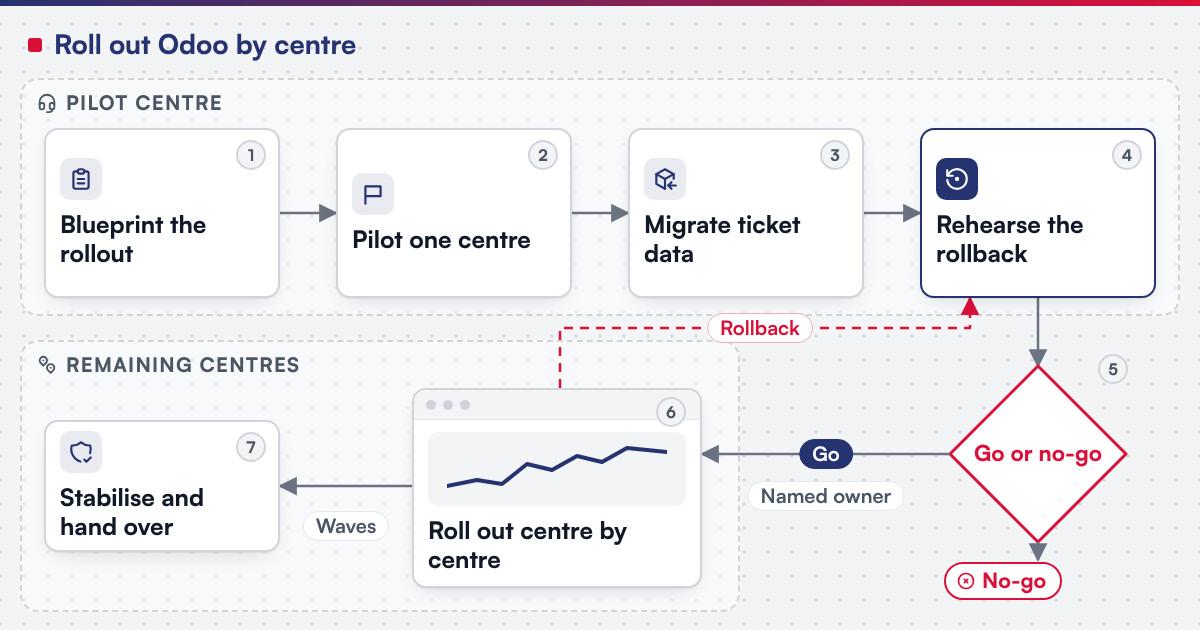 (opens the full-size diagram in a new tab)
Worked scenario: a hypothetical multi-centre appliance service network's pilot
A hypothetical appliance service network runs five regional centres, taking warranty calls by phone, logging repairs on paper, and stocking vans from memory. The blueprint stage maps ticket intake onto Helpdesk stages with an SLA policy for first response and repair completion, and each centre's repair bench onto Repairs orders with parts tracked in the Parts tab. The pilot centre goes live first: its technicians check a serial number before marking a job under warranty, while parts stock for the centre and its two vans migrates onto scoped locations in parallel, and an SLA breach on a ticket waiting for a customer's reply is traced to a waiting stage never added to the policy's excluded stages, fixed before the next centre is touched. The go or no-go review checks the pilot centre's SLA performance and a physical parts stock count; only then do the remaining four centres roll out in two scheduled waves.
What has Netbase delivered for service and warranty operations?
Working with a local Odoo implementation partner, Netbase has consulted on and customised Odoo in Vietnam for a warranty service network and a postal-service helpdesk, among the other sectors its Odoo work covers; the clients are not named, and the Odoo implementations record is the published summary of that work. Netbase's ERP consultancy and development experience also covers cloud ERP platform development; the modules built include inventory, sales orders, finance and accounting, CRM and reporting.
Plan the next step for your project
Where does AI fit in a service or warranty network's Odoo rollout?
The categories that pay off first are flagging a ticket whose SLA deadline is close to breach for a dispatcher to act on, matching a technician's parts request against the repair order's demand line when the wording does not match exactly, and drafting an out-of-warranty quotation from the parts used on the repair order for a person to approve. None of it replaces the SLA policy, the warranty check or the parts-tracking logic Odoo already owns; it reads from records that are more trustworthy once every centre reports into one system instead of a spreadsheet each. Legacy application modernization is the usual route when an AI feature is added to a rollout already running rather than a new implementation.
What should you check before committing to the stack?
Odoo's own Helpdesk documentation organises teams into "customizable stages that enable teams to track, prioritize, and solve customer issues quickly and efficiently," with a public team's "portal users" limited so they "can only access the tickets they are following." Its SLA documentation pairs a destination stage with a time allowance, and once a ticket reaches that stage before the deadline "the SLA tag turns green, and the deadline disappears from view," while a missed deadline keeps a red tag even after the ticket later reaches the stage. Its after-sales documentation lets a repair order opened from a ticket inherit the faulty product automatically, and ticking a repair as under warranty zeroes the amount charged for every product on that repair order. Its repair orders documentation lets a technician "add, remove, or recycle parts in the Parts tab," tracking a demanded and an actual quantity. Its Field Service worksheets documentation states "worksheets help your field service workers perform and report their on-site tasks," with a required field enforced before saving. Its product tracking documentation defines a serial number as a unique identifier whose "history is identifiable when it travels through the supply chain." Its locations documentation describes a location as "a specific space within a warehouse," the same mechanism a service network can scope to a centre or a van. Confirm before scoping a build:
- Which teams need an SLA policy, and what stage and time allowance each one sets, since the documentation pairs a destination stage with a time limit per team, not one rule for every ticket.
- Which tickets open a repair order automatically, and which a technician opens by hand, since the after-sales flow carries the faulty product across only when the ticket already names one.
- Which parts are added, removed or recycled on a given repair, since the Parts tab tracks each kind of movement separately against the demanded quantity.
- Which stock locations represent a centre and which represent a van, since a location is scoped the same way whether it sits inside a building or travels with a technician.
What goes wrong in a service or warranty network's Odoo rollout?
- No SLA policy configured before go-live. A ticket with no destination stage or time allowance gives a dispatcher nothing to act on until a customer complains.
- Serial numbers not checked before marking a job under warranty. A repair recorded at zero cost without a verified serial number repeats the cost the warranty check was meant to catch.
- Van stock never reconciled against the system. A technician who restocks from memory drifts from the recorded count until a job cannot be closed for a missing part.
- Rolling out every centre at once. Skipping the pilot centre means the first real mistake is made at full scale instead of on one site.
Which questions should you ask an Odoo implementation supplier?
- Which parts of this rollout are standard configuration, and which require a custom module for a workflow Odoo's modules do not already model?
- How is the pilot centre chosen, and what does the go or no-go review check before the next wave is approved?
- How is scope fixed? Most Netbase projects are agreed as fixed-scope contracts after discovery, with milestone-based arrangements also available.
- What does the delivery plan look like? Netbase's delivery lifecycle: discovery and strategic alignment; team assembly and architecture planning; agile execution with outcome-based milestones; modular components; training and rollout; ongoing support. For this rollout, discovery closes once the pilot centre's SLA policy, repair workflow and parts stock locations are signed off.
How this guide is sourced and where it stops
The Odoo facts are read from the documentation for Odoo 18.0 on the dates cited. SLA policies are an Odoo feature a centre configures for its own customers, never a Netbase service-level commitment. The rollout sequence and the operation table are editorial planning guidance, and the five-centre scenario above is hypothetical.
Common questions
Yes, that is the pilot-centre pattern this guide recommends: one centre runs fully on Odoo while the rest continue as before, until the go or no-go review clears the next wave.
No. Each team's SLA policy sets its own destination stage and time allowance; what should be shared across centres is the configuration pattern, the stage names and the parts-tracking method, so the next centre repeats a proven setup.
Through the portal, which shows only the tickets and field-service tasks they are following, with read access and no ability to edit the underlying record.
The field service and inspection apps solution covers dispatch, worksheets and technician records for that on-site work.
Move what the new process needs: open tickets, active warranty records and current parts stock counts, while closed historical tickets can stay in an archive.
Plan your centre-by-centre Odoo rollout
Bring your centre count, current SLA commitments and the parts stock you already hold to a scoping session, and a person will map them onto the sequence above. Legacy application modernization is the route when an existing service system needs assessing first.
OutsourcingVN is Netbase's own outsourcing-services platform. Submit a project with your centre count and current systems, and a person will reply with a sequence like the one above.
Work behind this guide

No figure, no result and no partner name appears on this page.
Keep ReadingRelated services and solutions
 Legacy application modernization, one bounded capability at a time
The code is assessed first, then one bounded capability moves at a time, with a way back.
Learn More
Sources
- Odoo, Helpdesk documentation
- Odoo, Helpdesk SLA policies documentation
- Odoo, Helpdesk after-sales documentation
- Odoo, Field Service documentation
- Odoo, Field Service worksheets documentation
- Odoo, Repairs documentation
- Odoo, Repair orders documentation
- Odoo, Locations documentation
- Odoo, Lots and serial numbers documentation
- Odoo, Customer portal documentation