

Moving from Vtiger CRM to an ERP, module by module
Moving from Vtiger CRM to an ERP means mapping every account, contact, product, quote, sales order, invoice and ticket onto the new system's own modules, deciding what a custom Vtiger module or workflow becomes in the ERP, cleansing the data before it moves, and cutting over module by module once a parallel run proves the two systems agree.
Submit a project See legacy application modernizationReviewed by Huy Nguyen (David), CEO · Updated 21 Oct 2026 · 12 min read

OutsourcingVN is operated by Netbase JSC, and legacy application modernization is the service that scopes a move like this as a project, so read this guide with that interest in mind. The mechanics are the same ones incremental modernization without a rewrite sets out for any legacy system; this page covers the Vtiger-specific seams that method meets on the way to an ERP: its modules, its custom fields and workflows, and its own import, export and API tools.
Contents
- When has Vtiger become your order, stock and support system?
- Which Vtiger records map to which ERP module?
- What happens to custom modules and workflows?
- How do you cleanse and migrate the data?
- Which ERP fits the gap Vtiger leaves?
- The Vtiger to ERP migration pipeline
- Worked scenario: a hypothetical distributor whose CRM became its order book
- Where does AI fit in a Vtiger to ERP migration?
- What has Netbase delivered that bears on a Vtiger to ERP move?
- Which questions should you ask a migration vendor?
- What goes wrong in a Vtiger to ERP migration?
- How this guide is sourced and where it stops
- Common questions
- From CRM decision to ERP project
When has Vtiger become your order, stock and support system?
| Signal | Still mainly a CRM | Time to plan the ERP move |
|---|---|---|
| Orders | Quotes and sales orders live beside Vtiger, in spreadsheets or another system | Vtiger's own Sales Orders and Invoices modules carry the order-to-cash record end to end |
| Stock | No product module in active use | Product records are the reference other systems check for stock and catalogue data |
| Support | Tickets close a conversation and stop | Tickets, SLAs and a knowledge base run day-to-day support operations |
| Customisation | A handful of custom fields on standard modules | Several custom modules and multi-path workflows model rules Vtiger's own modules were never built for |
| Integration | One or two systems read Vtiger's contacts | Vtiger's REST API is the hub several other systems now depend on |
A CRM failing two or more of these signals has become the order, stock and support system in practice, whatever it was bought to do, and the question worth asking is not whether Vtiger still works but what it would take to stop being the single point of failure for the business.
Which Vtiger records map to which ERP module?
Vtiger organises a deployment around Accounts and Contacts, Products, Quotes, Sales Orders, Invoices and Tickets, each connected by related lists; an ERP keeps a similar shape, so the mapping is mostly a naming and ownership exercise.
-
Accounts and Contacts
- Where it goes in the ERP
- Customers and their contacts
- Watch for
- Which related list encodes the owner, and which the parent-account link
-
Products
- Where it goes in the ERP
- Products, with the ERP's own catalogue records
- Watch for
- The product code ties old quotes and orders to the right item
-
Quotes
- Where it goes in the ERP
- Quotations
- Watch for
- Usually only the last accepted version needs to move
-
Sales Orders
- Where it goes in the ERP
- Sales orders
- Watch for
- Vtiger's order status must map onto the new system's own stages
-
Invoices
- Where it goes in the ERP
- Invoices, or the accounting module
- Watch for
- Payment status has to travel with the invoice
-
Tickets
- Where it goes in the ERP
- A help desk module
- Watch for
- An open ticket needs a live path during the parallel run
The replenishment and stock decisions a Products record then drives are the ones the ERP procurement and inventory guide defines before any module is chosen, and the stock and purchasing a sales order touches is covered on ERP and back-office operations. Once a ticket crosses into a sales conversation, the single-account view help desk and B2B CRM operations describes is the same workflow Vtiger's helpdesk and CRM shared.
What happens to custom modules and workflows?
Vtiger's Module Layouts & Fields tool, under Module Management, adds a custom field to an existing module, and a deployment running for years often carries custom modules as well. A custom field that captures data the ERP's standard module already has becomes a mapping, not new work; a custom module that modelled a process Vtiger had no screen for needs an equivalent built in the new system, or a native feature the ERP already ships. Automation follows the same split: Vtiger's own documentation defines a workflow as a trigger, a set of entry criteria and a set of actions, such as sending emails, creating records or updating fields. Each rule has to be read, not assumed: a multi-path workflow that silently reassigns a ticket after a day of inactivity is a business rule the new system must also enforce, not a detail that quietly lapses on cutover day.
How do you cleanse and migrate the data?
Legacy data migration planning sets out the general discipline: profile what the old system actually holds, agree in writing what moves, archives or stays behind, and accept the result on reconciliation evidence rather than a clean-looking log. Vtiger ships two bulk tools for this: an import that reads .csv, .vcf (vCard) and .ics (calendar) files into the CRM; and an export, from a module's list view, of selected records, the current page or all data, as CSV. Where the REST API is the extraction path instead, it runs the same way, one module at a time: Vtiger's own developer documentation limits a query to a single object with no joins across modules and caps each query's output at 100 records, so a migration script paginates through accounts, then contacts, then quotes.
If the destination is Odoo, the documentation for Odoo 18.0 describes the matching half: its own import tool uses an External ID, a reference kept apart from Odoo's internal database ID, to avoid duplicates on a second import pass and to carry a Vtiger record's identity forward; because a quote line refers to a product and a sales order refers to a customer, the related records have to be imported first, in the order the new system expects to look them up.
Which ERP fits the gap Vtiger leaves?
That destination choice is separate from the migration itself. Odoo vs custom ERP compares configuring Odoo, extending it with a custom module, and building a custom ERP from zero, by process fit, integration load and who owns the result; the Odoo platform page covers where Odoo itself fits before that three-way choice.
The Vtiger to ERP migration pipeline
Each stage below is a milestone with its own acceptance point, not a single cutover date.
-
Inventory Vtiger
List every module, custom field, related list and workflow in use, not just the ones in daily view, since an inactive-looking workflow can still be firing in the background.
-
Map records to the new ERP
Assign every Vtiger module to its ERP equivalent, including the custom ones that need a new home.
-
Cleanse the data
Fix broken related-list links, duplicate accounts and inconsistent product codes before anything is imported, not after.
-
Run Vtiger and the ERP in parallel
Keep Vtiger as the system of record while the same transactions are entered or synced into the new system, and reconcile the two daily; a module that does not reconcile is routed back to cleansing before it is tried again.
-
Cut over module by module
Once reconciliation holds for a module, switch its live use to the ERP and keep Vtiger read-only for that module's history.
-
Retire Vtiger's write access
Once every module has cut over, remove write access and keep the historical data reachable for as long as the business needs it.
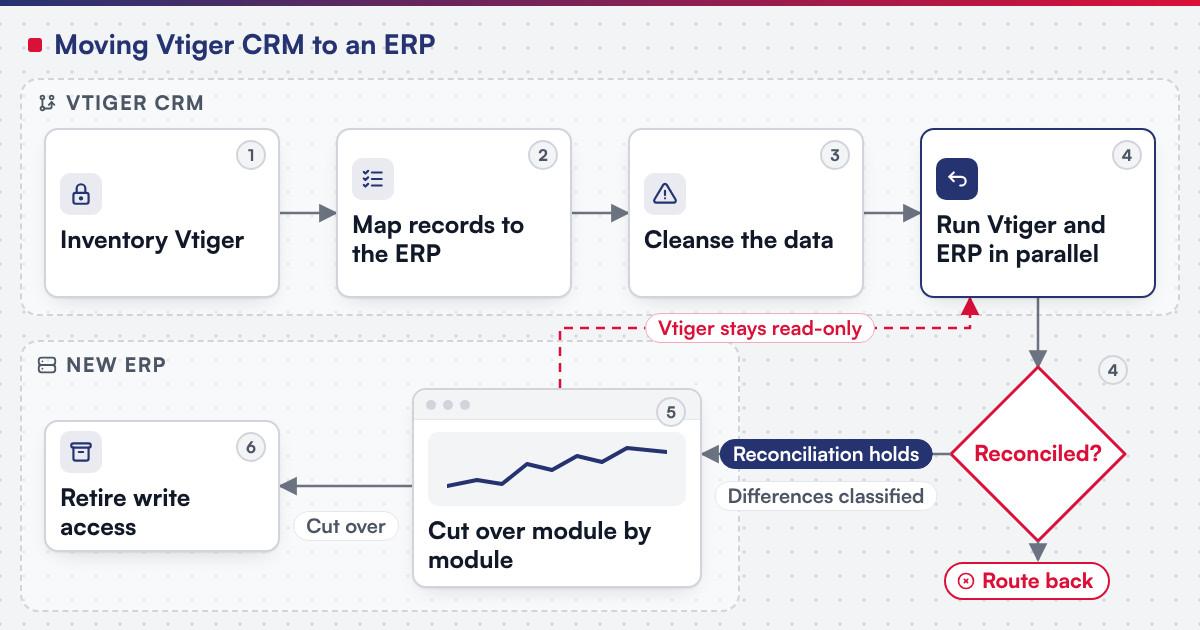 (opens the full-size diagram in a new tab)
Worked scenario: a hypothetical distributor whose CRM became its order book
A mid-size distributor started on Vtiger for contacts and a sales pipeline. Three years on, a custom module tracks warranty claims, a multi-path workflow reassigns overdue tickets, and the Sales Orders module is where warehouse staff check what shipped, none of it planned; it accumulated one request at a time. The inventory step finds four custom modules and six workflows, two of which nobody remembers approving. The warranty-claim module becomes a mapping, since the new ERP already models claims; the ticket-reassignment workflow is rebuilt, since nothing in the ERP replicates it automatically. Sales Orders and Invoices run in parallel for six weeks before cutover, since that is where warehouse staff would notice a gap first; the warranty and quote history cuts over last, since nobody depends on it daily.
Where does AI fit in a Vtiger to ERP migration?
The clearest use sits in the inventory and mapping steps: reading a Vtiger workflow's conditions and actions to draft a first-pass description of the rule it enforces, for a person to confirm, and generating a candidate field-mapping table from a sample export for a person to check line by line. Netbase's delivery lifecycle: discovery and strategic alignment; team assembly and architecture planning; agile execution with outcome-based milestones; modular components; training and rollout; ongoing support. None of that assistance decides whether a mapped record is correct or signs off a cutover.
What has Netbase delivered that bears on a Vtiger to ERP move?
Netbase's own ERP consultancy and development experience includes a Vtiger CRM to ERP upgrade covering customer experience management, sales orders, workforce administration, support tickets, product management, resource allocation and budget planning, for a client who stays unnamed.
Two published Work records are the closest examples of what comes next. Where Odoo is the destination, Odoo implementations record records Odoo consultancy and customisation delivered in Vietnam with a local Odoo implementation partner. Where the CRM's job sits inside a larger custom-built platform, the multi-tenant cloud ERP SaaS platform is the closest published record of CRM living beside other ERP modules: since 2020 Netbase has worked as offshore development and managing partner on it, and its first phase, 2020 to 2023, covers CRM, real-time messaging, HR, a knowledge base, custom fields and workflows, work and project management and API integrations.
Plan the next step for your project
Which questions should you ask a migration vendor?
- Which Vtiger workflows and custom modules are in scope, and who reads them line by line rather than assuming the module list is complete?
- What happens to an open ticket or an unpaid invoice on cutover day, not just to closed history? Most Netbase projects are agreed as fixed-scope contracts after discovery, and this is the kind of detail discovery should fix in writing.
- If the destination is Odoo, which import method is used for each module, and how are duplicates avoided on a second pass?
What goes wrong in a Vtiger to ERP migration?
- Treating workflows as documentation. A multi-path workflow nobody reads before cutover is a business rule that silently stops running.
- Migrating open tickets as if they were closed. An SLA clock that resets, or lost ticket history mid-conversation, is a support failure on day one.
- Assuming product codes are unique. A catalogue built over years in Vtiger often has duplicates an automated import will not catch.
- Cutting over before reconciliation holds. A module switched on optimism rather than evidence generates the first support call after go-live.
How this guide is sourced and where it stops
Vtiger's modules, custom fields, workflows, import, export and REST API facts are read from Vtiger's own help and developer documentation on the dates cited; the Odoo import and Helpdesk facts are read from the documentation for Odoo 18.0. The pipeline and the worked scenario above are editorial guidance for planning the move, not a duration or scope claim for any one project.
Common questions
No. The inventory and mapping steps are the same either way; Odoo vs custom ERP is where the destination gets decided, on its own schedule.
It is rebuilt as a module or feature in the destination, scoped from what it actually does today, not its original specification.
Yes, if both systems stay reachable and the open tickets reconcile daily; leaving them indefinitely turns a migration into two permanent systems.
When the differences between Vtiger and the new ERP have been classified, not just counted, and the ones that matter are at zero for long enough.
Read-only history, in most cases; only quotes still open or referenced by an active deal usually need to stay editable.
Yes. A script paginates through each module rather than pulling one combined export, so mapping and cleansing are scoped per module too.
From CRM decision to ERP project
Legacy application modernization scopes a Vtiger to ERP move as a project, with the inventory, the mapping, the parallel run and the cutover staged as separate milestones. Bring your module list, your busiest custom workflow and the ticket volume you cannot afford to lose, and submit a project; a person will reply with the fit. OutsourcingVN is Netbase's own outsourcing-services platform.
Work behind this guide

Since 2020, Netbase has worked as offshore development and managing partner on a multi-tenant cloud ERP that a US software company offers as SaaS to small and mid-sized businesses.
Keep Reading
This record is published because partner-assisted delivery is worth showing plainly.
Keep ReadingRelated services and solutions
 Legacy application modernization, one bounded capability at a time
The code is assessed first, then one bounded capability moves at a time, with a way back.
Learn More
Sources
- Vtiger, How do I create a new field in the CRM?
- Vtiger, What are Workflows?
- Vtiger, What is importing?
- Vtiger, How can I export records in CSV format?
- Vtiger, Third Party App Integration (REST APIs)
- Odoo, Import and export data, documentation for Odoo 18.0
- Odoo, Helpdesk, documentation for Odoo 18.0