

Moving from Redmine to an ERP, project by project
Moving from Redmine to an ERP means mapping every project, subproject, tracker, issue, custom field, time entry, activity, user, role, group, wiki page and attachment onto the new system's own project, timesheet and invoicing modules, cleansing the data before it moves, and cutting over project by project once a parallel run proves the two systems agree.
Submit a project See legacy application modernizationReviewed by Huy Nguyen (David), CEO · Updated 25 Oct 2026 · 13 min read

OutsourcingVN is operated by Netbase JSC, and legacy application modernization is the service that scopes a move like this as a project, so read this guide with that interest in mind. The mechanics are the same ones incremental modernization without a rewrite sets out for any legacy system; this page covers the Redmine-specific seams that method meets on the way to an ERP: its projects and trackers, its custom fields and time-tracking activities, and its own REST API.
Contents
- When has Redmine become your project accounting system?
- Which Redmine records map to which ERP module?
- How do you cleanse and migrate the data?
- Which ERP fits the gap Redmine leaves?
- The Redmine to ERP migration pipeline
- Worked scenario: a hypothetical engineering consultancy whose Redmine became its project ledger
- Where does AI fit in a Redmine to ERP migration?
- What has Netbase delivered that bears on a Redmine to ERP move?
- Which questions should you ask a migration vendor?
- What goes wrong in a Redmine to ERP migration?
- How this guide is sourced and where it stops
- Common questions
- From project tracker to ERP project
When has Redmine become your project accounting system?
A CRM or a ledger that outgrew its role raises the same kind of question from a different starting point; the Vtiger CRM to ERP migration guide covers the CRM side and the QuickBooks to Odoo migration guide covers the accounting side. Redmine raises it from project and issue tracking.
| Signal | Still mainly an issue tracker | Time to plan the ERP move |
|---|---|---|
| Projects | A handful of projects with no nested structure | Projects are nested into subprojects that mirror cost centres, phases or clients |
| Time tracking | Time entries are a developer convenience | Time entries and their activities are the record finance uses to bill or cost a project |
| Custom work | A few custom fields on issues | Custom fields on issues, time entries and projects model data Redmine was never built to hold |
| Access | A handful of roles | Several roles and groups, assigned per project, control who can see which project |
| Knowledge | A wiki page here and there | Wiki pages and their attachments are where specifications and sign-offs actually live |
A deployment failing two or more of these signals has become the project and time-tracking system of record in practice, whatever it was bought to do.
Which Redmine records map to which ERP module?
Redmine organises a deployment around projects and their subprojects, trackers, issues, time entries and wiki pages, each scoped by project membership; an ERP keeps a similar project shape, so the mapping is mostly a naming and ownership exercise.
-
Projects and subprojects
- Where it goes in the ERP
- Projects, each with its own analytic account
- Watch for
- Redmine nests projects without limit, so a deep hierarchy needs a decision on how many levels the new system's own project structure keeps
-
Trackers
- Where it goes in the ERP
- Task types or tags on a task
- Watch for
- A tracker such as bug, feature or support becomes a classification on the new system's own tasks
-
Issues and custom fields
- Where it goes in the ERP
- Tasks, with custom fields mapped to the nearest standard field or a new one
- Watch for
- A custom field with no equivalent becomes a mapping decision, not an assumption
-
Time entries and activities
- Where it goes in the ERP
- Timesheet lines, tagged with their own activity
- Watch for
- An entry booked at project level, with no issue set, needs a task to attach to
-
Users, roles and groups
- Where it goes in the ERP
- Users, with access rebuilt from project membership
- Watch for
- A group assigned to a project with a role has to become an equivalent access rule, not a single user
-
Wiki pages and attachments
- Where it goes in the ERP
- Project documents, linked back to the task they describe
- Watch for
- A locked wiki page's protection rule needs an equivalent in the new system, not silent removal
Redmine's own documentation describes custom fields as a way to add additional information to several types of data, including issues, spent time entries, projects, versions, users and groups, in formats including boolean, date, float, integer, list, text, link, user and version; a tracker defines the nature of an issue, and Redmine ships three by default — bug, feature and support — so a deployment that renamed or added its own needs each one read, not assumed, before it is mapped. A role is a collection of permissions a project member holds, a member with several roles gets the combination of their permissions, and groups can be added as project members just like users, with the same roles, and a user added to a group inherits the group's privileges; an equivalent access rule, not a single migrated user record, carries that pattern forward. The project and timesheet decisions this mapping feeds are the ones ERP and back-office operations maps more broadly, and a project whose cost and time roll up into one place is the structure legacy data migration planning expects before any module is chosen.
How do you cleanse and migrate the data?
Legacy data migration planning sets out the general discipline: profile what the old system actually holds, agree in writing what moves, archives or stays behind, and accept the result on reconciliation evidence rather than a clean-looking log. Redmine's own REST API documentation lists Issues, Projects, Users and Time Entries as stable resources, with Wiki Pages, Roles, Groups and Custom Fields still at alpha status, and supports both XML and JSON; a migration script authenticates with an API key and pages through each resource, since a request returns 25 items by default and at most 100. Wiki pages carry a full revision history, which Redmine's own documentation says is kept for every change made to a page, so a decision is needed on whether that history moves across or only the current version does.
If the destination is Odoo, its documentation describes the matching half: the import tool uses an External ID, kept apart from Odoo's internal database ID, to avoid duplicates on a second import pass and carry a Redmine record's identity forward; because a timesheet line refers to a project and an employee, the related records import first.
Which ERP fits the gap Redmine leaves?
That destination choice is separate from the migration itself. Odoo vs custom ERP compares configuring Odoo, extending it with a custom module, and building a custom ERP from zero, by process fit, integration load and who owns the result; the Odoo platform page covers where Odoo fits before that choice. Where the organisation's own work is itself project-based, such as an energy or engineering operation booking cost and time to a project, Odoo for energy and engineering projects picks up from that decision.
The Redmine to ERP migration pipeline
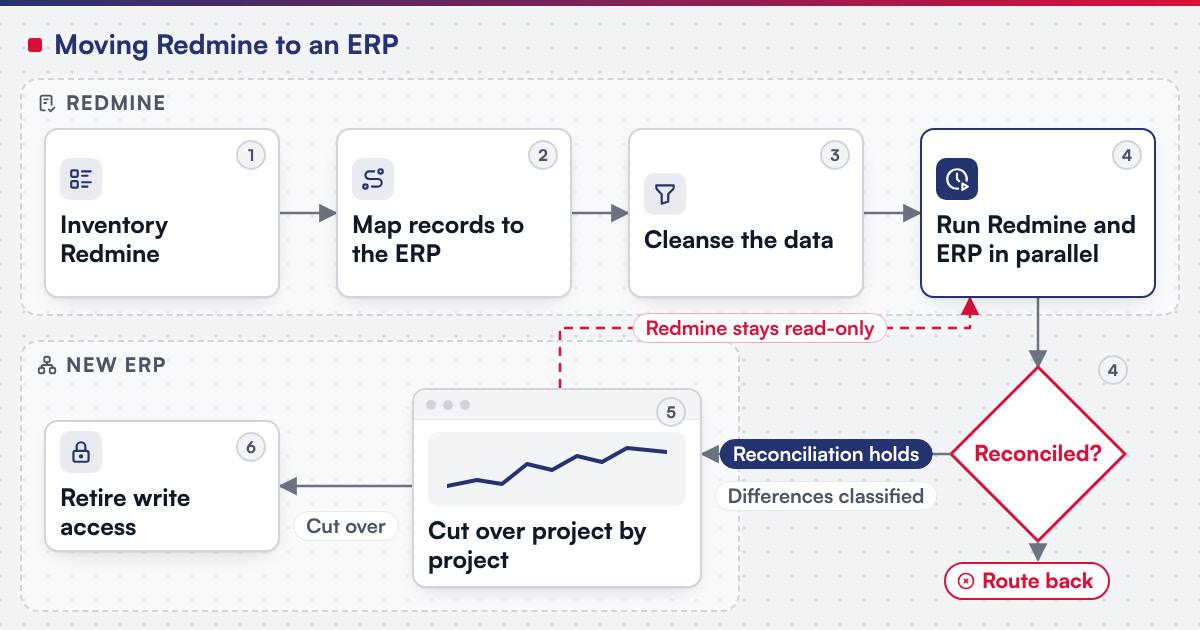
Each stage below is a milestone with its own acceptance point, not a single cutover date.
-
Inventory Redmine
List every project and subproject, tracker, custom field, time-tracking activity, role, group and wiki page in use, not just the ones in daily view, since a nested subproject or a locked wiki page is easy to miss.
-
Map records to the new ERP
Assign every project, tracker, issue type and time-tracking activity to its ERP equivalent, including the custom fields and access rules that need a new home.
-
Cleanse the data
Fix orphaned subtasks, duplicate project names and inconsistent activity names before anything is imported, not after.
-
Run Redmine and the ERP in parallel
Keep Redmine as the system of record while the same projects, issues and time entries are entered or synced into the new system, and reconcile the two daily; a project that does not reconcile is routed back to cleansing before it is tried again.
-
Cut over project by project
Once reconciliation holds for a project, switch its live use to the ERP and keep Redmine read-only for that project's history.
-
Retire Redmine's write access
Once every project has cut over, remove write access and keep the historical data reachable for as long as the business needs it.
 (opens the full-size diagram in a new tab)
Worked scenario: a hypothetical engineering consultancy whose Redmine became its project ledger
A mid-size engineering consultancy started on Redmine for issue tracking on one client project. Four years on, its live projects nest subprojects for phases and sites, custom trackers classify work beyond the default bug, feature and support set, and groups scope which subcontractors see which project, none of it planned; it accumulated one request at a time. The inventory step finds a dozen nested subprojects and locked wiki pages nobody remembers protecting. The custom trackers become task tags, since the new system already classifies tasks; the group-based access becomes a short list of access rules, since nothing replicates project membership automatically. The busiest project runs in parallel for three weeks before cutover, since that is where a missed time entry would be noticed first; finished projects cut over last.
Where does AI fit in a Redmine to ERP migration?
The clearest use sits in the inventory and mapping steps: reading a Redmine tracker's issues to draft a first-pass classification of the work it represents, for a person to confirm, and generating a candidate field-mapping table from a sample export for a person to check line by line. None of that assistance decides whether a mapped project is correct or signs off a cutover. Netbase's delivery lifecycle: discovery and strategic alignment; team assembly and architecture planning; agile execution with outcome-based milestones; modular components; training and rollout; ongoing support.
What has Netbase delivered that bears on a Redmine to ERP move?
Netbase's own ERP consultancy and development experience includes Redmine to ERP development, for an organisation that stays unnamed.
Separately, where Odoo is the destination, the Odoo implementations record records Odoo consultancy and customisation delivered in Vietnam with a local Odoo implementation partner.
A further published record, the multi-tenant cloud ERP SaaS platform, is the closest example of work and project management built beside other ERP modules: since 2020 Netbase has worked as offshore development and managing partner on it, and work and project management is among its first-phase modules.
Plan the next step for your project
Which questions should you ask a migration vendor?
- Which Redmine projects, trackers and custom fields are in scope, and who reads the access rules line by line rather than assuming the project list is complete?
- What happens to a project's wiki page on cutover day, not just to its issues and time entries? Most Netbase projects are agreed as fixed-scope contracts after discovery, and this is the kind of detail discovery should fix in writing.
- If the destination is Odoo, which import method is used for each module, and how are duplicates avoided on a second pass?
What goes wrong in a Redmine to ERP migration?
- Treating a tracker as self-explanatory. A renamed or added tracker nobody reads before mapping becomes a task classification that means something different in the new system.
- Migrating a wiki page without its attachments. A specification or sign-off that only exists as an attachment is lost if the script follows issues and time entries alone.
- Assuming project membership is the whole access picture. A group assigned to several projects with different roles needs several access rules, not one.
- Cutting over before reconciliation holds. A project switched on optimism rather than evidence generates the first missed time entry after go-live.
How this guide is sourced and where it stops
Redmine's projects, trackers, custom fields, time entries, activities, roles, groups, wiki pages and REST API facts are read from Redmine's own wiki and developer documentation on the dates cited; the Odoo import facts are read from the documentation for Odoo 18.0. The pipeline and the worked scenario above are editorial guidance for planning the move, not a duration or scope claim for any one project.
Common questions
No. The inventory and mapping steps are the same either way; Odoo vs custom ERP decides the destination on its own schedule.
It is rebuilt as a task type or tag, scoped from what it classifies today, not its original specification.
Yes, if both systems stay reachable and the active projects reconcile daily; leaving them indefinitely turns a migration into two permanent systems.
When the differences between Redmine and the new ERP have been classified, not just counted, and the ones that matter are at zero for long enough.
Read-only history, in most cases; only pages still referenced by an active project need to stay editable.
Yes. A script pages through each resource in blocks of up to 100 records rather than pulling one combined export, so cleansing is scoped per resource too.
From project tracker to ERP project
Legacy application modernization scopes a Redmine to ERP move as a project, with the inventory, the mapping, the parallel run and the cutover staged as separate milestones. Bring your project list, your busiest custom tracker and the wiki content you cannot afford to lose, and submit a project; a person will reply with the fit. OutsourcingVN is Netbase's own outsourcing-services platform.
Work behind this guide

Since 2020, Netbase has worked as offshore development and managing partner on a multi-tenant cloud ERP that a US software company offers as SaaS to small and mid-sized businesses.
Keep Reading
No figure, no result and no partner name appears on this page.
Keep ReadingRelated services and solutions
 Legacy application modernization, one bounded capability at a time
The code is assessed first, then one bounded capability moves at a time, with a way back.
Learn More