

Multimodal document AI: prove the fields that matter
Multimodal document AI reads scans, photos, forms and PDFs and returns structured fields. Before approving a build, decide which fields must be exact, collect real documents including the ugly ones, set a validation rule for every critical field, and name who corrects exceptions. Then test whether deterministic processing alone would already solve most of it.
Submit a project Assess a workflow firstReviewed by Huy Nguyen (David), CEO · Updated 2 Nov 2026 · 9 min read

OutsourcingVN is operated by Netbase JSC, which scopes and builds document workflows, so we have an interest in your decision. The method applies whoever builds yours. This guide is for operations leads, finance or compliance document owners and CTOs weighing extraction from invoices, claims, delivery notes, contracts or artwork files.
What this guide covers
- Which documents and fields are in scope?
- Which pipeline fits?
- How do you run the assessment?
- A worked example: a two-page supplier invoice
- What has Netbase delivered with documents?
- Which questions should you ask a supplier?
- What failure modes should you watch for?
- Common questions
- How this guide is sourced
- Bring your document inventory
Which documents and fields are in scope?
Start with an inventory, not a model. For each document type, record where it comes from, its formats (born-digital PDF, scan, phone photo, email body), languages, page counts, whether it contains handwriting, stamps, tables or signatures, and who is allowed to see it. Then list the fields you need and mark each one: must be exact (amounts, identifiers, dates), useful if right (descriptions, free-text notes), or not needed.
That marking drives everything else. An exact field needs a validation rule the machine can check, such as line items summing to the total, a tax identifier passing its checksum, or a purchase order number matching an open order. A useful field can go through with a confidence flag. A field you do not need should not be extracted, because every extra field adds review effort and data you must protect.
Which pipeline fits?
| Pipeline | Fits when | What must be proved |
|---|---|---|
| Deterministic parsing of born-digital files | PDFs or design files carry their own text and structure | Coverage of every template and version in circulation |
| OCR plus layout rules | Scans follow a few stable layouts | Accuracy on poor scans; effort to maintain templates |
| Layout-aware document model | Many layouts, mostly printed text and tables | Field-level accuracy per document type; table handling |
| Vision-language model returning structured output | Varied layouts, photos, mixed languages, handwriting | Schema-valid output, field accuracy, cost and latency at volume |
| Human data entry with assistance | Volume is low or consequence is high | Reviewer time per document; audit trail |
Vision-language models such as the open Qwen3-VL family can read a page image and return JSON that follows a schema you supply, which makes them attractive for varied layouts. They can also misread a digit with complete fluency, so pair them with deterministic validation and keep the page image and the location of each extracted value for review. Text inside a document can also carry instructions; OWASP lists injection through uploaded files as a known risk, so extracted text must never steer the pipeline itself.
How do you run the assessment?
-
Collect representative documents
Include clean, skewed, low-resolution, multi-page, stamped, handwritten and foreign-language examples, with permission to use them.
-
Label the truth
A document owner records the correct value for each exact field, so accuracy is measured per field and per document type.
-
Write validation rules
Totals, checksums, date ranges and cross-document matches that catch an error without a person.
-
Design the review screen
Show the page image with the extracted value highlighted, the rule that failed and a one-click correction; see human-in-the-loop design.
-
Measure the whole flow
Record how many documents pass every rule untouched, how many need review, and how long review takes.
-
Feed corrections back
Every reviewer correction becomes a new test case before the next model or prompt change.
 (opens the full-size diagram in a new tab)
A worked example: a two-page supplier invoice
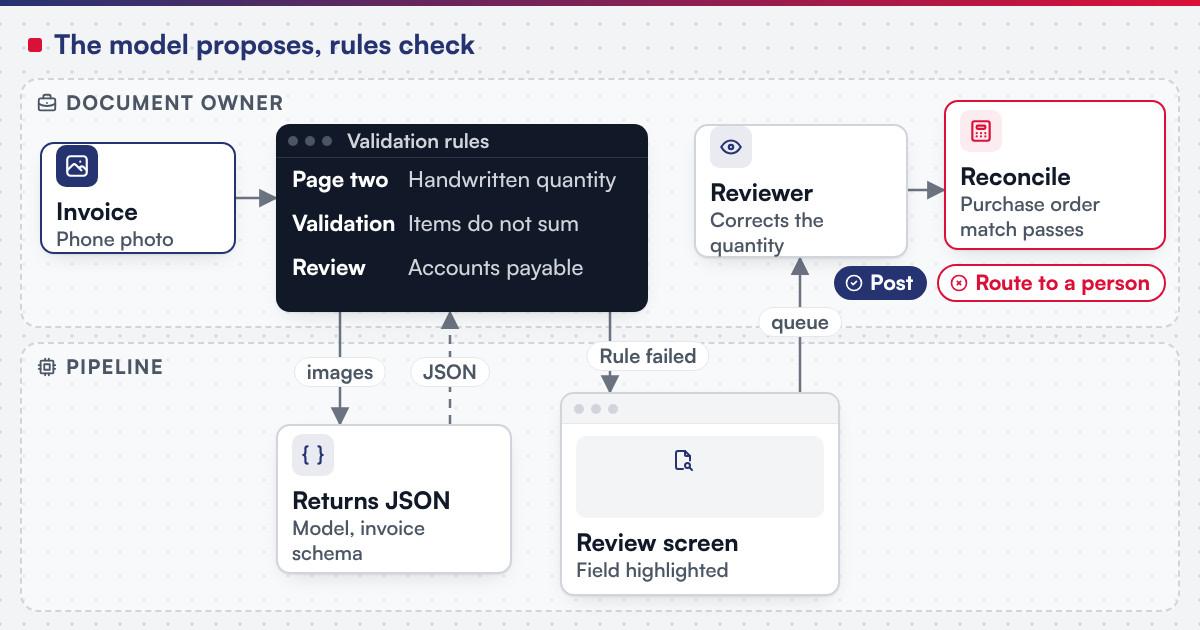
A distributor receives a two-page supplier invoice as a phone photo. Page two has a handwritten correction to one quantity, initialled beside a stamp.
The pipeline converts both pages to images, sends them to the vision-language model with the invoice schema, and receives JSON. Validation runs next: the line items do not sum to the printed total, because the model read the original quantity rather than the handwritten one. The invoice goes to the accounts payable queue with both pages shown, the failing rule named and the quantity field highlighted on page two.
The accounts payable clerk corrects the quantity, the totals now reconcile, and the purchase order match passes. The correction is logged with the reviewer's name and the original value, the invoice posts, and the photo is added to the test set as a "handwritten amendment" case. The finance controller, as document owner, reviews the queue weekly and decides whether handwritten amendments should always route to a person. That is the document and approval workflow pattern in practice: the model proposes, rules check, a named person decides.
What has Netbase delivered with documents?
Not every document problem needs a model. Netbase's delivered document work includes both kinds.
For document work, Netbase works with commercial and open-source AI models chosen per project, which matters when documents must stay on your own servers. Netbase applies the ISO/IEC 42001 AI management system framework to its own AI delivery practice; the framework governs Netbase's practice, not the client's document system.
-
In delivered work
Document AI
Netbase has delivered anonymised client AI projects including retrieval-based knowledge assistants, document AI and MLOps pipelines.
-
File conversion that is automation, not AI
For 4over4, Netbase delivered automated conversion of uploaded Adobe Illustrator files to SVG so layers can be ungrouped and recoloured, with .ai files importable as editable templates.
-
PDF pages turned into editable designs, deterministically
For a large-format inkjet printing company in Singapore, a custom function converts each uploaded PDF page to a high-resolution image on the design canvas, warns about low-resolution uploads and maps multi-page PDFs to product sides.
-
Print-ready output with pre-flight checks
For Deyar Printing & Advertising in Riyadh, the bilingual web-to-print platform generates print-ready PDFs with pre-flight checks and proof approval. Its AI design and pre-press suite is planned third-phase work.
Which questions should you ask a supplier?
-
Which of our fields can be validated without a person?
A per-field list of rules: sums, checksums, lookups, ranges
-
How will you measure accuracy?
Field-level results per document type on our labelled samples
-
What does a reviewer see?
The page image, the highlighted value, the failed rule, one-click correction
-
Would deterministic parsing cover part of the volume?
An honest split between born-digital and scanned inputs
-
Where is each document stored, and for how long?
Named storage, retention period and deletion method
-
How do you handle text inside documents that looks like instructions?
Extracted text treated as data; no pipeline decision taken from it
-
What happens when a model version changes?
The labelled set is rerun and compared before release
-
How do corrections improve the system?
Corrections logged and added to the test set, with an owner
What failure modes should you watch for?
-
Confident misread of a digit
- Early signal
- Totals fail to reconcile
- Who acts
- Validation rule routes to review; document owner checks trend
-
New supplier layout
- Early signal
- Review queue grows for one sender
- Who acts
- Technical owner adds cases and retests
-
Low-resolution or cropped photos
- Early signal
- Missing fields on mobile uploads
- Who acts
- Product owner adds an upload-quality warning
-
Multi-page misalignment
- Early signal
- Fields from page two land in page one
- Who acts
- Technical owner fixes page handling and adds a test
-
Reviewer fatigue
- Early signal
- Corrections accepted without change
- Who acts
- Document owner samples reviewed items
-
Retention drift
- Early signal
- Images kept past the agreed period
- Who acts
- Data owner audits storage
Plan the next step for your project
Common questions
Often not for those. Text and structure can be read directly from born-digital files with deterministic parsing, which is cheaper and fully predictable. Keep the model for scans, photos and irregular layouts, and route each document by type at intake.
Enough to cover every document type, source and quality problem you actually receive, with extra examples of the rare cases that carry risk. Owners usually find the problem categories faster than the volume target, so collect by category and label the exact fields carefully.
Vision-language models can often read clear handwriting and printed stamps, and struggle with faint, overlapping or cursive marks. Treat handwritten fields as review-first until your own labelled samples show they pass validation reliably, and keep the page image beside the value.
Into the system of record through an integration that checks the validation result first, never directly from the model. Failed documents wait in a review queue. The retrieval guide covers indexing documents for question answering, which is a different use.
If documents contain personal or regulated data that must stay in your environment, as privileged material for legal and compliance services often does, use a self-hosted or in-account model; the production inference assessment covers sizing it. Otherwise a hosted API under suitable contract terms is usually quicker to start with.
Talk to Huy Nguyen (David), Founder and CEO of Netbase JSC: message him on WhatsApp at +84 937 869 689 or email project@netbasejsc.com. You can also send your brief through the project request form. Say which workflow or system the project concerns and what has to stay unchanged; the first step is a discovery conversation, and scope and milestones are agreed after it.
How this guide is sourced
Statements about Netbase map to approved claims backed by attested company facts listed under Sources. External guidance comes from the Qwen3-VL repository, OWASP's prompt injection entry and NIST's generative AI profile, each dated below. The invoice example is illustrative and describes no client. The 4over4, Singapore and Deyar features above are deterministic document processing rather than model-based extraction. This page does not assess your data rights or regulatory position. See the methodology for how claims are reviewed.
Bring your document inventory
Start with the inventory from this guide, a set of real documents including the worst ones, and the fields that must be exact, then submit a project. The emerging technology adoption guide, the edge deployment assessment for on-device capture, and the other guides cover related decisions; an AI Workflow Blueprint is the assessment route when the field list is still open. OutsourcingVN is operated by Netbase JSC and is Netbase's own outsourcing-services platform.
Work behind this guide

They are that one company's outcomes on that one store, and this page presents them as nothing wider.
Keep Reading
This record separates what was delivered from a third phase that the source describes as planned.
Keep Reading
The redevelopment ran on a WordPress print-store feature set, with custom functions built to the client's own workflow and design specifications.
Keep ReadingRelated services and solutions
 AI workflow blueprint: decide where automation belongs before you build
A paid two-to-four-week project that ends in a scope you can approve, change or stop.
Learn More