

Moving from AngularJS to Vue.js, one component at a time
Moving an AngularJS (1.x) interface to Vue.js means pinning the current page's behaviour with tests, mounting Vue inside the still-running AngularJS page, moving one component at a time behind that seam, switching routing and forms once each piece matches, and retiring AngularJS once nothing on the page still needs it.
Submit a project See legacy application modernizationReviewed by Huy Nguyen (David), CEO · Updated 21 Oct 2026 · 11 min read

OutsourcingVN is operated by Netbase JSC, and legacy application modernization is the service that scopes a move like this as a project, so read this guide with that interest in mind. The mechanics are the same ones incremental modernization without a rewrite sets out for any legacy system, and the same seam a back-end move uses, such as the one legacy PHP to Laravel migration plans behind a router; this page covers the front-end-specific seam: mounting a second framework inside a page the first one still renders.
Contents
- Why does an AngularJS interface need to move now?
- What has to happen before anything moves?
- How do you mount Vue inside a page AngularJS still renders?
- Which parts move first — state, routing and forms?
- Which framework should the interface move to?
- The AngularJS to Vue.js migration pipeline
- Worked scenario: a hypothetical wholesaler's order-management dashboard
- Where does AI fit in an AngularJS to Vue.js migration?
- Which published Netbase work is closest to this move?
- Which questions should you ask a migration vendor?
- What goes wrong in an AngularJS to Vue.js migration?
- How this guide is sourced and where it stops
- Common questions
- From framework decision to project
Why does an AngularJS interface need to move now?
AngularJS's own version-support page states that AngularJS support ended in January 2022, points teams instead to the actively supported Angular, and records that its GitHub repository is archived, so no new issue or pull request can be submitted. An interface still on AngularJS 1.x gets no further fix from the Angular team, and the same page points teams that need one to a third-party extended-support service; for a public screen that is a risk carried today, not a hypothetical one.
| Signal | Stay on AngularJS, for now | Move to Vue.js (or Angular) |
|---|---|---|
| Security | No internet-facing surface, or risk accepted in writing | Public, logged-in or payment-adjacent screens with no patch path |
| Change frequency | Rarely touched, with low business pressure to add features | Changed often, and every change fights the same ageing directives |
| Team | Someone on the team still reads AngularJS comfortably | AngularJS skills are the hardest to hire for on the team today |
| Dependencies | Supporting libraries still receive updates | jQuery- or AngularJS-only libraries are themselves unmaintained |
| Reason for looking | None; the interface does its job | A security review, a hiring gap, or a roadmap the old framework cannot carry |
An interface failing two or more of these signals is a migration candidate; one that is rarely touched and carries no public attack surface is usually better left alone for now, the question replace or refactor legacy software answers for any legacy system, not only a front end.
What has to happen before anything moves?
Pin current behaviour with tests before any Vue code is written: real interactions on the live AngularJS page, not just the documented happy path, because an undocumented edge case in a controller is exactly what a rewrite loses first. Whether this interface is really the constraint worth the effort, rather than a process or access problem around it, is the prior question the technical debt assessment guide answers before a single component moves.
How do you mount Vue inside a page AngularJS still renders?
A Vue application can mount onto one element inside a page AngularJS still controls elsewhere: a sidebar, a panel, a single route, anything with a boundary you can draw in the DOM. Vue's own site describes the framework as "an approachable, performant and versatile framework for building web user interfaces" with "a rich, incrementally adoptable ecosystem," which is what makes mounting it inside part of an existing page practical rather than theoretical. The destination fit question itself, whether Vue suits the interface at all, is answered on the Vue.js platform page before this guide's mounting step begins. The two frameworks do not share state automatically; a small shared store, a set of DOM events, or a shared URL parameter is what keeps them talking while both are live.
An AngularJS app's own build tooling, anything from script tags to a task runner, is usually replaced at the same time, since Vue's own tooling guide recommends starting new projects with Vite; both frameworks' compiled output has to coexist in one page until every component has cut over.
Which parts move first — state, routing and forms?
Three seams decide the order. State that both frameworks need has to live somewhere both can reach until the AngularJS side of it is gone, then move into Pinia, described on its own site as "the intuitive store for Vue.js." Routing stays with AngularJS's own router until every route behind a URL has a Vue equivalent, then the boundary moves to Vue Router, which its own documentation describes as providing "expressive, configurable and convenient routing for Vue.js." Forms are usually rebuilt rather than bridged: AngularJS's two-way bound form directives and Vue's own model-binding directive handle data differently enough that a form is safer pinned with tests and rewritten whole than patched piecemeal.
Which framework should the interface move to?
Vue.js is one destination; Angular, the actively supported framework AngularJS's own documentation now points to, is the other named option, chosen when the team already knows its component and dependency-injection model. Where the interface is a dashboard or the authenticated screens of a larger product rather than an embedded widget, React is the other popular choice, and the Vue.js platform page sets out when Vue fits better than React.
The AngularJS to Vue.js migration pipeline
Each stage below is a milestone with its own acceptance point, not a single cutover date.
-
Pin current behaviour with tests
Characterise what the AngularJS interface actually does today, from real interactions, before anything moves.
-
Mount Vue inside the page
Add Vue to one bounded element while AngularJS keeps rendering everything else, with no behaviour change yet.
-
Move one component to Vue
Pick a narrow, low-traffic piece first, and bridge the state it needs from the AngularJS side.
-
Switch routes once behaviour matches
Compare the AngularJS and Vue versions on real cases until the differences are classified and accepted, then route that path to Vue.
-
Retire the AngularJS code for that route
Remove the old directives and controllers once nothing calls them and the rollback window has passed.
-
Repeat for the next component, or stop
Stopping once the highest-risk screens have moved is a normal and legitimate outcome.
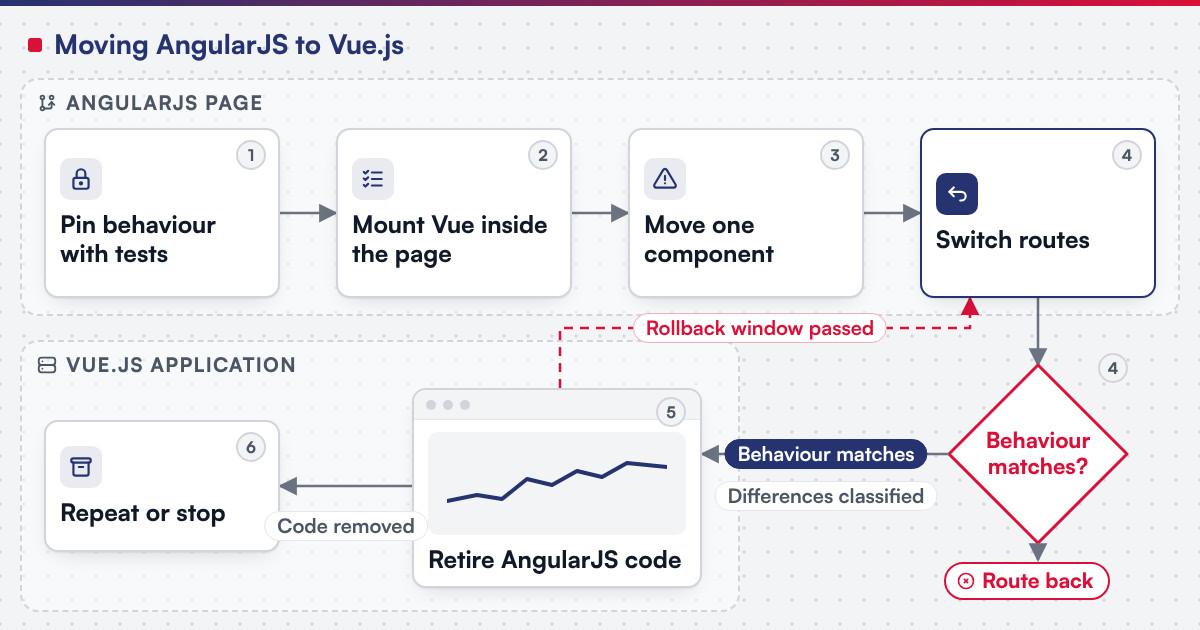 (opens the full-size diagram in a new tab)
Worked scenario: a hypothetical wholesaler's order-management dashboard
A mid-size wholesaler's internal order-management dashboard was built on AngularJS in the mid-2010s and has grown a dozen controllers since, with one developer who still reads them comfortably. A hiring gap, not an incident, is what starts the move.
The team pins the order-list screen's filtering and sorting behaviour with tests first, since it is the page used every hour and the one with the most undocumented edge cases. Vue mounts inside a single panel of that screen, reading the order data AngularJS already loaded through a small shared store. Once the panel's behaviour matches on real cases for two weeks, its route switches to Vue and the AngularJS panel is removed; the next component picked is the order-detail screen, because it is the second-most-used page, not the most complex one.
Where does AI fit in an AngularJS to Vue.js migration?
The clearest use sits in the characterisation step: reading an AngularJS controller and its directives to draft a first-pass description of the behaviour it implements, and generating candidate Vue component scaffolding and tests from the existing markup for a person to check against real interactions. Netbase's delivery lifecycle: discovery and strategic alignment; team assembly and architecture planning; agile execution with outcome-based milestones; modular components; training and rollout; ongoing support. None of that assistance decides whether a moved component matches, or signs off a route's cutover.
Which published Netbase work is closest to this move?
Two anonymised commerce records are the published examples closest to a front-end platform choice like this one. Netbase has built web-to-print stores with online design tools for print businesses in Singapore, France, the Netherlands and South Korea, on WooCommerce and WordPress with Angular JS or Vue.js and PDF generation; see the web-to-print stores record. Netbase has also built custom online-designer features for print businesses that are not named, such as a photo background-remover and a design preview bar listing every design page as a thumbnail; see the online designer feature builds record. The product personalisation and online design page covers how this kind of designer work is scoped more generally.
Plan the next step for your project
Which questions should you ask a migration vendor?
- Which component moves first, and why is it the lowest-risk choice rather than the most valuable one?
- How is current AngularJS behaviour pinned before any Vue code is written, and on whose real interactions?
- What happens to state that both frameworks need while the move is in progress? Most Netbase projects are agreed as fixed-scope contracts after discovery, and this bridging work is exactly what discovery should scope.
- Is the destination Vue.js or Angular, and what in the current interface decided that?
What goes wrong in an AngularJS to Vue.js migration?
- Bridging state ad hoc. A shared variable nobody wrote down becomes the thing that breaks when the next component moves.
- Running two routers with no written boundary. AngularJS's router and Vue Router both claiming the same path is a race, not a transition.
- Rewriting forms without pinning them first. A form's validation rules are exactly the undocumented logic a rewrite loses.
- Moving the most complex screen first. The first move should teach the team the mechanics at low risk; complexity is a reason to move a screen later, not first.
How this guide is sourced and where it stops
AngularJS's support-status facts are read from its own documentation; Vue's migration, tooling and state and routing facts are read from vuejs.org and its own tooling sites, on the dates cited. The pipeline and the worked scenario above are editorial guidance for planning a move off AngularJS, not a duration or scope claim for any one project.
Common questions
No. Vue.js is the framework this page plans the move to in detail, but Angular is a valid destination too, chosen when the team already knows it.
It stays exactly as it is in every controller that has not moved yet; only the moved component's data flow changes, behind the seam.
Yes, if the session is held outside either framework, in a cookie or a shared browser store both can read.
It depends on how many components the interface has and how entangled their shared state is; the timeline is fixed in discovery, once the component map and the characterisation tests exist.
Rewrite, in most cases, once the form's current behaviour is pinned with tests; a bridged form usually costs more than a careful rewrite.
Then a staged migration may be unnecessary; replace or refactor legacy software covers when a full rebuild is the better route.
From framework decision to project
Legacy application modernization scopes an AngularJS to Vue.js move as a project, with the characterisation tests, the mounting seam, the component moves and the cutover staged as separate milestones. Bring your current AngularJS version, your busiest screen and the component you suspect is riskiest, and submit a project; a person will reply with the fit. OutsourcingVN is Netbase's own outsourcing-services platform.
Work behind this guide

Netbase built custom features into the online designers and order flows of six unnamed print businesses: a photo background remover with more than 30 cartoon filter styles, a page-thumbnail preview bar, invitation-card order rules, finished-size rulers, wallpaper sample ordering and a label website with four design paths. No result is claimed.
Keep Reading
Netbase built web-to-print stores with online design tools for print businesses in Singapore, France, the Netherlands and South Korea.
Keep ReadingRelated services and solutions
 Legacy application modernization, one bounded capability at a time
The code is assessed first, then one bounded capability moves at a time, with a way back.
Learn More