

Moving from legacy PHP to Laravel, one module at a time
Moving a legacy or custom PHP application to Laravel goes more safely module by module: pin the old system's behaviour with tests, route every caller through one entry point, move one module behind it, switch traffic once parity holds, then retire what is left, rather than rewriting everything for a single cutover date.
Submit a project See legacy application modernizationReviewed by Huy Nguyen (David), CEO · Updated 18 Oct 2026 · 12 min read

OutsourcingVN is operated by Netbase JSC, and we build Laravel applications, so read this with that interest in mind. Whether Laravel fits the workflow at all is the prior question, answered on the Laravel platform page; this guide assumes Laravel is already chosen and plans the move off the legacy PHP application itself. The staged, module-by-module method here is the same one incremental modernization without a rewrite sets out for any legacy system; this page covers the PHP-specific seams that method meets on the way to Laravel: routing, shared sessions, Composer and the PHP version floor itself.
Contents
- When does a legacy PHP to Laravel move pay off?
- How do you pin current behaviour before moving anything?
- Route old and new code through one entry point
- Move one module to Laravel at a time
- What should you check in Laravel's and PHP's own documentation?
- The module-by-module migration pipeline
- Worked scenario: a hypothetical invoicing system on an unsupported framework
- Where does AI fit in a legacy PHP to Laravel migration?
- What has Netbase built on Laravel?
- Which questions should you ask a migration vendor?
- What goes wrong in a legacy PHP to Laravel migration?
- How this guide is sourced and where it stops
- Common questions
- From framework decision to project
When does a legacy PHP to Laravel move pay off?
PHP's own supported-versions page states that "each release branch of PHP is fully supported for two years from its initial stable release," then "supported for two additional years for critical security issues only," after which "the branch reaches its end of life and is no longer supported." A legacy application already past that four-year window is not a hypothetical risk; it is unpatched today.
| Signal | Stay or patch the legacy app | Move to Laravel |
|---|---|---|
| PHP version | On a version still inside active or security support | On a version already past PHP's own end-of-life date |
| Framework | An actively maintained framework, or clean, documented hand-written code | An abandoned framework, or code nobody can safely change |
| Change frequency | Rarely touched, with low business pressure to add features | Changed often, and every change is riskier than the last |
| Domain rules | Undocumented, but one person can still explain them | At risk of being lost if that person leaves |
| Reason for looking | None; the system does its job | Security exposure, hiring difficulty or a roadmap the old code cannot carry |
A system failing two or more of these signals is a Laravel migration candidate; one on a supported PHP version with rare, well-understood changes is usually better left alone or refactored in place, the route replace or refactor legacy software covers in full.
How do you pin current behaviour before moving anything?
Before a line of Laravel code is written, the legacy application's current behaviour is pinned with tests that describe what it actually does today, not what it should do. Real requests and their real responses, not only the documented happy path, become the characterization tests a moved module has to match before it is trusted. Whether the legacy system is really the constraint worth this effort, rather than a process or access problem around it, is the prior question, answered on legacy system risk assessment; technical debt assessment covers the same ground when the question is about code quality specifically.
Route old and new code through one entry point
A router in front of both applications, built in Laravel itself or as a reverse proxy, lets every caller keep one address while requests are forwarded to the legacy PHP code or to a moved Laravel module behind it. Sessions move the same way: a shared, database-backed session store or a shared cookie domain keeps a user logged in whether their next request lands on the old code or the new module. The two applications read and write the same database tables during the transition, so a moved module's Eloquent models describe tables the legacy code still owns, until that module's data is migrated on its own schedule.
Move one module to Laravel at a time
Composer gives the new Laravel application its own dependency tree from day one, so a moved module does not inherit the legacy app's ageing packages. Each module is picked for a narrow boundary: a reporting screen, a single workflow, an API endpoint a mobile client already calls, something whose inputs and outputs can be stated in one sentence. A thin adapter lets the legacy code call into the moved module, or the module call back into legacy code it still depends on, until the dependency itself is moved.
What should you check in Laravel's and PHP's own documentation?
Laravel's own release notes state that "major framework releases are released every year" and that "for all Laravel releases, bug fixes are provided for 18 months and security fixes are provided for 2 years." Laravel 13, released March 2026, requires PHP 8.3 or newer. Confirm before scoping a build:
- Which PHP version the legacy app runs, checked against PHP's own supported-versions page, since a version already past its security-support window is unpatched regardless of the application running on it.
- Which Laravel version the target PHP floor supports, since a new Laravel major release can raise the minimum PHP version, as Laravel 13 did.
- Where sessions and the database are actually shared, so the router, the session store and the schema are agreed before the first module moves.
- Which modules call each other, so the thin adapters between legacy and Laravel code are scoped, not discovered mid-build.
The module-by-module migration pipeline
-
Pin current behaviour with tests
Characterise what the legacy application does today from real requests and responses, before anything moves.
-
Route callers through one entry point
Put a router in front of both applications and a shared session store behind it, with no behaviour change yet.
-
Move one module to Laravel
Build it with its own Composer dependencies, reading the shared database until its own data is migrated.
-
Switch traffic once parity holds
Compare the module's old and new behaviour on real cases until the differences are classified and accepted, then route its traffic to Laravel.
-
Retire the legacy module
Remove the old code path once nothing calls it and the rollback window has passed.
-
Repeat for the next module, or stop
Stopping after a few modules, with the riskiest ones moved, is a normal outcome.
A rehearsed rollback, tested once rather than only written down, is what makes step four safe: if parity does not hold, traffic routes back to the legacy module while the difference is classified and fixed.
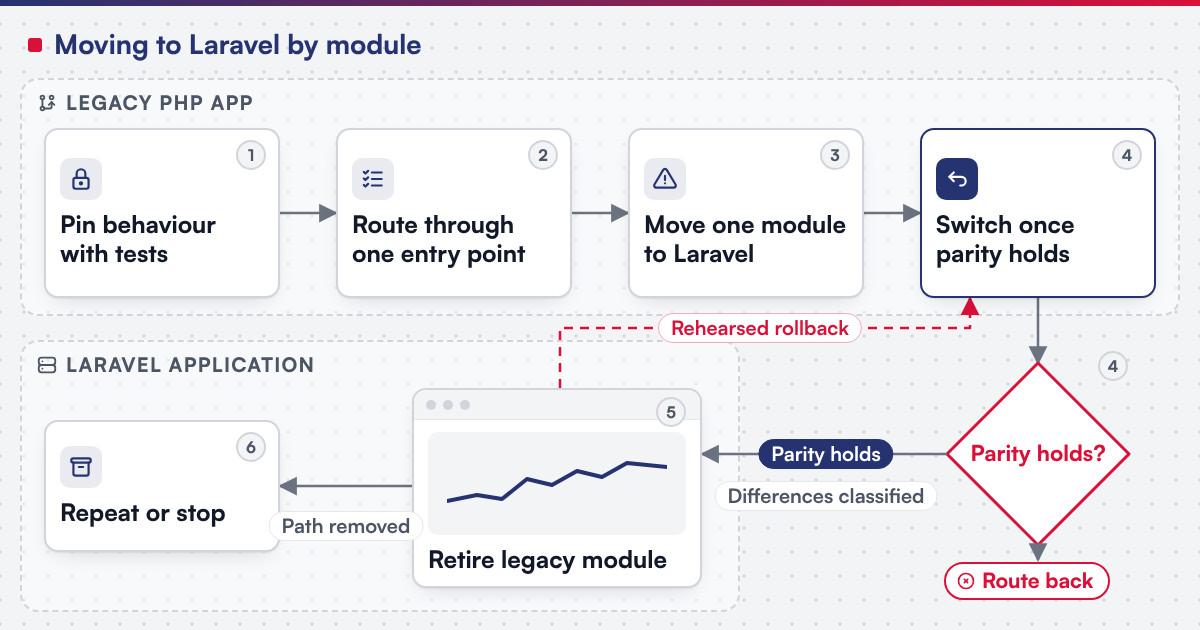 (opens the full-size diagram in a new tab)
Worked scenario: a hypothetical invoicing system on an unsupported framework
A mid-size distributor runs its invoicing on a PHP framework whose last release reached end of life years ago, on a PHP version with no security support left. Rewriting the whole system on one date is judged too risky given how much the business depends on it daily.
- Milestone one pins the invoice-numbering and tax-calculation logic with characterization tests, then puts a router in front of the legacy app with no behaviour change.
- Milestone two moves the invoice-PDF generation module to Laravel first, since it is the most isolated, reading the shared customer and order tables until its own schema is ready.
- Milestone three shadows the new module against real invoices, finds and classifies three formatting differences as intended fixes, then switches its traffic and retires the old generator.
The team moves the payment-reconciliation module next, judged the next-highest risk, and leaves the rest of the legacy application alone until its own turn comes.
Where does AI fit in a legacy PHP to Laravel migration?
The clearest AI use on a move like this sits in the characterization step: reading undocumented legacy code to draft a first-pass description of what it does, and generating candidate test cases from real request logs for a person to check against actual behaviour. Netbase's delivery lifecycle: discovery and strategic alignment; team assembly and architecture planning; agile execution with outcome-based milestones; modular components; training and rollout; ongoing support. None of that assistance decides whether a characterization test is correct or signs off a module's cutover.
What has Netbase built on Laravel?
Three Laravel builds on Netbase's record are the closest published examples. The RB Marketplace record is an English-first buyer-and-vendor marketplace for West Africa, with vendor registration behind administrator approval, order fulfilment and tracking, and a device-token REST API for its mobile clients, supported for 90 days once live. The Deyar Printing & Advertising record, a printing, packaging, signage and fleet-branding company in Riyadh, Saudi Arabia, runs its Arabic right-to-left and English online designer, pricing engine and print-ready PDF pipeline on a Laravel headless-commerce base across seven product families, built out in phases from discovery to live operations. The bilingual classifieds platform record, for a founder who stays unnamed, adds OTP accounts, paid ads, ratings, messaging and multi-language SEO on top of a Laravel backend with REST APIs. Laravel also sits inside a wider stack on a multi-tenant cloud ERP SaaS for a US client, where Netbase has worked as offshore development and managing partner since 2020, pairing Laravel with React, Next.js and a multi-database layer on AWS, its first phase from 2020 to 2023 covering CRM, messaging, HR, a knowledge base, custom fields and workflows, project management and API integrations; a later phase was planned work, not delivered.
Plan the next step for your project
Which questions should you ask a migration vendor?
- Which module moves first, and why is it the lowest-risk choice rather than the most valuable one?
- How is current behaviour pinned before any Laravel code is written, and on whose real requests?
- What is the rollback path if a module's parity fails after it takes traffic? Most Netbase projects are fixed-scope contracts agreed after discovery, and the rollback decision is scoped as part of it.
- Who owns the code once a module ships? For custom development the client owns the IP created for it; Netbase productized modules and products are licensed, not transferred.
What goes wrong in a legacy PHP to Laravel migration?
- Rewriting everything before pinning behaviour. A rewrite without characterization tests rediscovers every undocumented rule under deadline, during the cutover that matters most.
- Sharing the database without a written ownership rule. Two applications both writing the same table is a guaranteed disagreement once the second one starts changing it.
- Moving the most valuable module first. The first move should teach the team the mechanics at low risk; value is a reason to move a module second or third, not first.
- Leaving the legacy module running after cutover. A path nobody retires is a cost still being paid, and it makes the next module harder to reason about.
How this guide is sourced and where it stops
The PHP and Laravel support facts are read from each project's own documentation on the dates cited. Netbase's evidence covers three Laravel applications and a wider Laravel-based platform stack; the steps above are editorial guidance for the move from legacy PHP, not a duration claim for any one project.
Common questions
No. Moving one module at a time behind a shared router is usually safer than a single cutover date, especially when the legacy system is still handling live business daily.
A shared, database-backed session store or a shared cookie domain keeps a user logged in regardless of which application serves their next request.
Yes, with a written rule for which application owns each table at each stage; an unmanaged shared table is where most migrations go wrong.
When its behaviour matches the pinned characterization tests on real cases, and every difference has been classified as an intended fix or accepted as-is, not left unexplained.
The lowest-risk one with the clearest boundary, not the most valuable one; the first move should teach the team the mechanics cheaply.
It depends on how many modules the application has and how entangled their database tables are; the timeline is fixed in discovery, once the module map and the characterization tests are in place.
From framework decision to project
Legacy application modernization scopes a legacy PHP to Laravel migration as a project, with the characterization tests, the router, the module moves and the data migration staged as separate milestones; the general method is also set out in the legacy system modernization guide and legacy data migration planning for the data side specifically. Bring your current framework, your PHP version and the module you suspect is riskiest, and submit a project; a person will reply with the fit. OutsourcingVN is Netbase's own outsourcing-services platform.
Work behind this guide

Netbase delivered a bilingual classifieds marketplace, in English and Nepali, with paid ads, search, messaging, payments and an AI filter that flags offensive content into an administrator review queue. The client is not named, and no traffic, accuracy or commercial result is claimed.
Keep Reading
This record separates what was delivered from a third phase that the source describes as planned, and it claims no result for either.
Keep Reading
This record sets out what was delivered on each side, what deliberately stayed in the web panel, and what the project documents do not support.
Keep ReadingRelated services and solutions
 Legacy application modernization, one bounded capability at a time
The code is assessed first, then one bounded capability moves at a time, with a way back.
Learn More