

Odoo implementation for education institutes: planning the department rollout
An Odoo implementation for a university institute, college or training provider works when admissions enquiries in CRM, courses and eLearning, events and surveys, appointments, tuition invoicing, staff HR and recruitment, and research and grant budgets all run from one system instead of a spreadsheet each; configure the modules first, then prove the pattern on one department before the rollout continues.
Submit a project See the Odoo implementations recordReviewed by Huy Nguyen (David), CEO · Updated 25 Oct 2026 · 13 min read

OutsourcingVN is operated by Netbase JSC. This guide sets out a department-by-department Odoo implementation plan for a university institute, college or training provider, from the blueprint to a stabilised rollout.
Contents
- What does an institute's Odoo rollout need to cover?
- Which Odoo modules cover which part of an institute's administration?
- How should the department rollout be sequenced?
- Worked scenario: a hypothetical three-department training institute's pilot
- What has Netbase delivered for education institutes?
- Where does AI fit in an institute's Odoo rollout?
- What should you check before committing to the stack?
- What goes wrong in an institute's Odoo rollout?
- Which questions should you ask an Odoo implementation supplier?
- How this guide is sourced and where it stops
- Common questions
- Plan your department-by-department Odoo rollout
What does an institute's Odoo rollout need to cover?
Whether Odoo is the right platform at all is decided on the Odoo platform page, and whether to configure Odoo, extend it or build a custom ERP instead is decided in Odoo vs custom ERP; this guide starts once Odoo has been chosen. Education and training decides which education workflow a first project should change, on any platform; this guide plans the Odoo rollout for an institute's administration: admissions enquiries moving through a pipeline, courses delivered online or blended with eLearning, events and surveys, appointments for advising or interviews, tuition invoicing, staff HR and recruitment, and research or grant budgets tracked apart from day-to-day operating costs, sequenced here department by department. A service or warranty network's Odoo rollout centres on tickets, repairs and parts instead, covered in Odoo implementation for service and warranty networks.
Where an institute already books advising slots, labs or facility time through a dedicated scheduling tool, booking and scheduling systems scopes that layer as a project in its own right, and where alumni or student communities run as a standing membership rather than a one-off event, membership and community platforms covers that pattern separately from the rollout below.
Which Odoo modules cover which part of an institute's administration?
| Institute operation | Odoo module or feature | What it usually replaces |
|---|---|---|
| Admissions enquiries | CRM leads and opportunities, captured by email or a web form and moved through pipeline stages | A spreadsheet of enquiries with no follow-up trail |
| Courses and online learning | eLearning courses built from videos, documents and quizzes, with an enrol policy per course | A shared folder of course files with no completion record |
| Events and open days | Event registration and ticketing, with tracks for sessions | A paper sign-up sheet at the door |
| Feedback and assessment surveys | Surveys with a choice of question types and scored responses | An emailed form nobody tabulates |
| Appointments and advising slots | The Appointments app, booked against staff members or resources | A shared calendar invite sent by email |
| Tuition invoicing | Customer invoices drafted from the enrolment's sales order, then confirmed and posted | A manually typed invoice reissued for each change |
| Staff HR and recruitment | Employee records and departments, with a recruitment pipeline for open roles | A paper personnel file and a hiring spreadsheet |
| Research and grant budgets | Analytic accounts and budgets, tracked as budgeted, achieved and committed figures | A grant spreadsheet reconciled by hand at year end |
How should the department rollout be sequenced?
-
Blueprint the rollout
Document admissions enquiry handling, course and eLearning structure, event and appointment booking, tuition invoicing, HR and recruitment stages, and research budget lines, and map them onto Odoo's CRM, eLearning, Events, Appointments, Accounting, Employees and Recruitment modules.
-
Pilot one department
Configure and run the rollout on a single representative department first, including its admissions pipeline, course structure and invoicing policy, so the pattern is proven before it repeats.
-
Migrate enquiry, student and staff data
Move open admissions enquiries, active student accounts, employee records and open grant budgets from the legacy systems, reconciled against the pilot department's real numbers; legacy data migration planning covers that reconciliation in full.
-
Rehearse the cutover and the rollback
Run the pilot department on Odoo alongside its old process for a full term or intake cycle, and rehearse the rollback before anyone decides to proceed.
-
Decide go or no-go for the next wave
A named owner checks the pilot department's admissions conversion, invoicing accuracy and budget variance against the legacy baseline before approving the remaining departments.
-
Roll out department by department
Repeat the configured pattern across the remaining departments in scheduled waves, verifying each department's course structure and invoicing policy before the next wave starts.
-
Stabilise and hand over
Close out exceptions, confirm HR, recruitment and research budgets are running everywhere, and hand over the system with training and support.
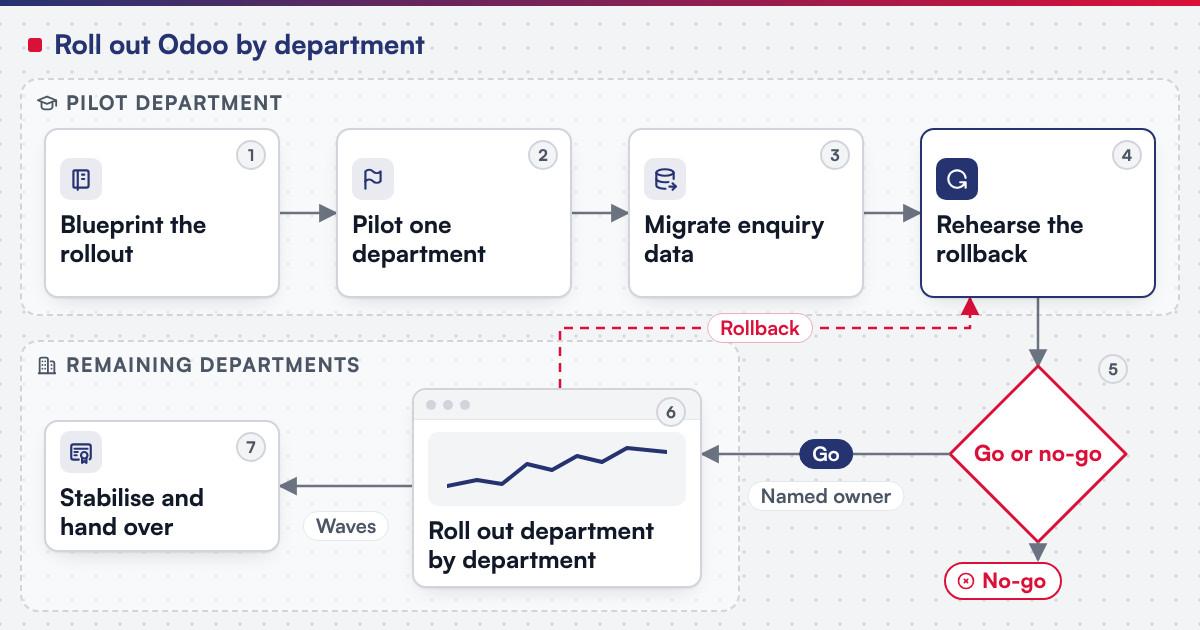 (opens the full-size diagram in a new tab)
Worked scenario: a hypothetical three-department training institute's pilot
A hypothetical training institute runs three departments, taking admissions enquiries by email, tracking courses on a shared drive, and reconciling a grant budget by hand at year end. The blueprint stage maps enquiry handling onto CRM pipeline stages, the course catalogue onto eLearning, and the grant onto an analytic account with a budget line. The pilot department goes live first: its admissions team moves enquiries through the pipeline for a full intake cycle while employee and grant-budget records migrate in parallel, and a budget variance in week three is traced to a vendor bill posted with no analytic account attached, fixed before the next department is touched. The go or no-go review checks admissions conversion against the legacy baseline and that the grant's achieved figure reconciles with actual spend; only then do the remaining two departments roll out in one scheduled wave.
What has Netbase delivered for education institutes?
Working with a local Odoo implementation partner, Netbase has consulted on and customised Odoo in Vietnam for a university institute, among the other sectors its Odoo work covers; the client is not named, and the Odoo implementations record is the published summary of that work. Netbase's ERP consultancy and development experience also covers cloud ERP platform development; the modules built include finance and accounting, HR and recruiting, CRM, sales orders and reporting.
Plan the next step for your project
Where does AI fit in an institute's Odoo rollout?
The categories that pay off first are triaging an admissions enquiry against the programmes it most likely fits for a staff member to confirm, flagging a grant budget whose committed figure is drifting from its achieved spend for a department head to review, and drafting an event or course description for a person to edit rather than publish automatically. None of it replaces the CRM pipeline, the enrolment policy or the analytic-budget logic Odoo already owns; it reads from records that are more trustworthy once every department reports into one system instead of a spreadsheet each. Legacy application modernization is the usual route when an AI feature is added to a rollout already running rather than a new implementation.
What should you check before committing to the stack?
Odoo's own CRM documentation states the app "helps you organize your sales activities: track leads, close opportunities and get accurate forecasts," capturing a lead by letting a team "create leads (from email or manually)" or "create opportunities from web contact forms." Its eLearning documentation lets a course owner "easily upload content, define learning objectives, manage attendees, assess students' progress, and even set up rewards," with an Enroll Policy set to "Open," "On Invitation," or "On Payment" for users who purchase the course, and a Certification feature that integrates with the Surveys app to assess understanding. Its Events documentation covers the "event-creation process" through to being able to "create, configure, and sell event tickets" and to "create, track, and manage event tracks." Its Surveys documentation offers "many question types and options" and lets an organisation "collect feedback, evaluate the success of a recent event, and measure the satisfaction of customers and/or employees." Its Appointments documentation describes a "self-service scheduling app" whose appointment types are built on "a Duration for this appointment type" and are "based on Users or Resources." Its customer invoices documentation states draft invoices can be "created directly from documents like sales orders or purchase orders," and that "on confirmation, Odoo assigns each invoice a unique number from a defined sequence." Its Employees documentation "centralizes personnel files, employment contracts, and departmental hierarchies in one system," and its Recruitment documentation moves each applicant through "a preconfigured series of steps and stages." Its analytic accounting documentation states analytic accounting "helps track costs and revenues and analyze a project's or service's profitability," and its budgets documentation tracks a "Budgeted," "Achieved" and "Committed" figure per line. Where an institute's academic record — enrolment, attendance, grades and progression — is tracked in a dedicated student information system, that system stays the record of academic progress, and the Odoo rollout above integrates with it for the administrative side: admissions, invoicing, HR and budgets. Confirm before scoping a build:
- Which admissions stages a lead moves through before becoming an enrolled student, since the documentation leaves pipeline stages to be configured per organisation.
- Which enrol policy each course needs, since open, invitation-only and payment-gated access are each a separate setting per course.
- Which appointment types are booked against a named staff member and which against a shared resource, since the two follow different booking rules.
- Which analytic account and budget line a research grant or department belongs to, since a transaction posted with no analytic account will not appear on that grant's budget line.
What goes wrong in an institute's Odoo rollout?
- Posting a grant expense with no analytic account. A cost that never reaches the grant's budget line understates its true spend until someone notices the gap at reconciliation.
- Leaving a course's enrol policy undecided. A course published before its access rule is set lets the wrong audience enrol before anyone notices.
- Rolling out every department at once. Skipping the pilot department means the first real mistake is made at full scale instead of in one place.
- No rehearsed rollback. A department that has never tested going back to its legacy process discovers the rollback does not actually work during a live cutover.
Which questions should you ask an Odoo implementation supplier?
- Which parts of this rollout are standard configuration, and which require a custom module for a workflow Odoo's modules do not already model?
- How is the pilot department chosen, and what does the go or no-go review check before the next wave is approved?
- How is scope fixed? Most Netbase projects are agreed as fixed-scope contracts after discovery, with milestone-based arrangements also available.
- What does the delivery plan look like? Netbase's delivery lifecycle: discovery and strategic alignment; team assembly and architecture planning; agile execution with outcome-based milestones; modular components; training and rollout; ongoing support. For this rollout, discovery closes once the pilot department's admissions pipeline, course structure and budget lines are signed off.
How this guide is sourced and where it stops
The Odoo facts are read from the documentation for Odoo 18.0 on the dates cited. The rollout sequence and the operation table are editorial planning guidance, and the three-department scenario above is hypothetical.
Common questions
Yes, that is the pilot-department pattern this guide recommends: one department runs fully on Odoo while the rest continue as before, until the go or no-go review clears the next wave.
No. Each department keeps its own pipeline stages; what should be shared is the configuration pattern, the invoicing policy and the analytic-budget method, so the next department repeats a proven setup.
Not in this plan. Where enrolment, attendance and grades sit in a dedicated student information system, it stays the academic record, and Odoo carries the administrative side: admissions, invoicing, HR and research budgets, the shared-record layer the enterprise resource planning glossary entry defines.
Each grant keeps its own analytic account and budget line, so its budgeted, achieved and committed figures are tracked apart from the institute's general operating spend.
Move what the new process needs: open enquiries, active student accounts and current employee records usually move, while closed historical transactions can stay in an archive.
Plan your department-by-department Odoo rollout
Bring your department count, current admissions and invoicing process, and the grants or budgets you already track to a scoping session, and a person will map them onto the sequence above. Legacy application modernization is the route when an existing institute system needs assessing first.
OutsourcingVN is Netbase's own outsourcing-services platform. Submit a project with your department count and current systems, and a person will reply with a sequence like the one above.
Work behind this guide

This record is published because partner-assisted delivery is worth showing plainly.
Keep ReadingRelated services and solutions
 Legacy application modernization, one bounded capability at a time
The code is assessed first, then one bounded capability moves at a time, with a way back.
Learn More
Sources
- Odoo, CRM documentation
- Odoo, eLearning documentation
- Odoo, Events documentation
- Odoo, Surveys documentation
- Odoo, Appointments documentation
- Odoo, Customer invoices documentation
- Odoo, Employees documentation
- Odoo, Recruitment documentation
- Odoo, Analytic accounting documentation
- Odoo, Budgets documentation